
Should you intend to fill out SMS, you won't have to download any kind of programs - simply give a try to our PDF tool. To retain our editor on the cutting edge of practicality, we strive to adopt user-driven capabilities and enhancements on a regular basis. We're always thankful for any feedback - join us in revampimg PDF editing. Getting underway is simple! Everything you need to do is follow the next simple steps down below:
Step 1: Click on the orange "Get Form" button above. It will open our tool so you can begin filling in your form.
Step 2: With the help of our advanced PDF file editor, you can do more than just fill in blank form fields. Try all of the features and make your documents seem faultless with customized textual content put in, or adjust the original content to perfection - all that supported by an ability to add your own images and sign the document off.
This PDF will need particular data to be typed in, hence be sure to take some time to type in what's asked:
1. Begin completing your SMS with a group of necessary fields. Get all of the important information and make certain nothing is omitted!
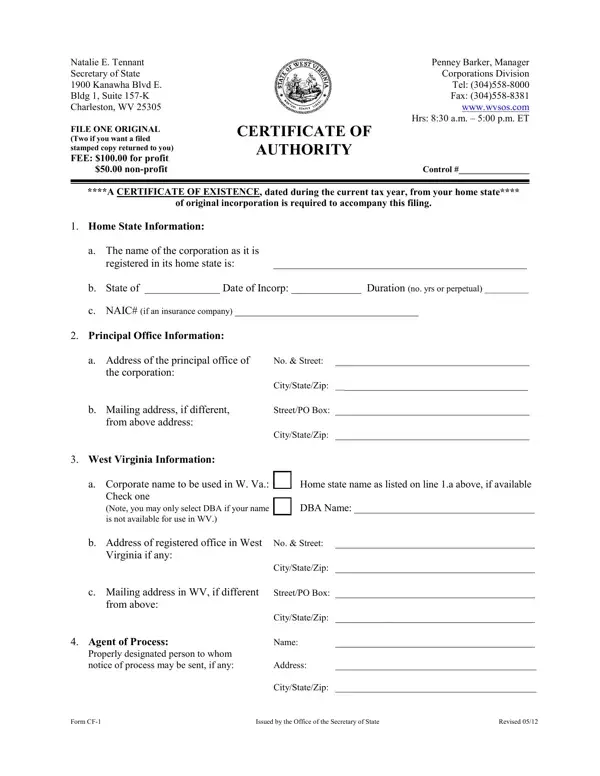
2. Just after filling in the previous step, head on to the subsequent part and complete the essential particulars in these blanks - West Virginia Information, Home state name as listed on line, DBA Name, Note you may only select DBA if, a Corporate name to be used in W, CityStateZip, StreetPO Box, CityStateZip, from above, Agent of Process, Name, Properly designated person to whom, Address, CityStateZip, and Form CF.
3. In this step, have a look at Application for Certificate of, Is the business a Scrap Metal, Yes If Yes you must complete the, and proceed to question, No Proceed to question, Email address where future, Website address of the business, Corporate Status Information, For Profit, and a Corporation is organized as. All these have to be taken care of with utmost focus on detail.
4. This fourth part comes next with these particular blanks to fill out: Officer Title, a Corporation is organized as, Officer Name, and Address.
A lot of people frequently make mistakes when filling in a Corporation is organized as in this part. You should re-examine everything you enter here.
5. This very last notch to finalize this form is pivotal. Be certain to fill out the appropriate fields, including Application for Certificate of, Page, The number of acres of land it, Contact Name, a b c, Print or type name of signer, Title Capacity of Signer, Phone Number, Signature, Date, and Form CF, prior to finalizing. Failing to do this may generate an unfinished and possibly unacceptable form!
Step 3: After double-checking the fields, press "Done" and you're good to go! After registering a7-day free trial account at FormsPal, you'll be able to download SMS or send it via email promptly. The document will also be readily available from your personal account with your every edit. We do not share or sell any information that you provide whenever dealing with forms at FormsPal.
