
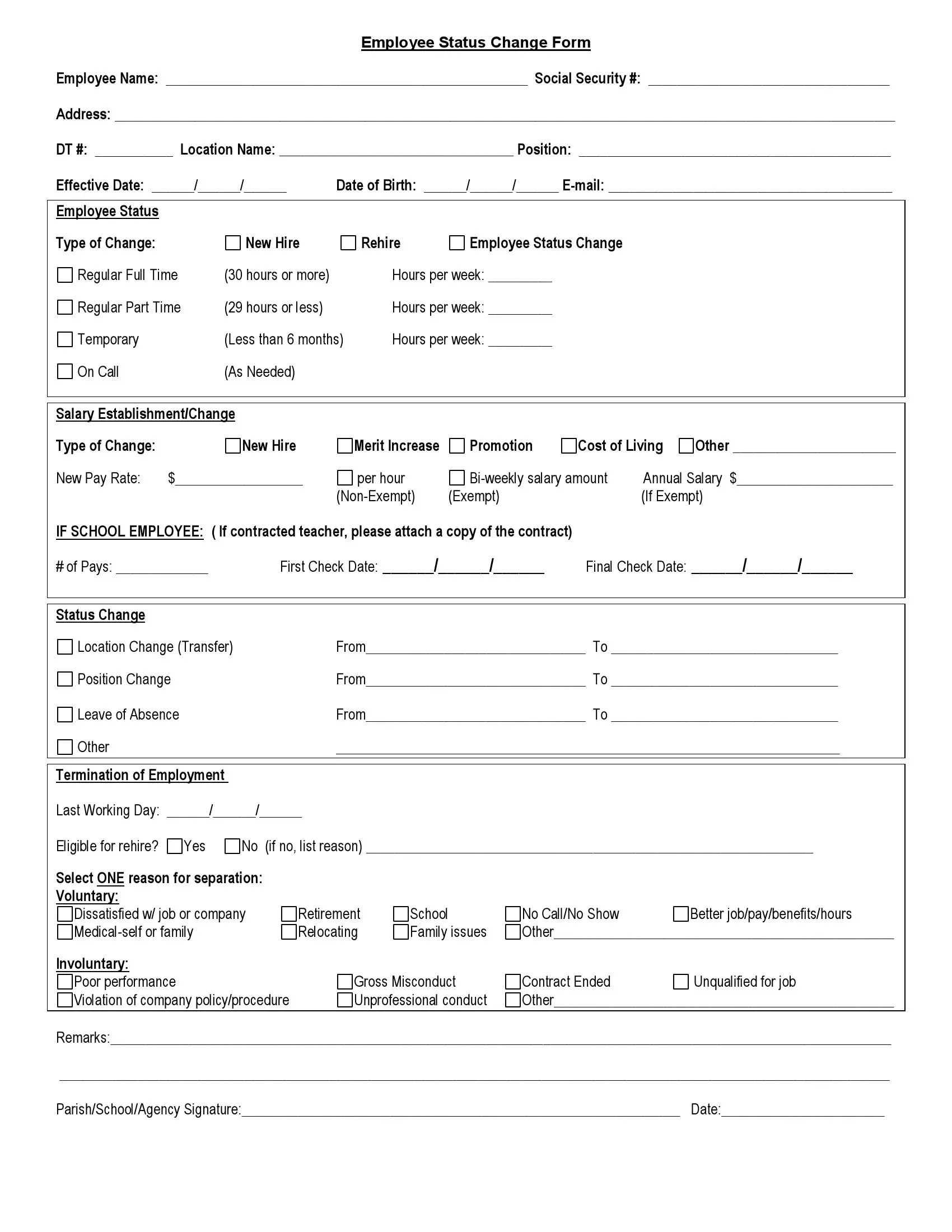
Employee Status Change Form

Get Form Now
Employee status change form preview
Get Form Now
Edit
Fill out
Sign
Export or Print
Download your fillable Employee Status Change Form in PDF

An employee status change form is a document that records a change in an employee’s status at work, such as a promotion, a raise, a transfer, or a new title. Employers and HR managers fill it in. Then supervisors and workers can see what changed and when.

Last Updated: October 2026. This guide is reviewed and updated regularly to reflect current law. If you notice an error or outdated information, please contact us.

What Is an Employee Status Change Form?

An employee status change form is a document that registers changes in an employee’s status in the workplace. Employers and HR managers use it to maintain documentation of every update in one place, from a new job title to a different reporting manager. The form covers these kinds of changes:

  • Promotions, which are upward moves on the career ladder
  • Salary increases for any reason except legislative or across-the-board raises
  • Job transfers to a role with the same or a lower level of responsibility
  • Title changes, where the responsibility and pay stay the same but the name of the position changes
  • Manager changes, where the employee reports to a different manager
  • Status changes, such as part-time to full-time or any other change in working hours
  • Secondary job appointments and similar updates

Record every change of this kind on the form. Employers and HR managers can also find a specific form for each type of change.

Why Fill In an Employee Status Change Form?

A status change form helps both employers and workers. In some states, federal law obliges employers to make records in these forms and report them to state organizations. Beyond that, it gives each side clear documentation that they can review later.

For employers, the form is useful in these ways:

  • It helps directors keep payment records for later tax reports.
  • It can serve as evidence for the tax service when it checks the annual expenses of the company.
  • In big companies, it helps track staff flow and run an analysis when needed.

For employees, the form can matter in several situations. As for employees, there may occur a situation when the unfair employer changes one’s job position. Since it is illegal, the form can act as evidence from the employee’s side in the court. Next, it is again a confirmation for the tax service or for the credit fund to guarantee the income amount or the income source.

The form can also become proof for the following working place of the employee instead of the employment verification or the reference check.

How Do You Ask for a Promotion?

Many workers are afraid to ask for a promotion, even when they do more than their role asks. Sometimes it is because of their abilities, the weaker results of coworkers, or a lack of staff. Asking for a raise is a normal step in that case. These tips help you make the request in a calm and professional way:

  1. Be sure you are worth the promotion. For a week after the idea of a raise comes to mind, record your own progress and the progress of colleagues. If someone is more successful than you, ask how they got there. Comparing your performance with the achievements of your coworkers helps you avoid an awkward situation in front of the whole team.
  2. Collect proof of your results. If the company grew rapidly in the quarter when you came back from vacation, bring the matching report to your director or manager.
  3. Add supporting papers. A letter of recommendation or diplomas from qualification programs you have completed can strengthen the request.

How Do You Ask for a Salary Advance?

A salary advance helps workers who face an emergency, such as health problems, the loss of a breadwinner, or other expenses that insurance does not cover. Treat it as the final resource to consider, after asking relatives or friends for financial help. If you have asked for an advance once, avoid asking again unless you face another dead-end situation.

Prepare for the request with these steps:

  1. Research your company’s policy. If the employer allowed salary advances before, the organization probably has this point in its policies, or even in your employment contract.
  2. Start with the right person. Consider your relationship with the director. It is often better to contact the HR manager first, because a director may not review the request as fast as you need the money.
  3. Write a formal letter. State the purpose, the amount, and the method of repayment. Add evidence where possible, because it improves your chances of approval.
  4. Agree on the terms. You and your employer come to an agreement on the terms of the loan. The final step is a contract with all the salary advance terms and your signature.

How to Fill In an Employee Status Change Form

The form has six parts, and each one is a short box to complete. Work through them in order, from the contact details at the top to the signature at the bottom. Have these details ready before you start:

  • The employee’s name, home address, position, SSN, email, and date of birth
  • The type of status change and the number of working hours per week
  • The new payment amount and the date of the change
  • The date of the worker’s last working day, if the employment ends

Step 1. Enter the Employee’s Contact Information

In the first part of the form, the employer enters the contact information of the employee whose status is changing. It includes the name, home address, position, SSN, email, and date of birth.
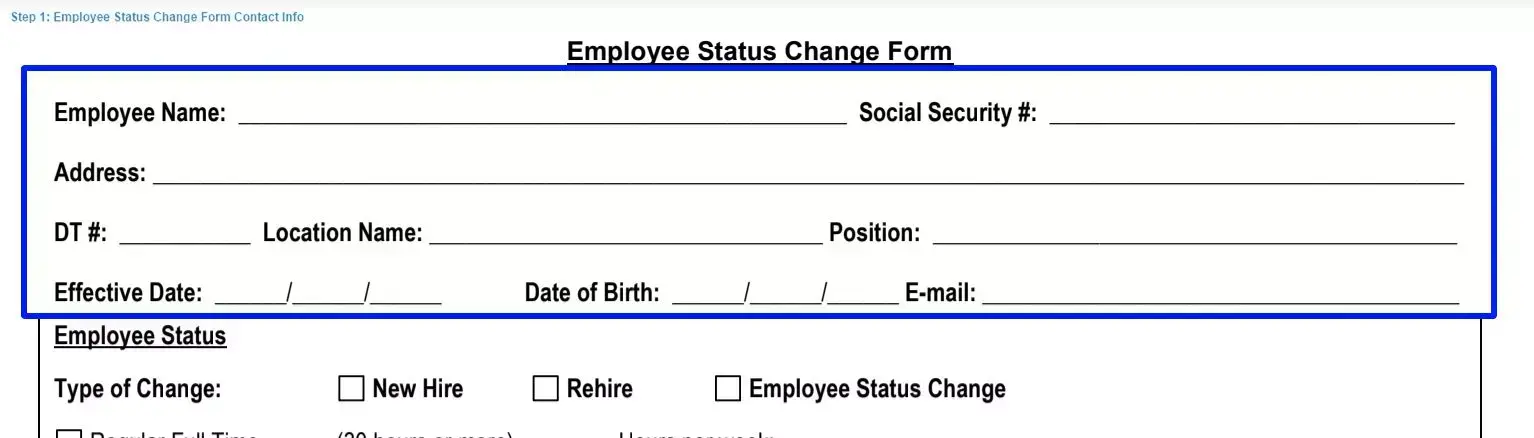
Step 1 to filling out an employee status change form contact info

Step 2. Record the Employment Change

Fill in the first box to record the employment change. Enter the type of status, the type of change, and the number of working hours per week.
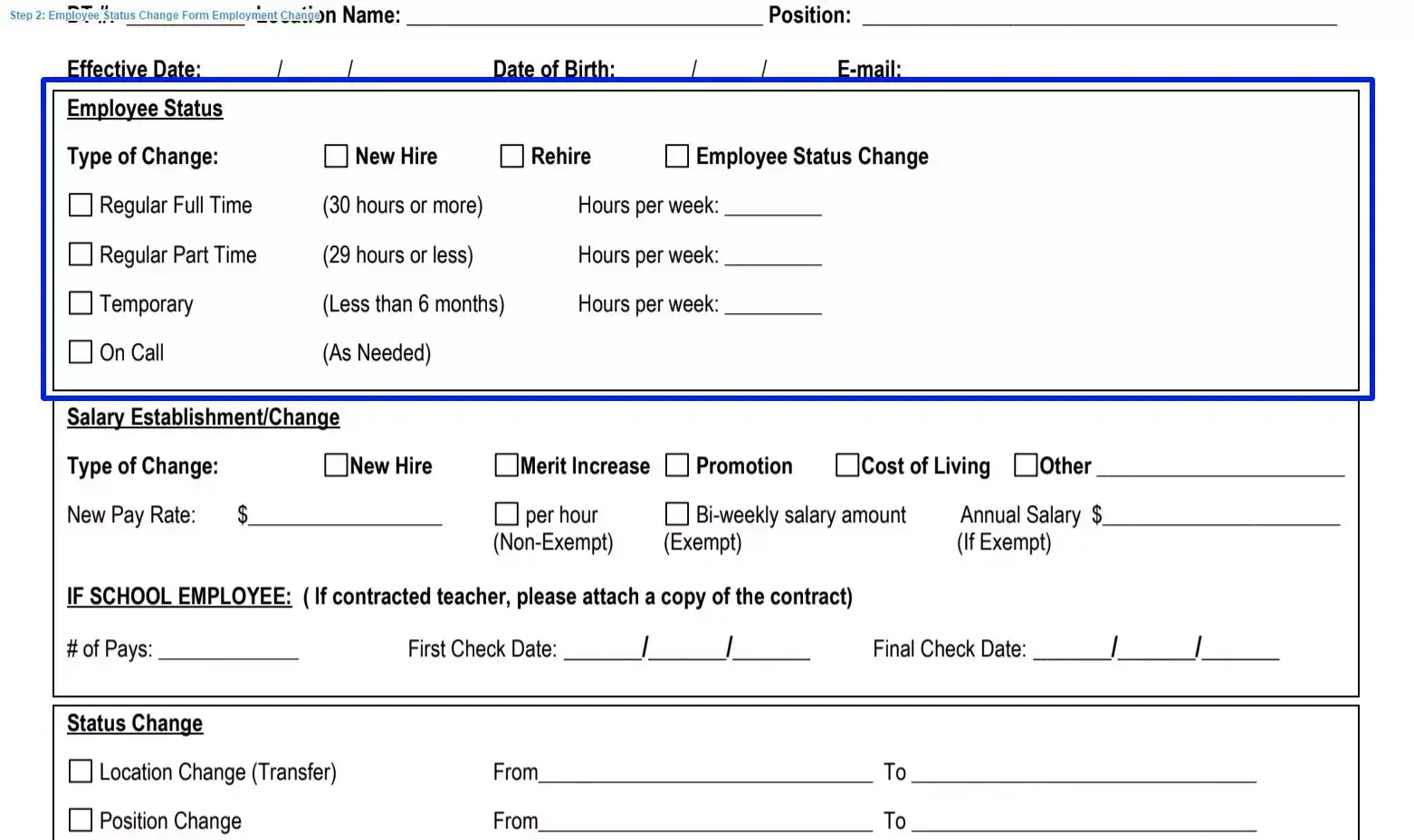
Step 2 to filling out an employee status change template employment change

Step 3. Record Changes in Salary

Use the second box to record changes in salary. Enter the type of change, the new payment amount, and the date of the change.
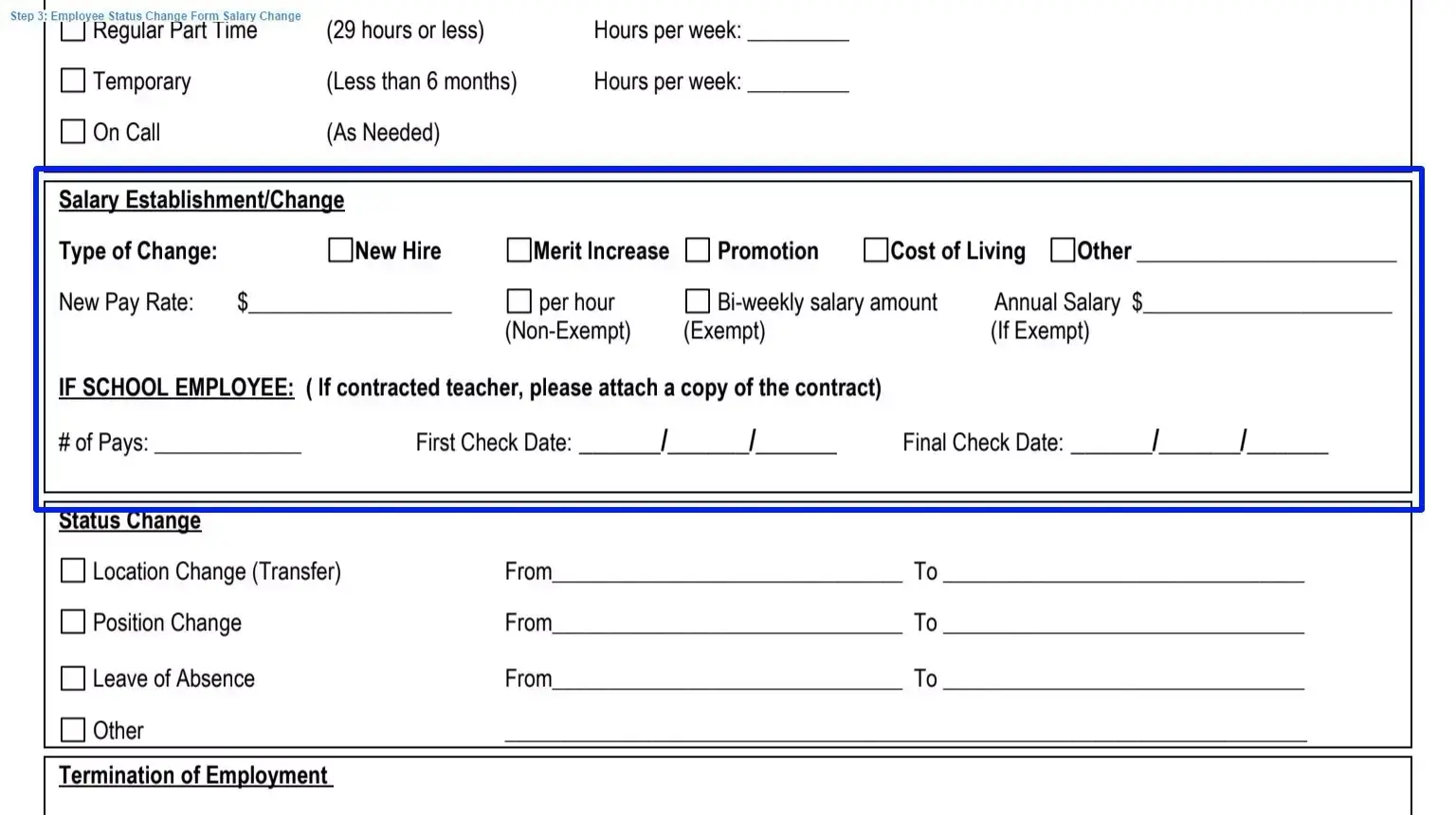
Step 3 to filling out an employee status change sample salary change

Step 4. Enter the Type and Duration of the Status Change

Use the next box for the type and duration of the status change. Fill in the dates of the change and tick the matching boxes.
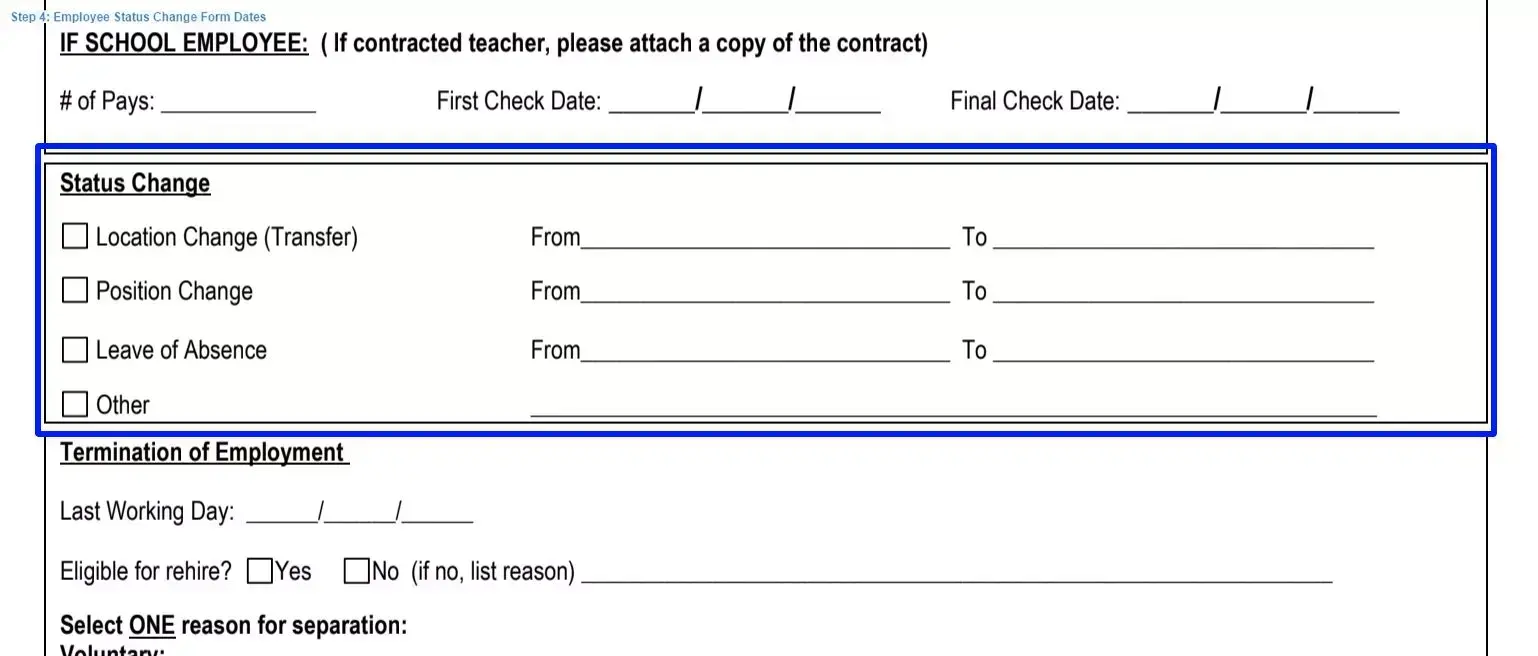
Step 4 to filling out an employee status change form dates

Step 5. Add the Terms of Termination

The last box covers the terms of termination. The employer writes the date of the worker’s last working day and ticks the one reason for separation.
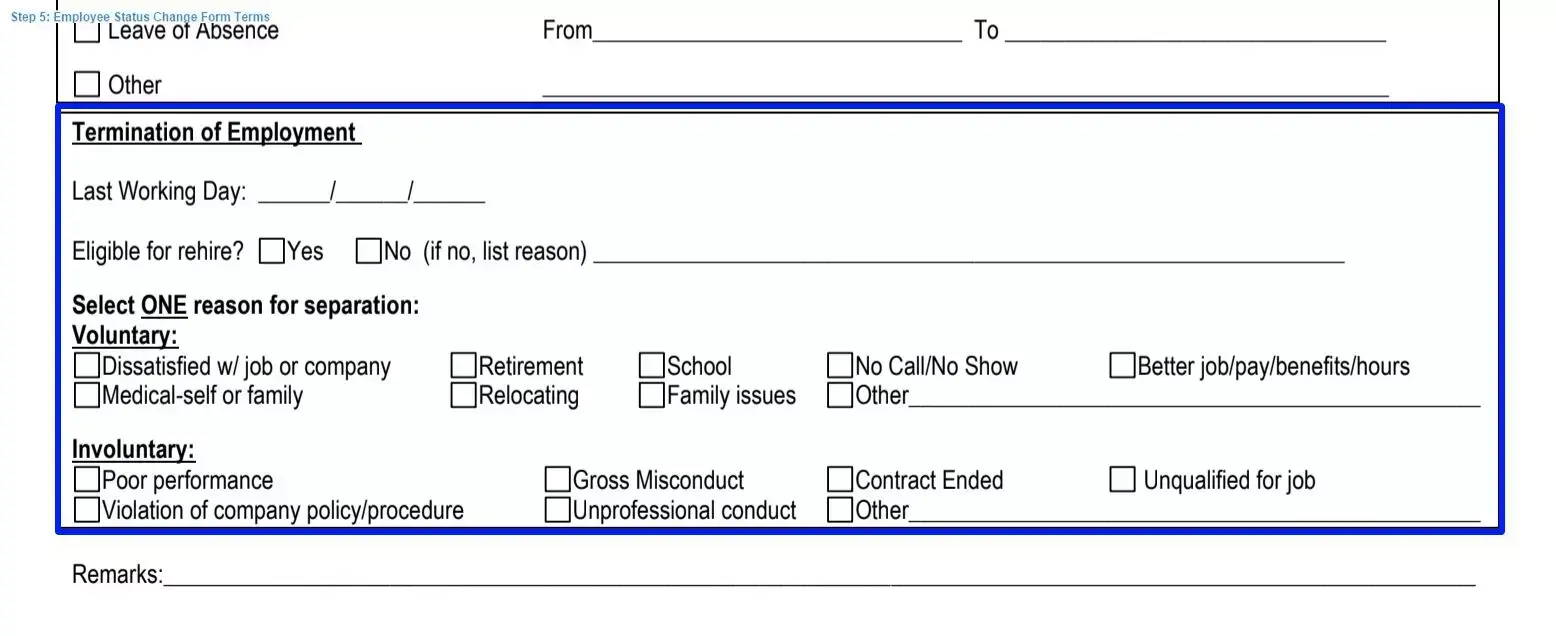
Step 5 to filling out an employee status change example terms

Step 6. Add Remarks and Sign

Finally, write any remarks, then sign the form and add the date it was drawn up.
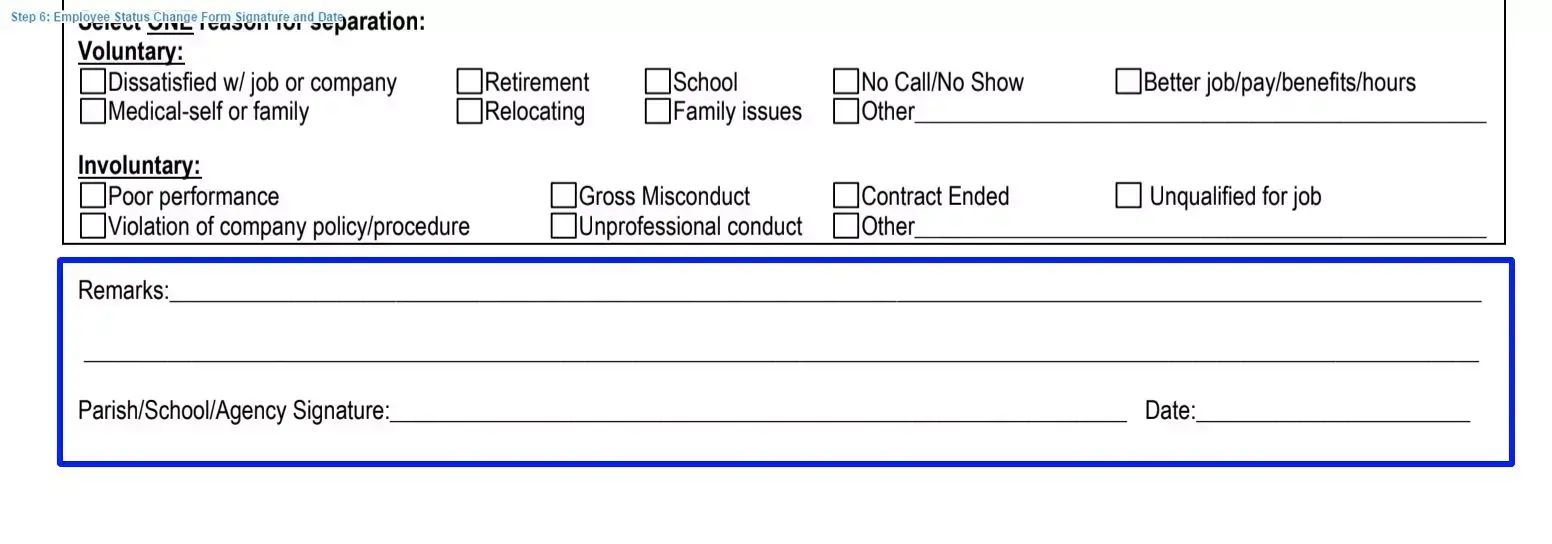
Step 6 to filling out an employee status change form signature and date

Keep a signed copy of the completed form in the employee’s personnel records, and confirm that the names and dates match the identification and payroll documentation.

Frequently Asked Questions

What does an employee status change form record?

It records a change in an employee’s status at work. Examples are a promotion, a salary increase, a job transfer, a title change, a manager change, or a switch between part-time and full-time hours.

Who fills in the form?

The employer or an HR manager usually completes it. The boxes cover the employee’s contact details, the change in employment and salary, the dates, and the last working day.

Where do you record a salary change?

Use the second box. Enter the type of change, the new payment amount, and the date of the change.

How do you record the last working day?

The last box covers the terms of termination. The employer writes the date of the worker’s last working day and ticks the one reason for separation.

What can you do before asking for a promotion?

Record your progress for a week, compare it to your colleagues, and collect reports, a letter of recommendation, or diplomas that show your results.

General information, not legal or tax advice.

Jennifer M. Settles
Jennifer M. Settles
Author & Attorney
With over 25 years of experience as a business and transactional attorney, Jennifer has mastered the craft of closing highly successful deals for her clients. Through her wide-ranging expertise in commercial contracts, real estate transactions, M&A and corporate law, Jennifer secures results that are second-to-none.