
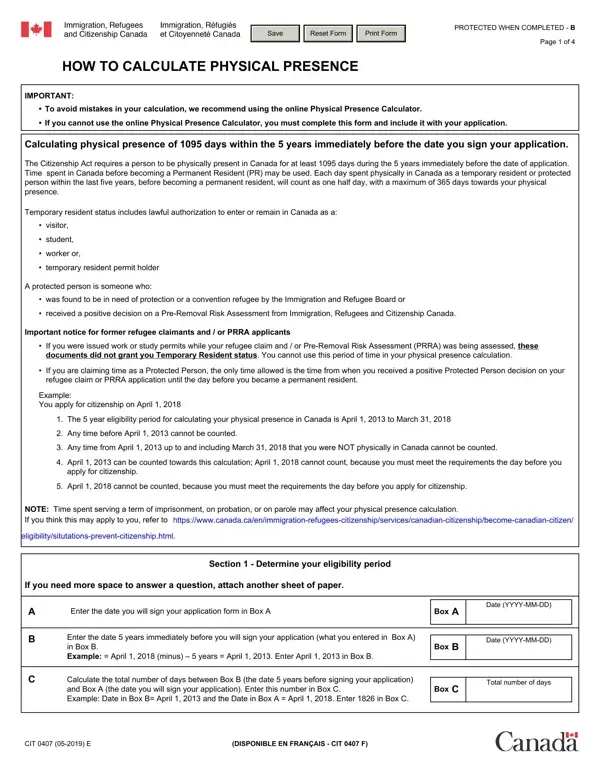
CIT 0407 Form PDF Details

Navigating the complexities of citizenship application processes requires a keen understanding of the specific requirements set forth by the governing bodies. One such pivotal aspect is the adherence to physical presence calculations, a critical step for those aspiring to obtain Canadian citizenship. The 0407 form serves as a comprehensive guide to assist applicants in accurately determining their eligibility, specifically focusing on the mandated 1095 days of physical presence within Canada during the five years immediately preceding their application. This form not only delineates the calculation process but also emphasizes the inclusion of days spent in Canada both as a Permanent Resident (PR) and under other temporary statuses, including as a student, worker, or protected person. It’s imperative to note that time spent under certain conditions, such as serving a term of imprisonment, does not contribute to this calculation, thereby requiring applicants to approach this process with meticulous attention to detail. Furthermore, the form provides clear instructions for documenting absences from Canada, which is crucial for maintaining the integrity of the physical presence calculation. By adhering to the guidelines provided in the 0407 form, applicants can navigate through the eligibility verification process with greater ease and precision, ensuring that all necessary criteria are met for a successful citizenship application.

QuestionAnswer
Form NameCIT 0407 Form (Physical Presence Calculator)
Also Known As0407 form, CIT 0407, physical presence form, cit 0407 online residence calculator
Published ByImmigration, Refugees and Citizenship Canada (IRCC)
Form Length4 pages
Fillable?No (use FormsPal online editor to fill digitally)
Fillable fields0 native PDF fields
Avg. time to fill out15-30 min (requires travel history records)
Required forCanadian citizenship paper application when online calculator is unavailable
Physical Presence Threshold1,095 days in the 5 years before signing your application

How to Edit 0407 Form Online for Free

You'll be able to complete physical presence calculator form effortlessly by using our online PDF editor. The tool is constantly upgraded by our team, acquiring useful features and turning out to be greater. This is what you'll need to do to start:

Step 1: Press the "Get Form" button in the top section of this webpage to get into our PDF editor.

Step 2: The editor grants the capability to change PDF forms in many different ways. Modify it by including customized text, adjust what's already in the PDF, and put in a signature - all within a couple of mouse clicks!

It really is an easy task to complete the pdf following our detailed tutorial! Here is what you should do:

1. The physical presence calculator form will require particular details to be inserted. Ensure the subsequent blanks are filled out:

Stage no. 1 for filling in cit 0407

2. After filling in the previous part, go on to the next step and enter the necessary details in these blank fields - Your ELIGIBILITY PERIOD Date in, This is your ELIGIBILITY PERIOD, information within the year, Section Calculating physical, your application, Enter the date that you became a, Date YYYYMMDD, Box D, Calculate the total number of days, Box E, Total number of days, Absences from Canada You will use, Have you been outside of Canada in, Proceed to F and enter in Box F, and YES List all of your time outside.

Part no. 2 in filling out cit 0407

3. Completing Date left Canada, to Canada, YYYYMMDD, YYYYMMDD, Destination, Reason for absence, Total days absent from, Canada, CIT E, Box F, and Total number of days absent from is essential for the next step, make sure to fill them out in their entirety. Don't miss any details!

Filling out segment 3 in cit 0407

You can easily get it wrong while filling in the Date left Canada, for that reason be sure to go through it again before you decide to send it in.

4. Filling out Enter the total number of days, Calculate Box E minus Box F, Is the number in Box G more than , Yes Congratulations you are, Number of days, Days of physical PR presence, Box F, Box G, Note, Section allows you to calculate, Section Calculating physical, within the last year eligibility, During your ELIGIBILITY PERIOD, status in Canada before becoming a, and If you answered NO and you do not is key in the next section - make sure you take your time and fill out each field!

Guidelines on how to fill in cit 0407 part 4

5. Lastly, this final segment is what you need to wrap up prior to submitting the document. The fields here include the next: YYYYMMDD, YYYYMMDD, protected person, permanent resident, CIT E, Box H, and Total of TR or PP days.

cit 0407 completion process detailed (part 5)

Step 3: Check that your information is accurate and just click "Done" to finish the project. Right after setting up a7-day free trial account at FormsPal, it will be possible to download physical presence calculator form or send it via email right away. The PDF form will also be available in your personal account menu with all your adjustments. If you use FormsPal, you can certainly fill out documents without the need to be concerned about data breaches or data entries being distributed. Our protected platform helps to ensure that your personal details are stored safely.