
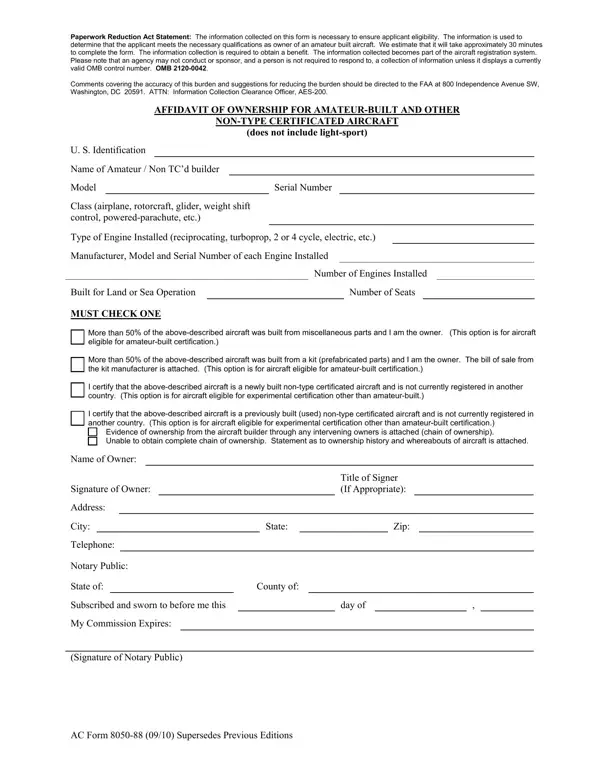
Ac Form 8050 88 can be filled out easily. Simply use FormsPal PDF editing tool to accomplish the job quickly. FormsPal team is dedicated to making sure you have the perfect experience with our tool by regularly adding new functions and upgrades. Our tool has become a lot more intuitive with the latest updates! So now, filling out documents is simpler and faster than ever before. By taking a few basic steps, it is possible to start your PDF editing:
Step 1: First, open the editor by pressing the "Get Form Button" above on this page.
Step 2: As you access the PDF editor, you will get the document all set to be filled out. Besides filling out various blank fields, you may as well perform various other actions with the form, including putting on your own text, changing the initial text, adding illustrations or photos, signing the document, and much more.
Step-by-Step Field Instructions
It's an easy task to finish the document using this helpful tutorial! Here is what you want to do:
1. It is recommended to fill out the Ac Form 8050 88 correctly, therefore be mindful while working with the segments including all of these fields:
2. The next step is usually to complete these blanks: I certify that the abovedescribed, Name of Owner, Signature of Owner, Address, City, Title of Signer If Appropriate, State, Zip, Telephone Notary Public State of, County of, day of, and My Commission Expires Signature of.
Be extremely attentive when filling in County of and Address, since this is the part in which most users make some mistakes.
Step 3: Just after looking through your form fields you've filled out, click "Done" and you're done and dusted! Get hold of the Ac Form 8050 88 after you register here for a 7-day free trial. Easily gain access to the document from your personal account, along with any edits and adjustments being all preserved! At FormsPal, we endeavor to make sure that all your details are maintained secure.
What to Prepare Before Filling Out the Form
Before you start filling out the AC Form 8050-88, have the following information ready. You will need the builder's full legal name and address, the aircraft make and model, the number of seats and engines, the type of fuel the engine uses, and a description of the aircraft's operating environment. You will also need to arrange for a notary public to witness your signature. The completed form is submitted to the FAA Aircraft Registry together with the AC Form 8050-5 Aircraft Registration Application. If you need help with related aircraft paperwork, the aircraft insurance application is also available on FormsPal.
Frequently Asked Questions About AC Form 8050-88
Who needs to submit the AC Form 8050-88?
Any person seeking to register an amateur-built or other non-type certificated aircraft with the FAA must file this form. This includes homebuilders who constructed the aircraft from raw materials or from a commercially available kit. The owner listed on the form must be a U.S. citizen or a resident alien to qualify for registration.
Does the form need to be notarized?
Yes. The AC Form 8050-88 is an affidavit, meaning the owner must sign it in the presence of a notary public who then stamps and signs the document to certify the signature. The notarized form is a required part of the FAA registration package for amateur-built aircraft.
What is the difference between the AC Form 8050-88 and the AC Form 8050-5?
The AC Form 8050-5 is the standard Aircraft Registration Application used to request an N-number assignment for any aircraft. The AC Form 8050-88 is an affidavit specifically for amateur-built and non-type certificated aircraft to verify ownership and confirm the aircraft meets eligibility requirements for that registration category.
