Please rate Alarm Permit Application Rev. 10-18

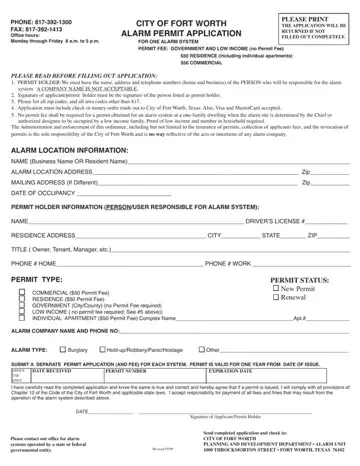
Application Type: check New Alarm Permit or Renew Existing Permit.
Permit holder: a contact name, address and telephone number is required for all permits; business accounts must have an individual person listed as contact.
Payment: applications must include payment; payments are accepted via check or money order (made out to City of Fort Worth), and all major credit cards.
Valid for: a twelve (12) month period from the date of issuance as indicated on the permit.
Expires: a permit expires one year from the date of issuance and must be renewed annually by submitting an updated application.
Government: no permit is required of state and federal governmental entities; city and county subdivisions that operate alarm systems are required to obtain a permit.
| Question | Answer |
|---|---|
| Form Name | Alarm Permit Application |
| Form Length | 2 pages |
| Fillable? | Yes |
| Fillable fields | 34 |
| Avg. time to fill out | 6 min |
| Issued by | City of Fort Worth, Planning and Development, Alarm Unit |
| Permit fee | $50 (commercial and residential); waiver available for low-income |
| Who needs it | Residents and businesses in Fort Worth installing an alarm system |
| Edition | Rev 10/18 |
| Other names | Alarm Permit Application, Fort Worth alarm permit, City of Fort Worth alarm permit, alarm permit renewal |
| Official source | Alarm Permit Application (Rev. 10/18), City of Fort Worth |
Alarm Permit Application isn’t the one you’re looking for?
Please rate Alarm Permit Application Rev. 10-18
