
Ambulance Report Form PDF Details

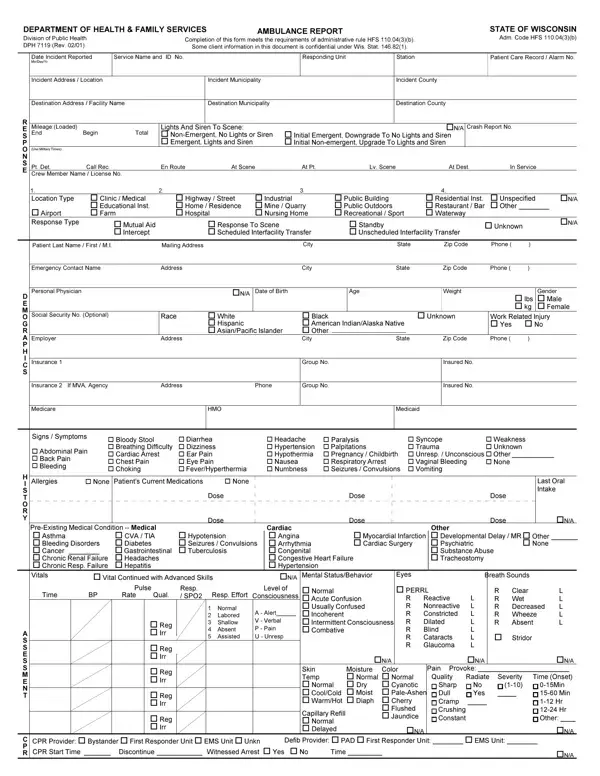
In the fast-paced environment of emergency health services, the Ambulance Report Form serves as a crucial document, meticulously designed to capture a wide array of information following an ambulance call. Issued by the Department of Health & Family Services, especially within the context of the State of Wisconsin, this form adheres strictly to the administrative rule HFS 110.04(3)(b), ensuring that all required data is systematically recorded. It begins with the basics such as the date of the incident, the service name and ID number, and detailed patient care record numbers, extending to more intricate details involving the incident's location, the patient's demographic information, and the medical response undertaken. Additionally, the form includes sections dedicated to capturing the patient's medical history, vital signs, the nature/cause of the injury or health issue, and any treatments provided by the emergency medical technicians (EMTs). The specificity of the form extends to recording the use of lights and siren during the transport, type of incident disposition, and even the status upon arrival at the destination. Furthermore, it acknowledges the importance of documenting interactions with other services on the scene and any difficulties encountered during the course of the emergency response. By transcoding such comprehensive information, the form not only aids in the immediate treatment and transport of patients but also contributes to the broader scope of healthcare analysis and policy formulation, ensuring that each response is well-documented for future reference, analysis, and potential improvement of emergency medical services.

QuestionAnswer
Form NameAmbulance Report Form
Form Length2 pages
Fillable?No
Fillable fields0
Avg. time to fill out30 sec
Other namesambulance prf, patient report form ambulance pdf, patient report form app, patient report form ambulance

How to Edit Ambulance Report Form Online for Free

form ambulance report can be completed effortlessly. Simply open FormsPal PDF editing tool to complete the job fast. We are dedicated to giving you the absolute best experience with our editor by continuously adding new capabilities and enhancements. Our editor is now even more useful thanks to the most recent updates! So now, editing PDF forms is simpler and faster than ever before. If you're looking to start, here is what it's going to take:

Step 1: Access the PDF inside our tool by clicking the "Get Form Button" at the top of this webpage.

Step 2: The tool will let you change your PDF file in various ways. Enhance it with your own text, adjust existing content, and put in a signature - all at your convenience!

This form will require specific data to be filled out, therefore be sure to take some time to type in exactly what is asked:

1. Firstly, once completing the form ambulance report, beging with the area with the next blanks:

patient report form ambulance completion process clarified (step 1)

2. Now that this segment is finished, you're ready include the required particulars in o lbs o kg, Gender o Male o Female, Race, Address, o White o Hispanic o AsianPacific, o Black o American IndianAlaska, State, o Unknown, Work Related Injury o Yes o No, Zip Code, Phone , Social Security No Optional, Employer, Insurance , and Insurance If MVA Agency allowing you to progress to the third step.

How one can prepare patient report form ambulance stage 2

Concerning Gender o Male o Female and Social Security No Optional, be sure you review things in this section. Both of these are the most important fields in this file.

3. Throughout this step, review A S S E S S M E N T, C P R, Normal Labored Shallow Absent , A Alert V Verbal P Pain U , o Reg o Irr, o Reg o Irr, o Reg o Irr, o Reg o Irr, o Reg o Irr, o Normal o Acute Confusion o, R R R R R R R, Reactive Nonreactive Constricted, L L L L L L L, R R Wet R R Wheeze R, and Absent. Each one of these have to be completed with highest attention to detail.

Part no. 3 in submitting patient report form ambulance

4. To go ahead, the following part involves filling out a handful of fields. Examples of these are Some client information in this, Patient Last Name First MI, Patient Care Record Alarm No, Division of Public Health DPH Rev , Service Name and ID No, Physical Examination, Injury Pain Location, Head Face, Neck, Chest Axilla, Abdomen, Back Flank, Pelvis Hip, L Arm U, and R Arm U, which are essential to carrying on with this particular document.

Pelvis  Hip, Patient Care Record  Alarm No, and Head  Face of patient report form ambulance

5. The document has to be finalized by filling in this area. Here there's an extensive listing of form fields that must be filled in with accurate details in order for your document usage to be accomplished: C O M M E N T, M I S C E L L A N E O U S, Provider Impression o Abd Pn , o Cardiac Arrest o Cardiac Rhythm, o Electrocution o GI Bleed o, Chief Complaint Mechanism of, o Hypothermia o Hypovolemia Shock, Alcohol Ingestion, o Obvious Death o Poison Drug, Time of Onset, Comments, Incident Disposition o Treated , AND , o Home Residence o Police Jail o, and Destination Determination.

How you can fill in patient report form ambulance part 5

Step 3: Prior to moving forward, it's a good idea to ensure that all blank fields have been filled in right. The moment you’re satisfied with it, press “Done." After starting afree trial account here, you'll be able to download form ambulance report or send it via email right away. The form will also be readily available through your personal account menu with your each edit. We don't share any details you type in whenever filling out documents at FormsPal.