
PeachCare for Kids is Georgia's low-cost health assistance program for children under 19. It provides medical assistance to families who meet income guidelines but cannot afford private coverage. Medical assistance through the program covers doctor visits, hospital stays, prescription drugs, dental care, and vision services.
To qualify for this kids health assistance program, the child must meet all of the following:
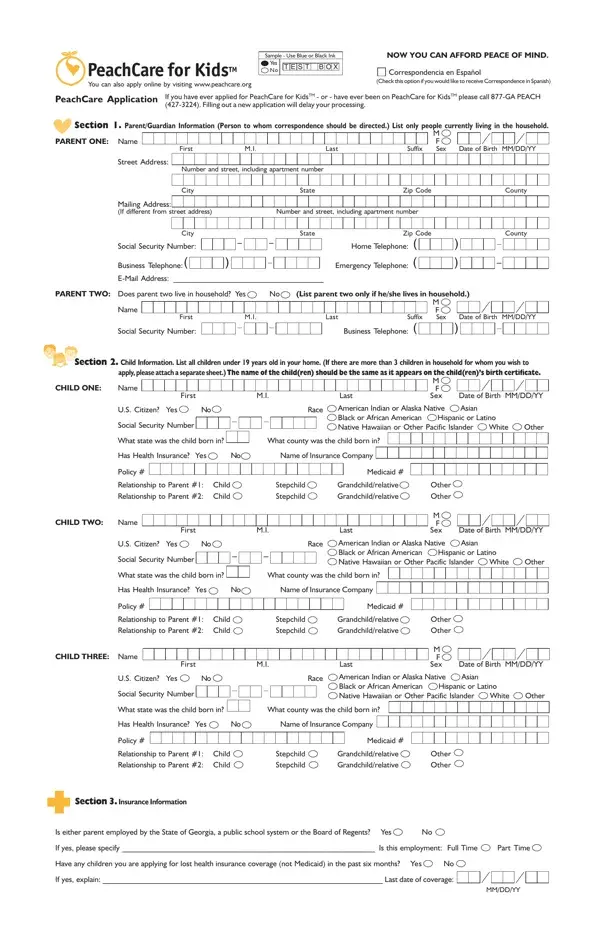
The PeachCare for Kids application collects information across several sections. The parent or guardian section asks for name, address, Social Security Number, and contact details. The child information section asks for each child's name, date of birth, citizenship status, and race, plus whether the child has current health coverage. The employment and income section documents the parent's employer, work status, and all household income sources. The form also requires proof of income and citizenship for verification.
The PeachCare for Kids application accepts both online and paper submission. Paper copies require blue or black ink. After you submit the application, the Georgia Division of Family and Children Services reviews it for medical assistance eligibility. Children who do not qualify for PeachCare for Kids may still be eligible for Medicaid.
If your household has self-employment income, the PeachCare self-employment form may also be needed. For Medicaid assistance, see the Georgia Medicaid application. Families renewing existing coverage can use the health insurance renewal form.
| Question | Answer |
|---|---|
| Form Name | Apply For Peachcare Form |
| Form Length | 2 pages |
| Fillable? | No |
| Fillable fields | 0 |
| Avg. time to fill out | 30 sec |
| Other names | peach care for kids application, georgia peachcare application, peachcare renewal, peachcare for kids application form |