
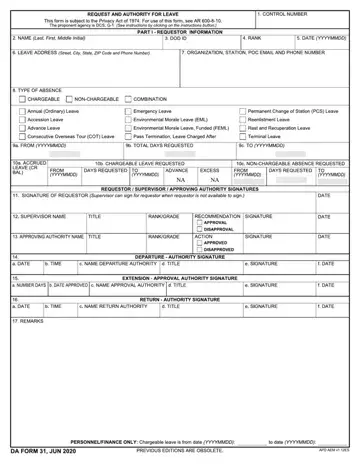
Soldiers use the DA form 31 to request leave and record command approval for military leave. It sets the ground rules. Whether someone needs emergency leave or plans routine time off, this form captures the required details and creates a clear record for managing absences.
At the top, the service member fills in personal and unit information, social security number, along with contact details while away. Then they select the type of military leave and state the reason for the request. Dates matter here. The form asks for the exact start and end dates, total days requested, and the breakdown between chargeable leave and any non-chargeable absence.
In the middle of the form, the leave categories are listed, including:
• Annual leave
• Emergency leave
• Permanent Change of Station leave
• Reenlistment leave
• Terminal leave
After the soldier completes their section, the immediate supervisor reviews the request leave entry and makes a recommendation. Approval authority signs off if everything meets policy and operational needs. Those signatures confirm that the absence fits unit requirements and regulations.
The form also includes sections for extensions, departure verification, and return confirmation. That's needed for accurate record-keeping and helps finance teams track chargeable leave balances correctly.
Put simply, the DA Form 31 turns a leave request into an official, documented action within the Army’s system.
Any active-duty Army soldier who plans to take time off needs a DA Form 31. That includes enlisted personnel and officers at every army rank. If you’re stepping away from duty for annual leave, emergency leave, or another authorized absence, you must file this form before you go.
It applies across units and departments. Whether you serve stateside or overseas, the requirement stays the same. The form creates a formal record that shows when you leave, when you expect to return, and who approved the request. It also connects with other forms and internal systems that track leave balances and personnel status.
In short, if you want to pass through the gate on approved time off, you need this document. Command must review and authorize the request before you depart, and you may have to report back through your chain of command once you return.
First, complete the form with accurate dates, leave type, and required personal details. Then submit it through your chain of command, usually starting with your immediate supervisor.
Your supervisor reviews the request and forwards it to the relevant approving authority within the department. Once authorized, the signed form is returned to you and filed according to unit policy.
Some units process it digitally, while others still require a printed file. Either way, do not leave until approval is official.
| Question | Answer |
|---|---|
| Form Name | DA Form 31 |
| Form Length | 1 page |
| Fillable? | Yes |
| Fillable fields | 65 |
| Avg. time to fill out | 15 min |
| Other names | DA form 31 fillable, DA31, DA 31, DA 31 fillable |
