
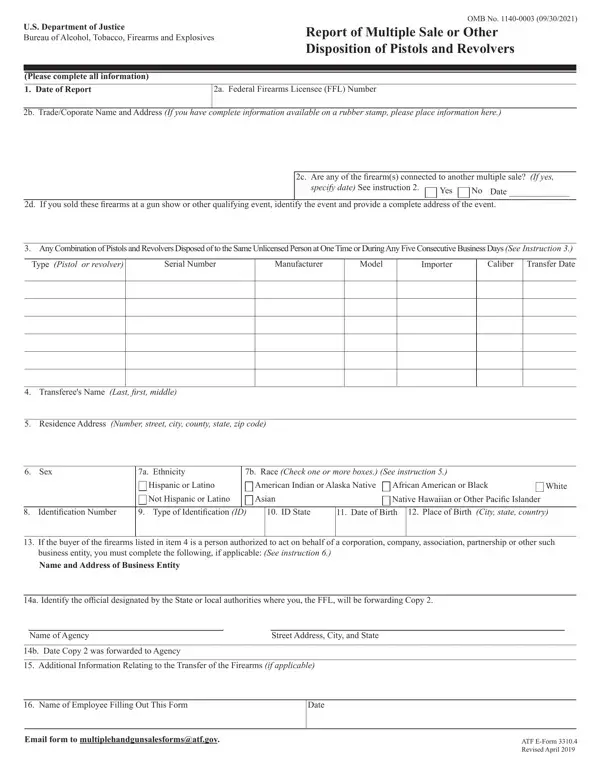
Any time you want to fill out this multiple handgun sale form, you can open the pdf directly in your browser using FormsPal. Our online pdf editor requires no downloads or installations. You can edit the pdf form, complete every field, and download the pdf file in just a few minutes. We update the editor regularly to keep the pdf tool current with the latest ATF form versions.
What Is ATF E Form 3310 4?
ATF E Form 3310 4 is the Report of Multiple Sale or Other Disposition of Pistols and Revolvers. It is a compliance form that firearms dealers licensed by the federal government are obligated to file whenever they sell two or more handguns to the same unlicensed buyer in a five-working-day window. The form enables the ATF and local law enforcement agencies to track patterns of firearms sales that may be linked to illegal trafficking or straw purchases. Understanding what the atf form covers and when to file it is the first step toward meeting your firearms compliance obligations as an FFL holder.
Who Needs to File This ATF Form?
Federal Firearms Licensees who sell or otherwise dispose of two or more pistols or revolvers to the same unlicensed person within five consecutive working days are obligated to file ATF E Form 3310 4. This covers all FFL classes that deal in handguns, including retail dealers, pawnbrokers, and collectors who make commercial sales. Private individuals without an FFL do not use this form. If you are unsure whether a particular set of handgun sales triggers the reporting requirement, review the ATF guidance for your FFL class or consult a firearms compliance specialist.
What You Need Before You Start the PDF
Before you open the pdf form in the editor, gather the following details for each firearm and each buyer in the transaction:
- Your FFL number and business address
- The date of each handgun sale or disposition
- The make, model, serial number, type, and caliber of each pistol or revolver
- The buyer's full legal name, residential address, date of birth, and place of birth
- The type of ID the buyer presented (driver's license, passport, etc.) and the ID number
- The buyer's race, ethnicity, sex, and Hispanic or Latino status as shown on their ID
Collecting this details before you edit the pdf will help you avoid delays and errors during the submission process.
Step-by-Step Instructions
Step 1: Click the "Get Form" button at the top of this page to open the ATF E Form 3310 4 pdf in our online editor. There you will find all the fields needed to complete the report.
Step 2: Fill in the buyer's details. Enter the last name, first name, and middle name. Add the residential address with the street number, city, state, and zip code. Check the boxes for the buyer's sex, ethnicity, and race. Enter the ID type, ID number, state of issue, date of birth, and place of birth. If the buyer is a corporation or entity, use the entity name in place of the individual name fields.
Pay close attention when you edit the ID type and number fields. Errors here are the most common mistakes seen on multiple handgun sale forms. Verify the ID number matches exactly what is on the buyer's document before proceeding.
Step 3: Fill in the firearms details. For each pistol or revolver in the multiple sale, enter the manufacturer, model, type, caliber, and serial number in the correct row. Each firearm must have its own entry with all fields filled in. Do not leave rows partially blank.
Step 4: Fill in the licensee details. Enter your FFL number, business name, and business address. Sign and date the form to certify that all entries are accurate.
Step 5: Review the pdf one final time. Once all fields are filled in correctly, click "Done" to finalize the pdf. Download the atf form 3310 4 and save a copy for your records.
Step 6: Submit the pdf. Send one copy to the ATF and one copy to the local law enforcement agency in the buyer's area of residence. Both copies must reach their destinations within one working day of the pistol or revolver sales date.
Common Mistakes to Avoid
Leaving the ID number field blank or entering it incorrectly is the most frequent error on multiple handgun sale forms. Double-check the ID number against the buyer's physical ID before you finalize the pdf. Another common mistake is failing to list all firearms involved in the multiple sales transaction. Each handgun must appear on a separate row. Submitting a pdf with missing rows causes processing delays and may trigger a compliance review. A third error is late submission. The deadline to submit this atf form is within one working day of the sales date, not several days later. Set a reminder or workflow flag the moment a multiple handgun sale is completed to ensure you submit the pdf report on time.
Common Questions About ATF Form 3310 4
When is ATF E Form 3310 4 triggered?
The form is triggered when an FFL dealer makes two or more handgun sales or dispositions to the same unlicensed person within five consecutive working days. Each qualifying multiple sale event generates one report.
Where does the completed pdf get submitted?
One copy of the pdf goes to the ATF. A second copy goes to the local law enforcement agency in the county and city of the buyer's place of residence. The FFL dealer keeps a third copy in their bound book. All copies must be submitted or retained within one working day of the date of the multiple sales.
How long must I keep records of the atf form 3310 4?
Retain your copy of every ATF E Form 3310 4 in your bound book for a minimum of 20 years. This record retention period is set by ATF regulations and applies regardless of whether the FFL is still active. Proper record-keeping is a core part of any firearms compliance program.
Can I edit and resubmit the pdf if I make an error?
If you catch an error before submission, use our online pdf editor to correct it and download a new copy. If you have already submitted an incorrect report, contact the ATF directly to ask about their process for filing amended or corrected atf forms. Do not simply send a second pdf without notifying the ATF, as duplicate submissions can cause processing issues.
Are there other atf forms I should know about?
Yes. The ATF Form 4473 is used to document every individual firearms sale to an unlicensed buyer. If your sales include rifles, you may also need to file the ATF E Form 3. All of these pdf forms are available for free on FormsPal. Our pdf editor lets you fill out, edit, and save all common atf forms at no cost.
Tips for Accurate Completion
Use the buyer's government-issued ID to fill out all personal fields in the pdf. If you edit any section, verify the change does not create inconsistencies in the rest of the form. Avoid writing over or crossing out fields in a printed copy. If you need to correct an entry, use our online pdf editor to start with a fresh, clean copy of the atf form 3310 4. Keeping a disciplined process for every multiple handgun sales event helps you stay in compliance and avoid costly penalties. Start by clicking the "Get Form" button at the top of this page to open the pdf editor for free.
