
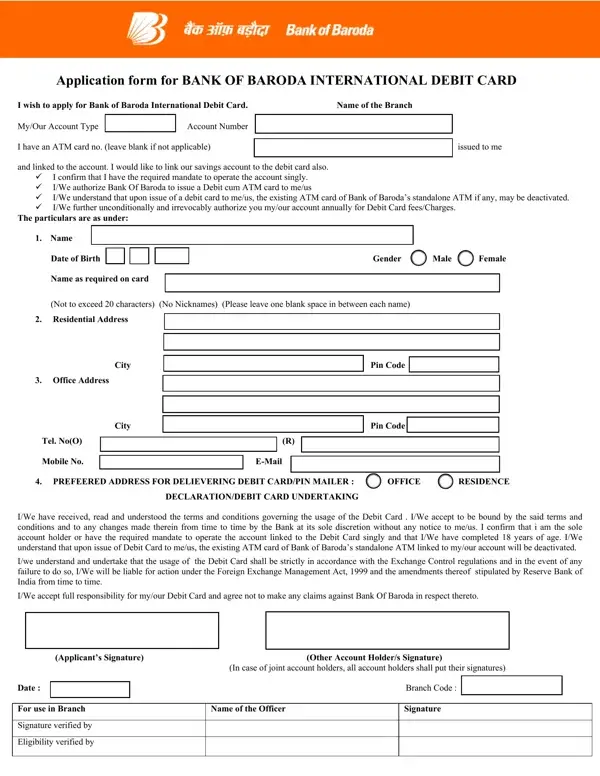
The Bank of Baroda ATM card form is quick to complete using FormsPal. The PDF editor is free to use. You do not need to install any software.
Step 1: Click the "Get Form" button at the top of this page. The form opens in the FormsPal PDF editor ready to fill out.
Step 2: Use the editor tools to fill in text fields, add a signature, and adjust the document as needed.
The form requires specific information in each section. Follow the instructions below to complete each part correctly.
1. Complete the personal details section first. Enter your full name, account number, date of birth, and gender exactly as they appear on your bank records.
2. Fill in the address section next. Enter your City, Office Address, Tel No, Pin Code, and Mobile No. Also select your preferred address for card and PIN mailer delivery.
3. Complete the final section with your signature and date. The bank officer adds their verification signature and eligibility confirmation in this section.
Review the Applicant Signature section before submitting. Errors in this section are the most common reason for delays.
Step 3: Click "Done" once all fields are filled in. Register for a free FormsPal account to download and save your completed form. Your information is never shared with third parties.
Tips for Filling Out the Form Without Errors
Follow these tips to avoid the most common mistakes when filling out the debit card application:
- Write your name exactly as it appears in your bank account records. Any mismatch can cause rejection.
- Use the full account number. Do not use abbreviated versions or account aliases.
- Select the correct card type. If you are unsure which card suits your account, check with your branch before submitting.
- Enter an accurate mailing address. Both the card and PIN mailer are sent to this address separately.
- All joint account holders must sign the form. A missing signature will delay processing.
- Read the FEMA declaration before signing. This confirms your obligations under the Foreign Exchange Management Act, 1999.
What Happens After You Submit the Form
Bring the completed and signed form to your nearest Bank of Baroda branch. A bank officer reviews your application and verifies your eligibility. If the application is approved, your international debit card is processed. The card is then mailed to your chosen address. The PIN mailer is sent separately. Your existing standalone ATM card is deactivated once the new card is activated at the branch.
The debit card can be used at ATMs and point-of-sale terminals in India and abroad. It is also valid for online transactions. Annual fees are charged to your linked account as per the bank's schedule of charges.
Related Bank Forms You May Need
If you are looking for other banking forms, the following pages may be helpful:
- Bank of Baroda Account Opening Form – use this form to open a new savings or current account
- Canara Bank Debit Card Application Form – apply for a debit card at Canara Bank
- UBI ATM Card Application Form – apply for a United Bank of India ATM card
- UCO Bank ATM Card Application – apply for a UCO Bank ATM card
