
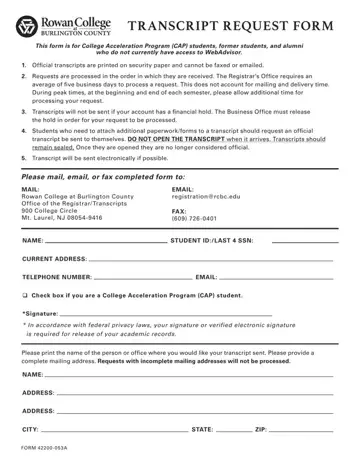
The Bccedu Transcript Request Form is used by College Acceleration Program (CAP) students, former students, and alumni of Burlington County Community College (BCCC) to order official and unofficial academic transcripts. Students who lack access to online self-service portals such as WebAdvisor or Parchment must use this form to submit a transcript request directly to the Registrar's Office.
Official transcripts are printed on security paper and cannot be faxed or emailed. Any copy sent via those methods would not be considered official. When a transcript must be sent to a third party — another college, an employer, or a scholarship organization — please indicate the recipient's mailing address on the form. For electronic transcript delivery, the college accommodates digital sending whenever possible.
Processing typically takes an average of five business days, not counting mail delivery time. This window may extend during peak enrollment periods at the start and end of each semester. Transcripts will be withheld if there are any outstanding financial holds on the account, pending clearance from the Business Office.
Students who need to attach additional documents should request that the official transcript be mailed directly to them and keep the envelope sealed to maintain its official status. To comply with FERPA, a signature or verified electronic signature is required to authorize the release of academic records. Please complete all fields — including your name, student ID, current address, telephone number, and email — before submitting your transcript order. Students may select whether to order an official or unofficial transcript on this form.
| Question | Answer |
|---|---|
| Form Name | Bccedu |
| Form Length | 1 pages |
| Fillable? | No |
| Fillable fields | 0 |
| Avg. time to fill out | 15 sec |
| Other names | rowan college at burlington county transcript request, burlington county college transcripts, bcc transcript request, burlington county community college transcript request |
