
Class Roster Form PDF Details

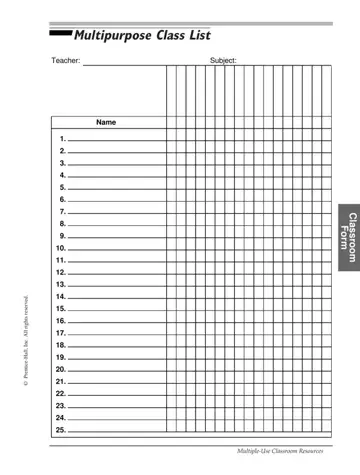
This class roster template will help you keep all your class information neat and organized. Teachers often use it in classrooms to see how students are doing in a particular subject over time. At the top of the form, there's space to write the date range or week, name, and subject. This makes it easy to know exactly which class the roster belongs to. Below that, the form lists up to 25 students, which is a good fit for most class sizes.

Each student's name goes in the first column. The columns that follow show the days of the week from Monday to Saturday. It's easy to check attendance, note participation, or record other daily details. The nice thing about it is that the simple layout makes it easy to read and quick to fill out, even on busy days.

Use this form to keep track of who's there each day, follow along with what everyone's doing, and record what you did each week. It's also a great way to keep your class records neat and organized.

QuestionAnswer
Form Name Class Roster Form
Form Length 1 page
Fillable? Yes
Fillable fields 178
Avg. time to fill out 15 min
Other names printable class list template, class roster template, editable class roster template, editable class list

Form Preview Example

Multipurpose Class List

Teacher:

Subject:

NAME


1.


2.


3.


4.


5.


6.


7.


8.


9.


10.


11.


12.


13.

reserved.

14.

15.

rights

16.

Inc. All

17.

18.

-PrenticeHall,

19.


20.

©

21.


22.


23.


24.


25.

CLASSROOM FORM

39

Multiple-Use Classroom Resources

How to Edit Blank Class List Online for Free

To fill out this blank class roster form, start at the top. You can write a single date, a date range, or a week - use whatever works best for how you track your class.

Next, enter your name and the subject to identify the class.

Move down to the main table. In the first column, write each student’s name, one per line, starting from number one. You can list up to 25 students. Just make sure the names are easy to read.

Across the row, you’ll see columns labeled Monday through Saturday. Use these spaces to mark what you need each day. For example, you might check attendance, note participation, or add simple symbols or initials for daily activities. Stay consistent with the marks you use so the information is easy to understand later.

As the week goes on, update the form daily. Review it at the end of the week to make sure all entries are complete, then keep it on file for your records.

Watch Blank Class List Video Instruction

Please rate Blank Class List

2 Votes
If you believe this page is infringing on your copyright, please familiarize yourself with and follow our DMCA notice and takedown process - click here to proceed .
