
Form RRF-1 at a glance
What it is: Form RRF-1, the Annual Registration Renewal Fee Report, assists the Attorney General's Office with early detection of charity fiscal mismanagement and unlawful diversion of charitable assets (section 301-307, and 310).
Who signs: An authorized agent may be the president or chief executive officer, treasurer or chief financial officer of a public benefit corporation; or a trustee if the organization is a trust; or other authorized agent of the organization.
Every charitable nonprofit corporation, unincorporated association or trustee holding assets for charitable purposes that is required to register with the Attorney General's Office is also required to annually file Form RRF-1, even if the corporation does not file Form 990s annually or is on extended reporting with the Internal Revenue Service.
What to bring and attach to Form RRF-1
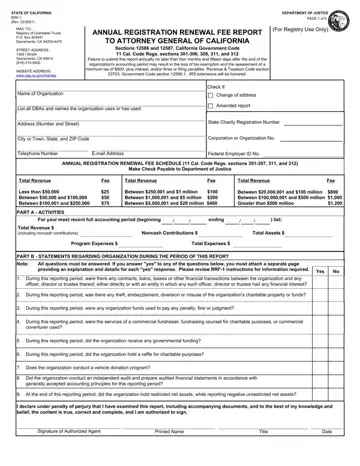
Annual Registration Renewal Fee Schedule (11 Cal. Code Regs. sections 301-307, and 310): Make Check Payable to Department of Justice.
A filled-in Form RRF-1 example: a small charity's treasurer files the annual report
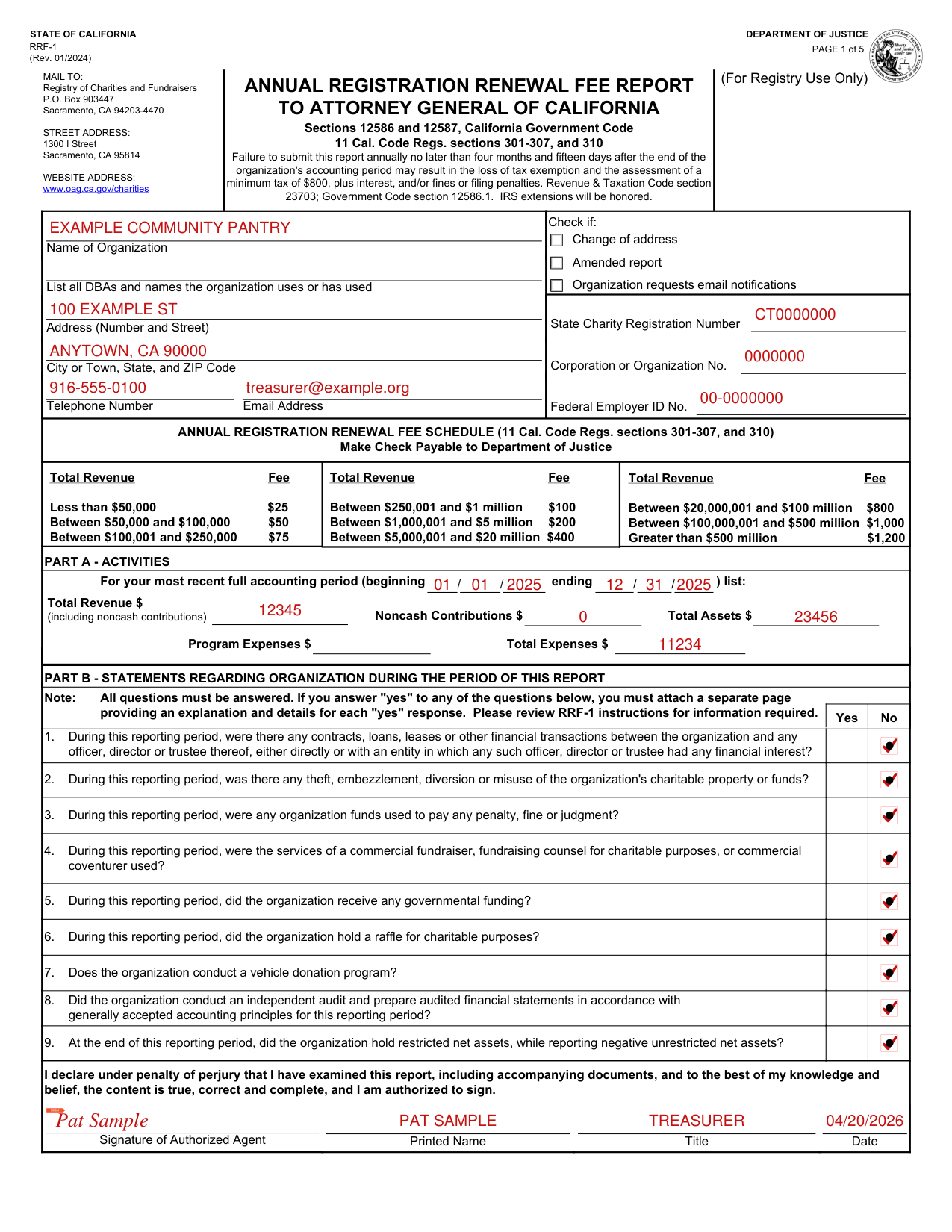
How to fill out Form RRF-1, box by box
Name of Organization
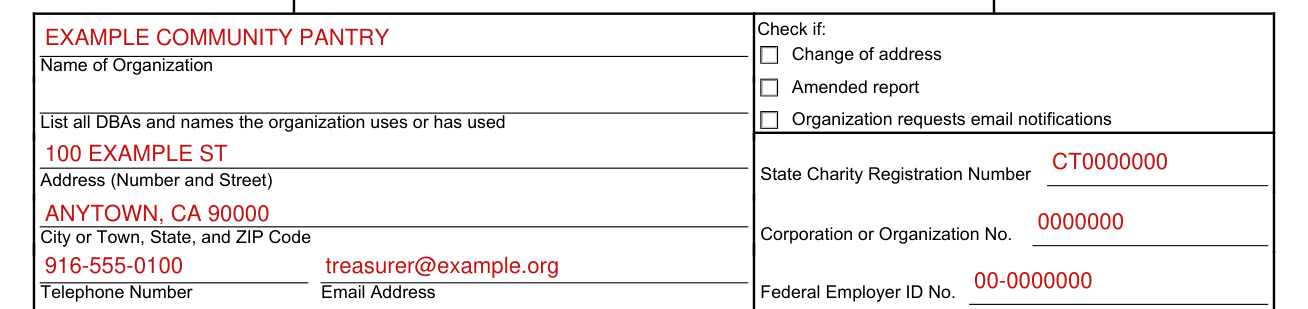
Enter the Name of Organization, then List all DBAs and names the organization uses or has used. Enter the Address (Number and Street), City or Town, State, and ZIP Code, Telephone Number and Email Address.
Check if: Change of address, Amended report, Organization requests email notifications

Check if: Change of address; Amended report; Organization requests email notifications.
State Charity Registration Number, Corporation or Organization No. and Federal Employer ID No.

Enter the State Charity Registration Number, Corporation or Organization No. and Federal Employer ID No.
OTHER IDENTIFICATION NUMBERS The corporation number is a seven-digit number assigned by the Office of the Secretary of State and is stamped on the organization's articles of incorporation.
The Federal Employer Identification Number is a nine-digit number assigned by the Internal Revenue Service.
PART A - ACTIVITIES

Part A - Activities: For your most recent full accounting period (beginning ending ) list: Total Revenue (including noncash contributions), Noncash Contributions, Total Assets, Program Expenses and Total Expenses.
In responding to the questions on Form RRF-1, Part A: Provide the beginning and ending dates of the most recent full accounting period (Month/Day/Year).
Noncash Contributions - Are noncash donations made to a charity. Noncash contributions exclude contributions made by cash, check, electronic funds transfer, debit card, credit card, or payroll deduction.
If you are not required to file Form 990, 990-EZ, nor 990-PF with the IRS because total annual revenue was under $50,000, and are instead filing the required Form CT-TR-1, leave Program Expense blank (checked October 21, 2026).
PART B - STATEMENTS REGARDING ORGANIZATION DURING THE PERIOD OF THIS REPORT
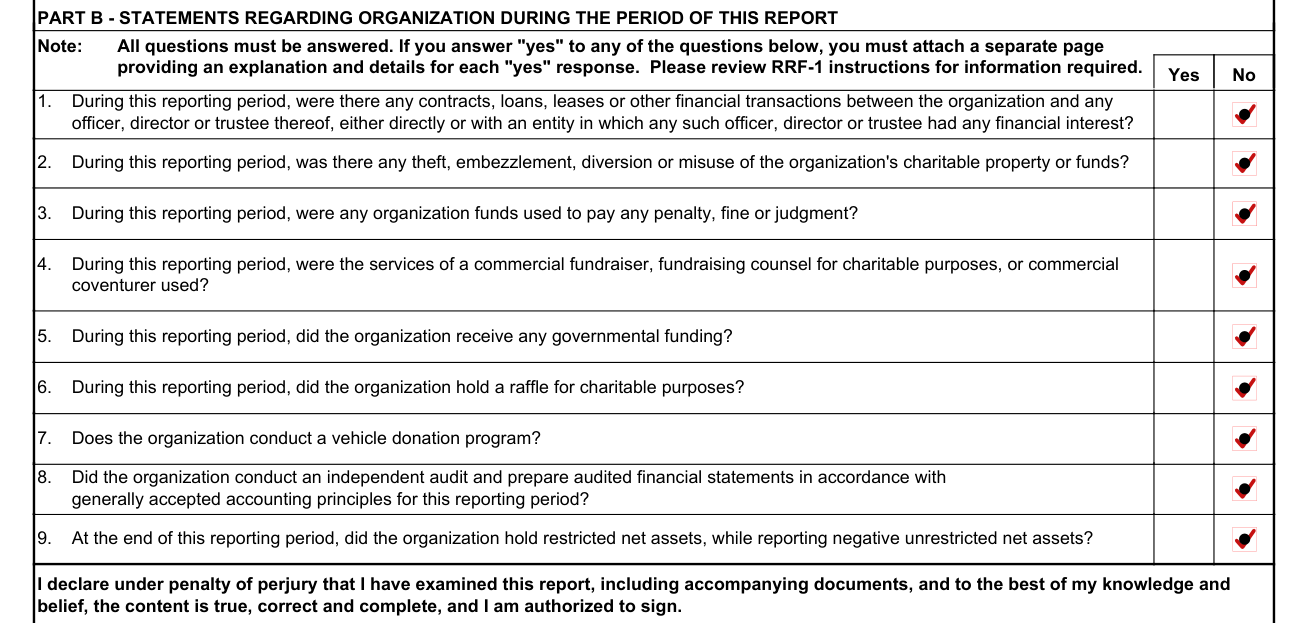
Part B - Statements Regarding Organization During the Period of This Report. Note: All questions must be answered. If you answer “yes” to any of the questions in Part B, you must attach a separate page providing an explanation and details for each “yes” response. Please review RRF-1 instructions for information required. Yes No 1. During this reporting period, were there any contracts, loans, leases or other financial transactions between the organization and any officer, director or trustee thereof, either directly or with an entity in which any such officer, director or trustee had any financial interest?
2. During this reporting period, was there any theft, embezzlement, diversion or misuse of the organization's charitable property or funds?
3. During this reporting period, were any organization funds used to pay any penalty, fine or judgment?
4. During this reporting period, were the services of a commercial fundraiser, fundraising counsel for charitable purposes, or commercial coventurer used? If “yes,” provide an attachment listing the name, mailing address, telephone number, and e-mail address of each commercial fundraiser, fundraising counsel, or commercial coventurer.
5. During this reporting period, did the organization receive any governmental funding? If “yes,” provide an attachment listing the name of each funding source, the name of the agency, mailing address, contact person, and telephone number. Do not submit IRS Schedule B as a response to this question.
6. During this reporting period, did the organization hold a raffle for charitable purposes? If “yes,” provide an attachment listing the date of each raffle.
7. Does the organization conduct a vehicle donation program? If “yes,” provide an attachment describing whether the vehicle donation program is operated by the charity or a commercial fundraiser, together with the name, mailing address, telephone number and e-mail address for each commercial fundraiser.
8. Did the organization conduct an independent audit and prepare audited financial statements in accordance with generally accepted accounting principles for this reporting period? If you received over $2 million in total revenue, as reported on IRS Form 990, 990-PF or 990-EZ, audited financial statements using generally accepted accounting principles are required (checked October 21, 2026)
9. At the end of this reporting period, did the organization hold restricted net assets, while reporting negative unrestricted net assets? If the line reporting net assets without donor restrictions is a negative number, and the line reporting net assets with donor restrictions is a positive number, answer "yes." If “yes,” provide on the attachment: 1) A written statement confirming that all restricted funds were used consistent with their restricted purpose, and explaining why unrestricted net assets were negative at the end of the reporting period, and 2) Proof of directors' and officers' liability insurance coverage.
SIGN: Signature of Authorized Agent, Printed Name, Title and Date

Sign: Signature of Authorized Agent, Printed Name, Title and Date.
I declare under penalty of perjury that I have examined this report, including accompanying documents, and to the best of my knowledge and belief, the content is true, correct and complete, and I am authorized to sign.
A signature of an authorized agent is required.
If your situation is different
The organization has an extension from the IRS
Extensions of time for filing Form RRF-1 will be allowed if an organization has received an extension from the Internal Revenue Service for filing the IRS Form 990, 990-PF, 990-EZ, or 1120.
An organization shall file both forms (RRF-1 and IRS Form 990, 990-PF, 990-EZ, or 1120) with the Registry of Charities and Fundraisers at the same time, together with (1) the applicable renewal fee; and (2) a copy of all requests to IRS for an extension and, where approval of the extension is not automatic, a copy of each approved extension request.
The organization's revenue falls below the threshold for filing IRS Form 990-EZ
Organizations whose revenue falls under the threshold for filing IRS Form 990-EZ shall file Form RRF-1 with the Registry, together with a treasurer's report (CT-TR-1) sufficient to identify and account for revenue, assets and disbursements.
Common questions about Form RRF-1
What are the instructions for filing California Form RRF-1?
Form RRF-1, the Annual Registration Renewal Fee Report, assists the Attorney General's Office with early detection of charity fiscal mismanagement and unlawful diversion of charitable assets (section 301-307, and 310). A copy of IRS Form 990, 990-PF, 990-EZ, or 1120 as filed with IRS, together with all attachments and schedules, must be filed with the Attorney General's Registry of Charities and Fundraisers, together with Form RRF-1.
Is there a deadline?
All registrants, regardless of the amount of total revenue, must file Form RRF-1 with the Attorney General's Registry of Charities and Fundraisers no later than four months and fifteen days after the organization's accounting period ends (May 15 for calendar year filers).
Where do I file it?
Mail to: Registry of Charities and Fundraisers, P.O. Box 903447, Sacramento, CA 94203-4470. Street address: 1300 I Street, Sacramento, CA 95814. Website address: www.oag.ca.gov/charities.
Are there fees?
All registrants must include with Form RRF-1 the appropriate registration renewal fee based on the registrant's total revenue (the reported total revenue on Form 990, 990-PF, 990-EZ, or CT-TR-1) for the preceding fiscal year, as follows: Total Revenue Fee Less than $50,000 $25; Between $50,000 and $100,000 $50; Between $100,001 and $250,000 $75; Between $250,001 and $1 million $100; Between $1,000,001 and $5 million $200; Between $5,000,001 and $20 million $400; Between $20,000,001 and $100 million $800; Between $100,000,001 and $500 million $1,000; Greater than $500 million $1,200 (checked October 21, 2026). Note: A registration fee is not due with an amended report for any report period in which a fee has already been paid unless an amended report changes the amount of the fee due.
Is there a penalty?
Failure to submit this report annually no later than four months and fifteen days after the end of the organization's accounting period may result in the loss of tax exemption and the assessment of a minimum tax of $800, plus interest, and/or fines or filing penalties (checked October 21, 2026). Fines or filing penalties: Revenue & Taxation Code section 23703; Government Code section 12586.1; Sections 12586 and 12587, California Government Code; 11 Cal Code Regs sections 301-307, and 310.
When is this form not the right one?
Only those charitable entities and trustees required by law to register with the Attorney General are required to file Form RRF-1.
Sources
[1] Form RRF-1 (Rev. 01/2024), Annual Registration Renewal Fee Report, California Department of Justice (the Official source link on this page).
