
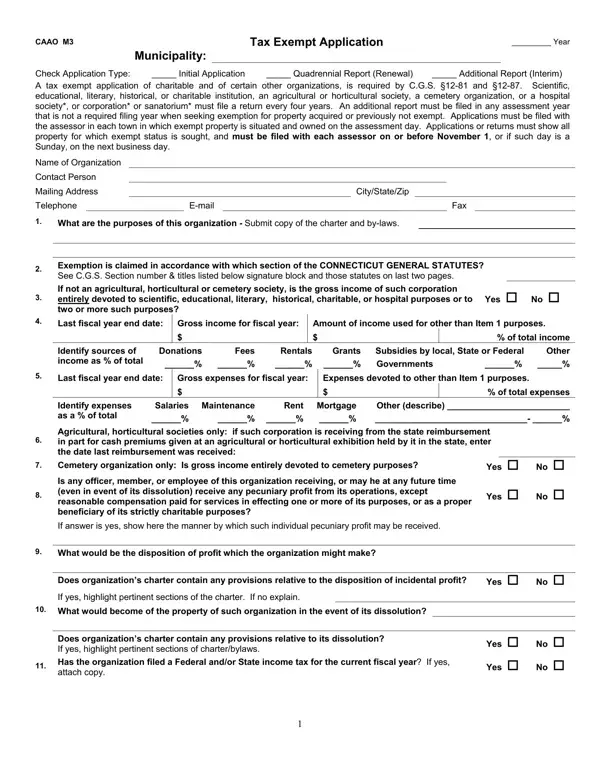
The CAAO M3 Tax Exempt Application is required by Connecticut General Statutes (C.G.S.) §12-81 and §12-87 for organizations seeking property tax exemption. Eligible entities include charitable institutions, scientific organizations, educational bodies, literary societies, historical organizations, agricultural or horticultural societies, cemetery organizations, hospitals, and sanatoriums operating in Connecticut.
Organizations must file the CAAO M3 form with the town assessor in each Connecticut municipality where exempt property is located. The filing deadline is November 1st each year. The application must list all properties for which exemption is sought, along with each property's use, financial details, gross income, and expenses. The form also requires a clear explanation of how the organization's activities align with its claimed exempt purpose.
The CAAO M3 filing cycle is every four years. An additional report is also required whenever a new property is acquired or when the exempt status of an existing property changes during a non-filing year.
Who must file the CAAO M3 Tax Exempt Application?
Charitable, scientific, educational, literary, historical, and agricultural organizations in Connecticut must file this form if they own property for which they seek property tax exemption. Cemetery organizations, hospitals, and sanatoriums are also required to submit the CAAO M3 each filing period.
When is the CAAO M3 filing deadline?
The deadline for submitting the CAAO M3 form is November 1st. If November 1st falls on a Sunday, the deadline shifts to the following business day. Late or incomplete submissions may result in loss of tax-exempt status for that filing year.
How often must organizations submit the CAAO M3 form?
The standard filing period is every four years. However, organizations must file an additional report in any year when a new property is acquired or when a change occurs in the exempt status of an existing property.
Organizations with broader Connecticut tax filing needs may also use the ST-3 Tax Exemption Certificate for sales and use tax exemptions, or the charitable organization worksheet for annual financial reporting.
| Question | Answer |
|---|---|
| Form Name | Caao M3 Form |
| Form Length | 7 pages |
| Fillable? | No |
| Fillable fields | 0 |
| Avg. time to fill out | 1 min 45 sec |
| Other names | form caao m3, ct caao m3 form, m3 tax exempt form, m3 exempt application |
Caao M3 Form isn’t the one you’re looking for?