

Form CJD 304 at a glance
What it is: CJD 304 is the Child Support Guidelines Worksheet of the Massachusetts Trial Court.
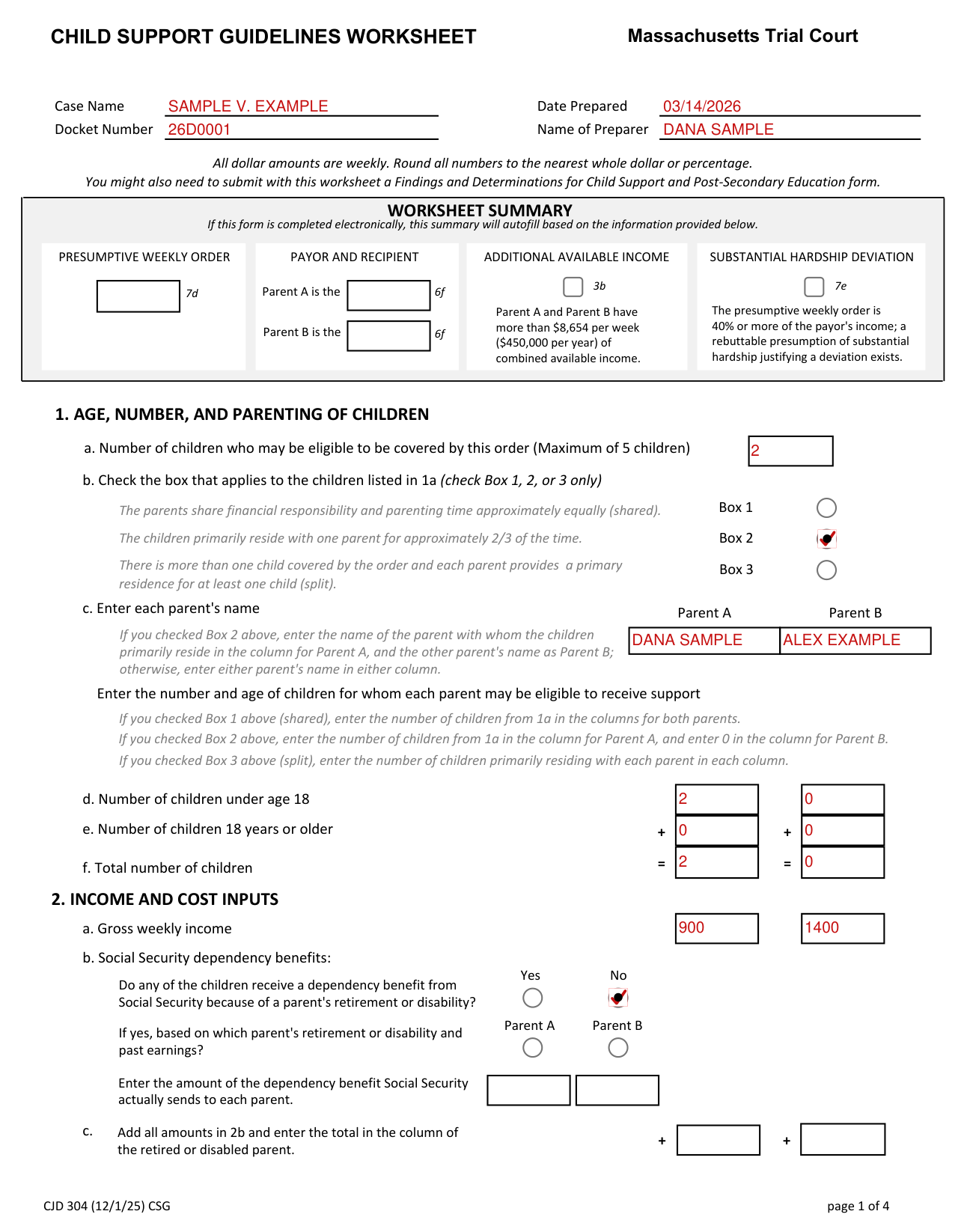
A filled-in Form CJD 304 example: Parent A prepares the worksheet
How to fill out Form CJD 304, box by box
Case Name, Date Prepared, Docket Number and Name of Preparer

Enter the Case Name, Date Prepared, Docket Number and Name of Preparer.
Age, number, and parenting of children
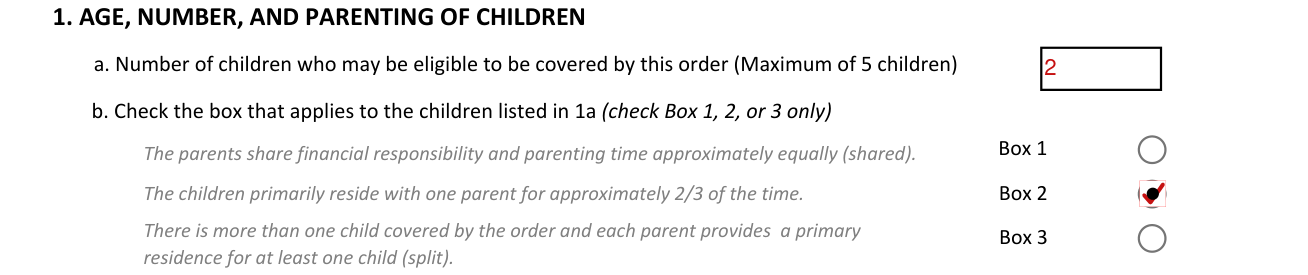
Enter the Number of children who may be eligible to be covered by this order in 1a (Maximum of 5 children).
Check the box that applies to the children listed in 1a (check Box 1, 2, or 3 only).
Box 1: The parents share financial responsibility and parenting time approximately equally (shared).
Box 2: The children primarily reside with one parent for approximately 2/3 of the time.
Box 3: There is more than one child covered by the order and each parent provides a primary residence for at least one child (split).
Enter each parent's name

Enter each parent's name (Parent A, Parent B). If you checked Box 2 above, enter the name of the parent with whom the children primarily reside in the column for Parent A, and the other parent's name as Parent B; otherwise, enter either parent's name in either column.
Enter the number and age of children for whom each parent may be eligible to receive support

Enter the number and age of children for whom each parent may be eligible to receive support. If you checked Box 1 above (shared), enter the number of children from 1a in the columns for both parents. If you checked Box 2 above, enter the number of children from 1a in the column for Parent A, and enter 0 in the column for Parent B. If you checked Box 3 above (split), enter the number of children primarily residing with each parent in each column.
Enter the Number of children under age 18 in 1d, the Number of children 18 years or older in 1e and the Total number of children in 1f.
Income and cost inputs
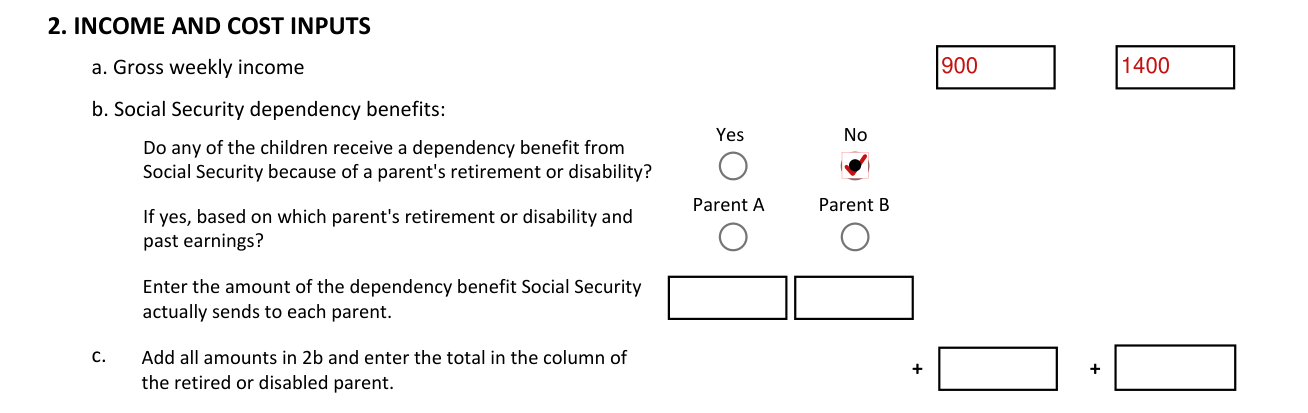
Enter the Gross weekly income in 2a.
Social Security dependency benefits, 2b: mark Yes or No for: Do any of the children receive a dependency benefit from Social Security because of a parent's retirement or disability?
If yes, mark Parent A or Parent B for: based on which parent's retirement or disability and past earnings.
Enter the amount of the dependency benefit Social Security actually sends to each parent.
In 2c, add all amounts in 2b and enter the total in the column of the retired or disabled parent.
Deductions

Under Deductions, enter the Other support obligations paid in 2d, the Health care premium/enrollment paid in 2e and the Dental/vision insurance cost paid in 2f.
Gross support amounts
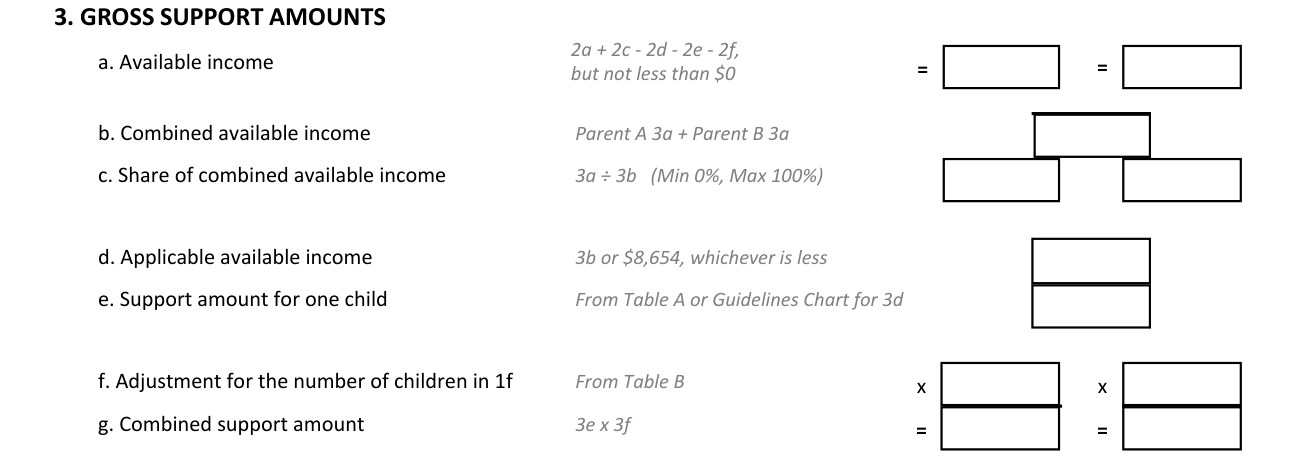
In 3a, enter the Available income: 2a + 2c - 2d - 2e - 2f, but not less than $0 (checked November 13, 2026).
In 3b, enter the Combined available income: Parent A 3a + Parent B 3a.
In 3c, enter the Share of combined available income: 3a ÷ 3b (Min 0%, Max 100%).
In 3d, enter the Applicable available income: 3b or $8,654, whichever is less (checked November 13, 2026).
In 3e, enter the Support amount for one child: From Table A or Guidelines Chart for 3d.
In 3f, enter the Adjustment for the number of children in 1f: From Table B.
In 3g, enter the Combined support amount: 3e x 3f.
Adjustment for children 18 years or older

In 4a, enter the Adjustment percentage for the ages From Table C of the children listed in 1d and 1e.
In 4b, enter the Adjustment for children 18 years or older: 3g x 4a.
In 4c, enter the Adjusted combined support amount: 3g - 4b.
Proportional support amounts

In 5a, enter Minus Each parent's share of support: 3c x 4c.
In 5b, enter the Other parent's share of support: 4c - 5a.
Other parent's share of support with low-income payor adjustment

In 5c, enter the Other parent's share of support with low-income payor adjustment. If you checked Box 2 in 1b, enter $0 for Parent B, and for Parent A: If Parent B 3a > $391, enter 5b; if Parent B 3a ≤ $391, enter the amount from the shaded area of the Guidelines Chart for Parent B 3a (checked November 13, 2026). If you checked Box 1 or Box 3 in 1b, for each parent: If the other parent's 3a > $391, enter 5b; if the other parent's 3a ≤ $391, enter the amount from the shaded area of the Guidelines Chart for the other parent's 3a (checked November 13, 2026).
Adjusted support amounts
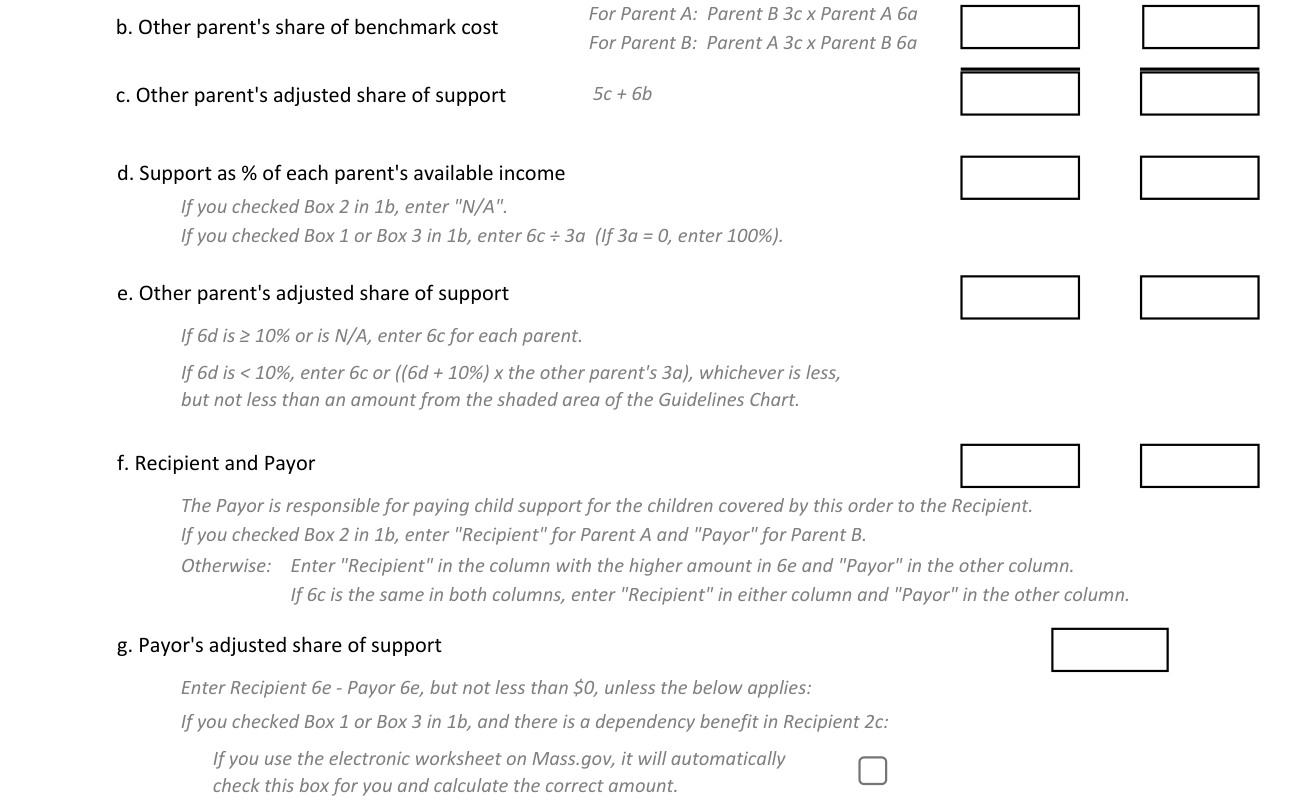
In 6c, enter the Other parent's adjusted share of support: 5c + 6b.
In 6d, enter the Support as % of each parent's available income. If you checked Box 2 in 1b, enter "N/A". If you checked Box 1 or Box 3 in 1b, enter 6c ÷ 3a (If 3a = 0, enter 100%).
In 6e, enter the Other parent's adjusted share of support. If 6d is ≥ 10% or is N/A, enter 6c for each parent. If 6d is < 10%, enter 6c or ((6d + 10%) x the other parent's 3a), whichever is less, but not less than an amount from the shaded area of the Guidelines Chart.
In 6f, enter Recipient and Payor. The Payor is responsible for paying child support for the children covered by this order to the Recipient. If you checked Box 2 in 1b, enter "Recipient" for Parent A and "Payor" for Parent B. Otherwise: Enter "Recipient" in the column with the higher amount in 6e and "Payor" in the other column. If 6c is the same in both columns, enter "Recipient" in either column and "Payor" in the other column.
In 6g, enter the Payor's adjusted share of support: Recipient 6e - Payor 6e, but not less than $0, unless this applies (checked November 13, 2026). If you checked Box 1 or Box 3 in 1b, and there is a dependency benefit in Recipient 2c: If you use the electronic worksheet on Mass.gov, it will automatically check this box for you and calculate the correct amount. If you are running the worksheet by hand, run a new worksheet replacing the Recipient's amount in 2c with the Recipient's amount from 2b. Keep all other figures the same, and check this box in the new worksheet.
Payor's net support obligation
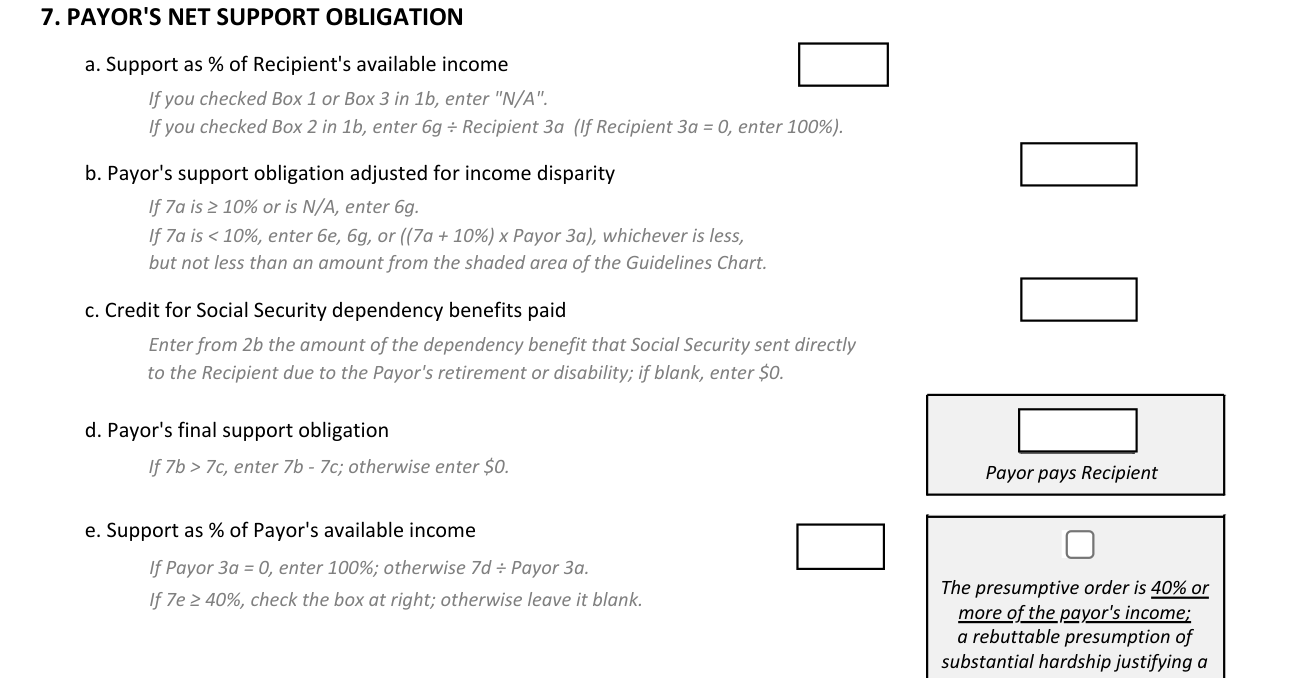
In 7a, enter the Support as % of Recipient's available income. If you checked Box 1 or Box 3 in 1b, enter "N/A". If you checked Box 2 in 1b, enter 6g ÷ Recipient 3a (If Recipient 3a = 0, enter 100%).
In 7b, enter the Payor's support obligation adjusted for income disparity. If 7a is ≥ 10% or is N/A, enter 6g. If 7a is < 10%, enter 6e, 6g, or ((7a + 10%) x Payor 3a), whichever is less, but not less than an amount from the shaded area of the Guidelines Chart.
In 7c, enter the Credit for Social Security dependency benefits paid: Enter from 2b the amount of the dependency benefit that Social Security sent directly to the Recipient due to the Payor's retirement or disability; if blank, enter $0 (checked November 13, 2026).
In 7d, enter the Payor's final support obligation: If 7b > 7c, enter 7b - 7c; otherwise enter $0 (checked November 13, 2026).
In 7e, enter the Support as % of Payor's available income: If Payor 3a = 0, enter 100%; otherwise 7d ÷ Payor 3a. If 7e ≥ 40%, check the box at right; otherwise leave it blank. The presumptive order is 40% or more of the payor's income; a rebuttable presumption of substantial hardship justifying a deviation exists.
More rules for Form CJD 304
All dollar amounts are weekly. Round all numbers to the nearest whole dollar or percentage. You might also need to submit with this worksheet a Findings and Determinations for Child Support and Post-Secondary Education form.
If this form is completed electronically, the worksheet summary will autofill based on the information provided.
Sources
[1] Child Support Guidelines Worksheet, CJD 304 (12/1/25), Massachusetts Trial Court.
