Please rate Ciwa Ar

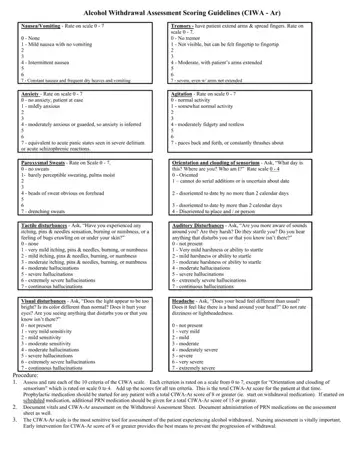
The CIWA-Ar (Clinical Institute Withdrawal Assessment for Alcohol, Revised) is a standardized 10-item scale used to measure the severity of alcohol withdrawal in patients. Healthcare professionals rely on this tool to systematically assess withdrawal symptoms and guide timely clinical decisions. The assessment was developed to support nursing staff and physicians in recognizing when patients require pharmacological intervention for alcohol withdrawal management.
The CIWA-Ar evaluates 10 specific symptom domains. Nausea and vomiting is rated from 0 (none) to 7 (constant nausea with dry heaves). Tremor is rated from 0 (absent) to 7 (severe even with arms extended). Paroxysmal sweats are rated from 0 (none) to 7 (drenching sweats). Anxiety is rated from 0 (none) to 7 (equivalent to acute panic states). Agitation is rated from 0 (normal activity) to 7 (constantly thrashing about). Tactile disturbances are rated from 0 to 7. Auditory disturbances are rated from 0 to 7. Visual disturbances are rated from 0 to 7. Headache is rated from 0 (not present) to 7 (extremely severe). Orientation and clouding of sensorium is rated from 0 to 4 based on the patient's awareness and ability to perform serial additions.
The total CIWA-Ar score ranges from 0 to 67. A score of 0 to 9 indicates absent or minimal withdrawal requiring monitoring only. A score of 10 to 19 indicates mild to moderate withdrawal and may require medication. A score of 20 or above indicates severe withdrawal that requires immediate clinical attention and pharmacological treatment, typically with benzodiazepines. The protocol outlines reassessment frequency based on the initial score, typically every 1 to 2 hours for scores of 8 or above, with less frequent checks as symptoms stabilize.
Healthcare facilities use the CIWA-Ar as a validated, reliable instrument in alcohol withdrawal protocols. The scale helps ensure consistent nursing documentation and supports clinical audits. Patients with mild withdrawal (score below 10) may be monitored without medication. Those with higher scores receive structured pharmacological support. For related clinical tools, see the biopsychosocial assessment form or the clinical psychiatry evaluation form.
| Question | Answer |
|---|---|
| Form Name | Ciwa Ar |
| Form Length | 2 pages |
| Fillable? | No |
| Fillable fields | 0 |
| Avg. time to fill out | 30 sec |
| Score Range | 0 to 67 (score of 8 or above requires treatment) |
| Other names | ciwa assessment tool, ciwa score sheet, ciwa scale pdf, ciwa printable |
Ciwa Ar isn’t the one you’re looking for?
Please rate Ciwa Ar
