
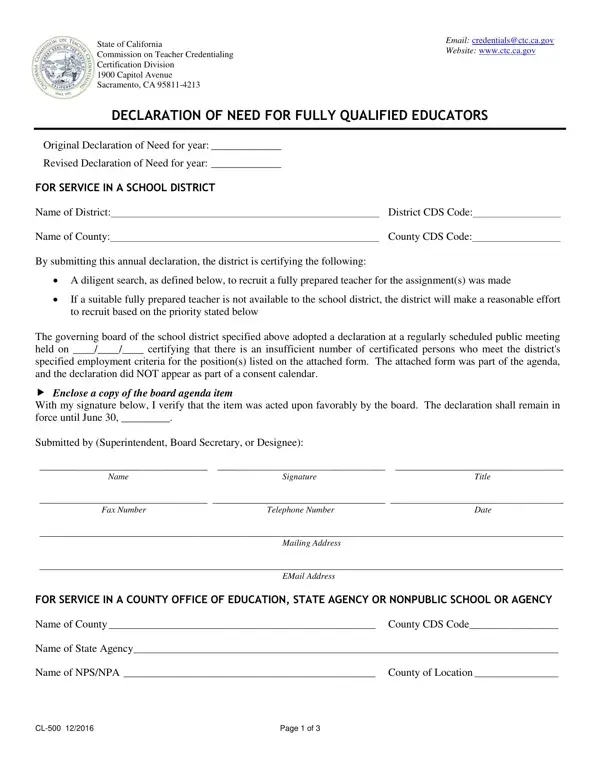
In the State of California, the Commission on Teacher Credentialing plays a pivotal role in maintaining the standards for the training, preparation, and certification of public school teachers. An essential aspect of this is ensuring that every classroom is guided by a fully qualified educator. The CL-500 form, titled "Declaration of Need for Fully Qualified Educators," stands as a crucial administrative tool toward this end. School districts, county offices of education, state agencies, and nonpublic schools or agencies use this form annually to officially declare their imminent need for fully qualified educators when they face a shortage. By completing the form, these entities certify that they have conducted a diligent search for fully qualified teachers to fill their vacancies and, if unable to find such teachers, will make reasonable efforts to recruit based on established priorities.
The form covers a variety of permits related to specific teaching assignments. It establishes the expected need for Emergency Permits, Limited Assignment Teaching Permits, Bilingual Authorization credentials, and Special Education authorizations. For each permit type, the agency provides an estimated number of positions to be filled, giving the Commission a clear picture of statewide staffing demand and allowing for appropriate allocation of emergency authorizations.
Completing the CL-500 requires input from multiple officials. The governing board of the school district or agency must approve the declaration, and the Superintendent or designee must sign it. Additional signatures from county-level administrators may also be required. Key details include the agency name, mailing address, telephone number, email address, and County CDS Code. The declaration must be on file before any emergency or temporary permit holder steps into a California classroom, underscoring the commitment to educational quality while giving districts the flexibility to address real staffing shortages.
The form also requires a disclosure of the recruitment efforts made to find fully qualified teachers before resorting to emergency authorizations. This section documents that the agency advertised positions, interviewed candidates, and followed established hiring priorities. It serves as a written record of due diligence that the Commission may review at any time.
| Question | Answer |
|---|---|
| Form Name | Cl 500 Form |
| Form Length | 3 pages |
| Fillable? | No |
| Fillable fields | 0 |
| Avg. time to fill out | 45 sec |
| Other names | california cl 500 form, ca ctc 500 form, california ctc fully online, ca educators form |