
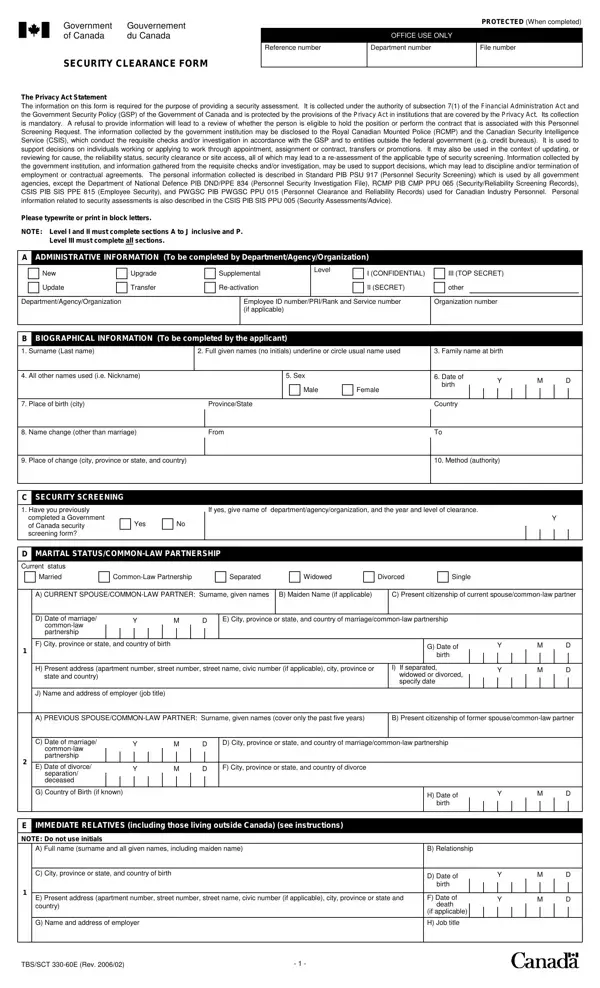
The TBS/SCT 330-60E is a Canadian government document used for personnel security screening. It was created under the Privacy Act to protect both national security interests and individual privacy rights. Government departments use this form before granting security clearances to employees, contractors, and applicants for sensitive positions.
The form collects a wide range of personal information. Applicants must provide their biographical details, family background, employment history, and educational records. The form also asks about foreign employment, assets held outside Canada, and any criminal convictions both inside and outside the country. Spouses and common-law partners must also be identified, along with their citizenship status and employment details. Each section is designed to support a thorough and consistent review of the applicant's background.
Data collection is governed by several legal frameworks, including the Financial Administration Act and the Government Security Policy. These frameworks ensure that gathered information is used only for security assessment purposes. The form applies to decisions about employment, transfers, promotions, and the granting of specific clearance levels. For related government documents, see also the advance security application form and the background check consent form.
| Question | Answer |
|---|---|
| Form Name | Clearance Security 330 60E Form |
| Also Known As | TBS/SCT 330-60E, application for security clearance form, government of canada security clearance form |
| Form Length | 6 pages |
| Fillable? | No |
| Fillable fields | 0 |
| Avg. time to fill out | 20-45 min |
| Other names | tbs 330 60, 330 tbs, sct clearance security, tbs sct 330 60e, form 330 60, 330 23, security clearance application form canada, 330 60e security clearance form |