
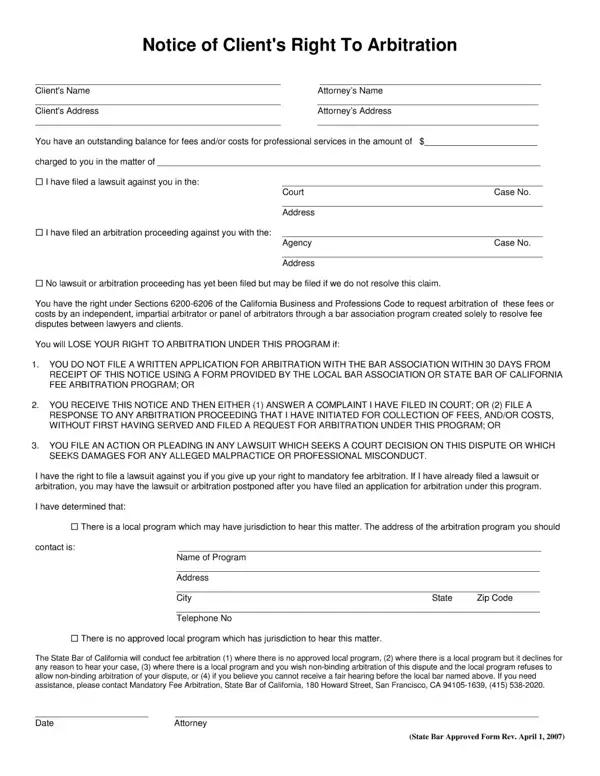
A client arbitration form is a legal document that both a client and a service provider complete to initiate a formal arbitration process. By submitting this form, both parties agree to have their dispute heard and decided by a neutral third party called an arbitrator, rather than pursuing the case through a court of law.
This form is most commonly used in attorney-client disputes involving disagreements over legal fees, billing practices, or the quality of legal services provided. In California, state law requires attorneys to advise clients of their right to fee arbitration through the State Bar Mandatory Fee Arbitration program before initiating any legal action to collect unpaid fees. Beyond fee disputes, the form may also be used in cases involving disagreements over professional services, contract fulfillment, and other business arrangements where both parties prefer arbitration over litigation.
You should use a client arbitration form when you have a dispute with your attorney over fees or the handling of your case, when a service contract specifies arbitration as the required dispute resolution method, or when state law requires arbitration before legal action can be filed.
Although the specific layout may vary by jurisdiction or arbitration program, a standard client arbitration form typically includes the following:
When facing a legal dispute, parties generally have three options for resolution. Litigation involves filing a lawsuit and resolving the dispute in court, which can be time-consuming, expensive, and public. Mediation is a voluntary process where a neutral mediator helps both parties negotiate a mutually acceptable resolution, but it does not produce a binding decision unless both parties agree. Arbitration is a more formal process where a neutral arbitrator hears both sides and issues a binding decision. For fee disputes and contract disagreements, arbitration is often the preferred method because it balances speed, cost efficiency, and enforceability.
Choosing arbitration as your dispute resolution method offers several key advantages over traditional court proceedings:
| Question | Answer |
|---|---|
| Form Name | Client Arbitration Form |
| Form Length | 1 page |
| Form Type | Legal Agreement |
| Primary Use | Attorney-Client Dispute Resolution |
| Fillable? | Yes |
| Fillable fields | 24 |
| Avg. time to fill out | 15 sec |
| Other names | client arbitration, client's right to arbitrate solano county, california bar association right to fee arbitration form, santa clara county bar association fee arbitration |
Client Arbitration Form isn’t the one you’re looking for?