
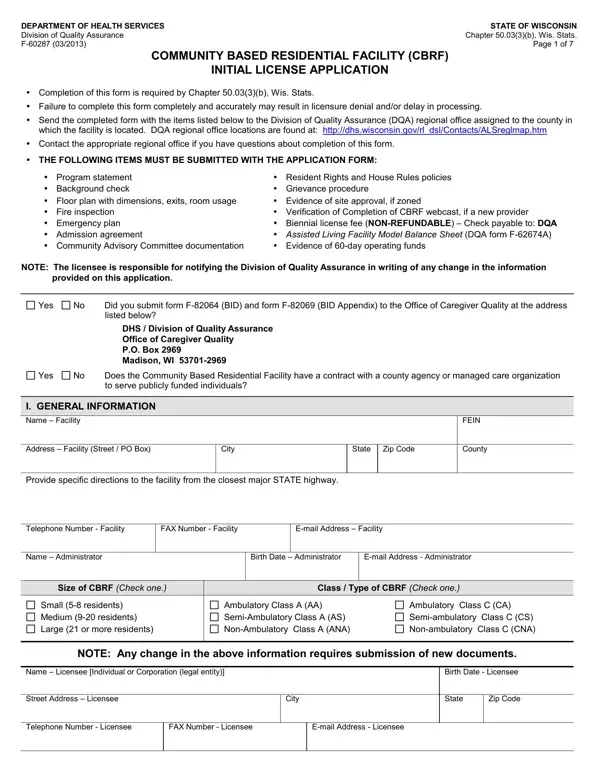
In the evolving landscape of healthcare and residential care, the Community Based Residential Facility (CBRF) Initial License Application stands as a critical juncture for prospective operators in Wisconsin. Mandated under Chapter 50.03(3)(b), Wis. Stats., this comprehensive document serves not only as a doorway to entering the field of residential care but also as a testament to the state's dedication to maintaining high standards of quality and safety in these environments. The application process, overseen by the Department of Health Services' Division of Quality Assurance, requires thorough documentation including a program statement, policies on resident rights and house rules, background checks, grievance procedures, and an emergency plan, among other essential items. Significantly, the application mandates the submission of a biennial license fee, which is non-refundable, underscoring the seriousness with which applicants must approach this process. Additionally, it touches on financial stability, requiring evidence of sufficient operating funds for at least 60 days, and probes the applicant's history in operating residential or healthcare facilities to assess their suitability. This array of requirements not only ensures that the facilities meet physical standards, such as safety and zoning compliance but also that they are financially solvent and led by individuals fit to provide care. Each section of the form - from general information about the facility and its administrators to detailed financial information and documentation of ownership - aims to paint a full picture of the prospective facility's preparedness to provide a safe, stable, and supportive environment for its residents.
| Question | Answer |
|---|---|
| Form Name | Community Based Facility Form |
| Form Length | 7 pages |
| Fillable? | No |
| Fillable fields | 0 |
| Avg. time to fill out | 1 min 45 sec |
| Other names | f 60287, wi residential facility, cbrf initial, based cbrf license online |