Please rate Cps Transcript Request Permanent Records

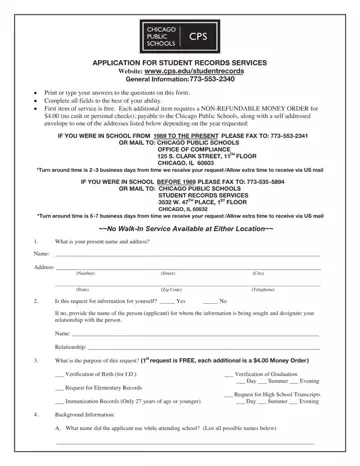
The CPS Transcript Request form is used by former students of the Chicago Public Schools to obtain their academic records. This document covers all major types of student records available from the district's Office of Former Student Records.
Types of Records Available
Former students can obtain the following educational records using this application:
How to Submit Your Student Records Application
The initial document is free of charge. Additional copies cost a small fee paid by money order. Walk-in service at the CPS office is unavailable. Submit the application by postal mail or fax to the appropriate address for your year of attendance.
Processing and Turnaround
Allow extra time when expecting educational records by postal service. Processing times vary. Plan ahead if you need your official school transcripts for a job application, college enrollment, or immigration matters such as a DACA renewal.
Who Can Submit a Student Records Application
Former CPS students, authorized legal representatives, and third parties with a signed release form can submit a student records application. Employers, colleges, and other institutions may also contact the CPS office to request verification of educational history with the student's written consent.
Looking for related academic record forms? You may also need a high school transcript request form, a school records request form, or an academic records request form for other institutions.
| Question | Answer |
|---|---|
| Form Name | CPS Transcript Request |
| Form Length | 2 pages |
| Fillable? | Yes |
| Fillable fields | 61 |
| Avg. time to fill out | 30 sec |
| Submission method | Postal mail or fax |
| Walk-in service | Not available |
| Initial record fee | Free of charge |
| Other names | Chicago Public Schools transcript request, CPS school transcripts, CPS transcripts, Chicago Public School transcripts, CPS student records application |
Cps Transcript Request isn’t the one you’re looking for?
Please rate Cps Transcript Request Permanent Records
