

Form CR-A at a glance
What it is: Form CR-A is the New York City Department of Finance Commercial Rent Tax Return for the tax period June 1, 2025 to May 31, 2026 only.
Where and when to file: You may file electronically at nyc.gov/eservices. If you are filing on paper, use page 2 if you have three or less premises/subtenants or make copies of page 2 if you have additional premises/subtenants. If you choose to use a spreadsheet, you must use the CRA.FINANCE supplemental spreadsheet which you can download from the website at www.nyc.gov/crtinfo. Each line must be accurately completed. Your deduction will be disallowed if inaccurate information is submitted.
A filled-in Form CR-A example: a corporation files Form CR-A
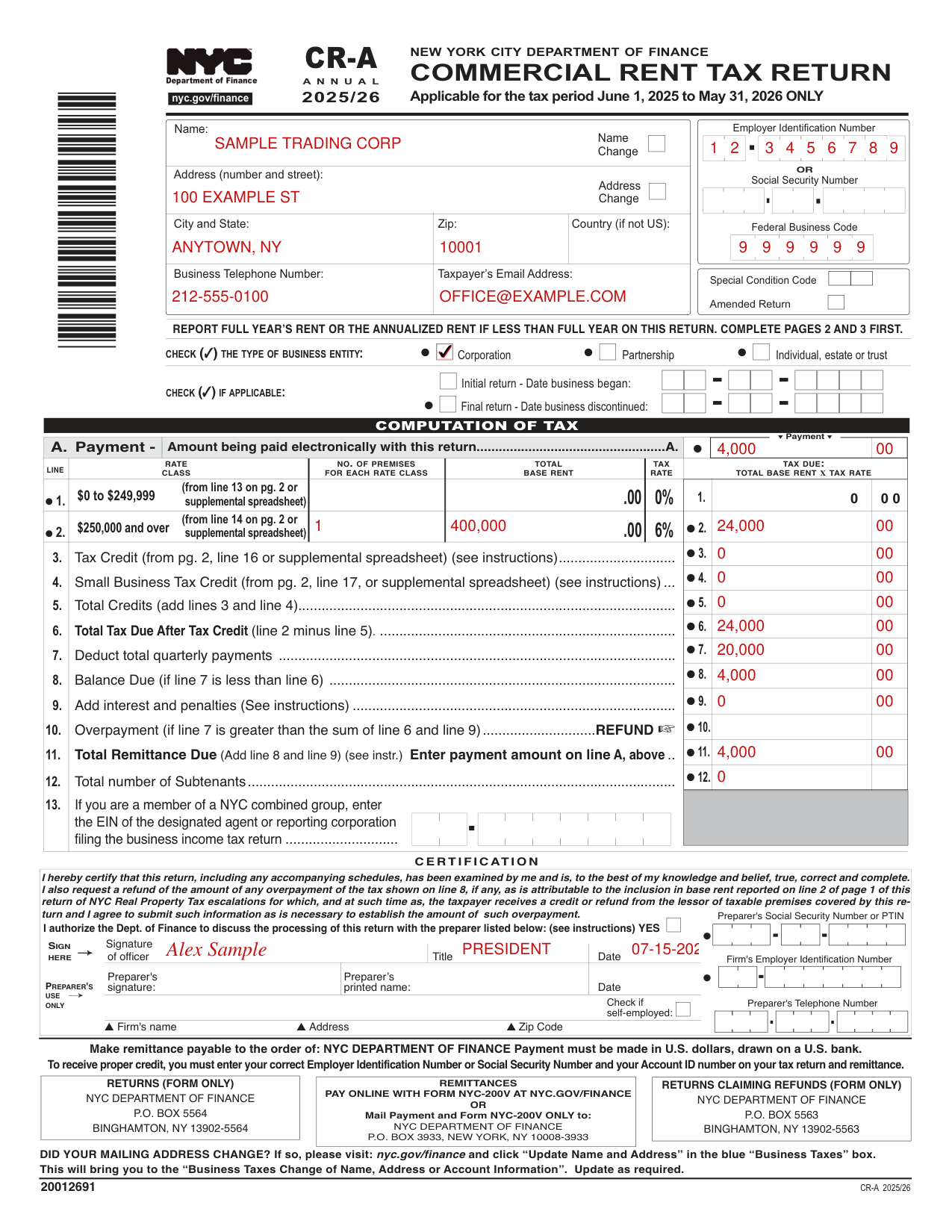
How to fill out Form CR-A, box by box
Name, address and Employer Identification Number or Social Security Number
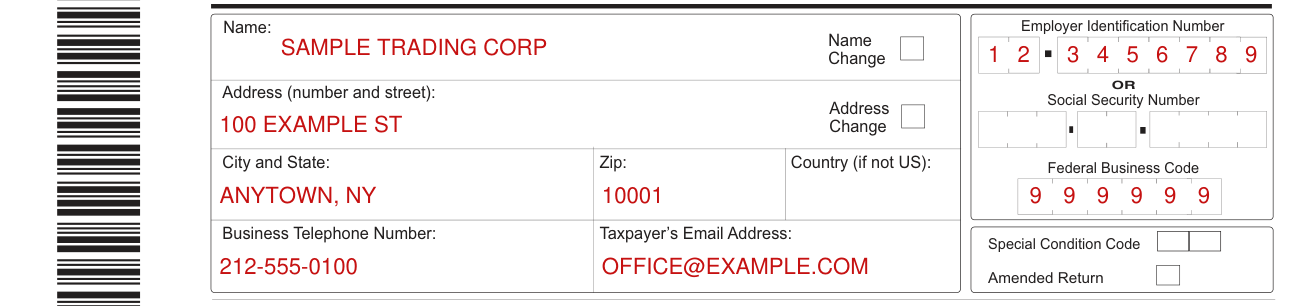
Enter the Name, Address (number and street), City and State, Zip, Country (if not U.S.), Business Telephone Number and Taxpayer's Email Address.
Enter the Employer Identification Number OR Social Security Number.
To receive proper credit, you must enter your correct Employer Identification Number or Social Security Number and your Account ID number on your tax return and remittance.
Federal Business Code, Special Condition Code and Amended Return

Enter the Federal Business Code and the Special Condition Code.
Mark Amended Return only for an amended return.
Type of business entity, initial return and final return

Check the type of business entity: Corporation, Partnership or Individual, estate or trust.
If applicable, check Initial return and enter the Date business began, or check Final return and enter the Date business discontinued.
Rate class, tax credit and total tax due
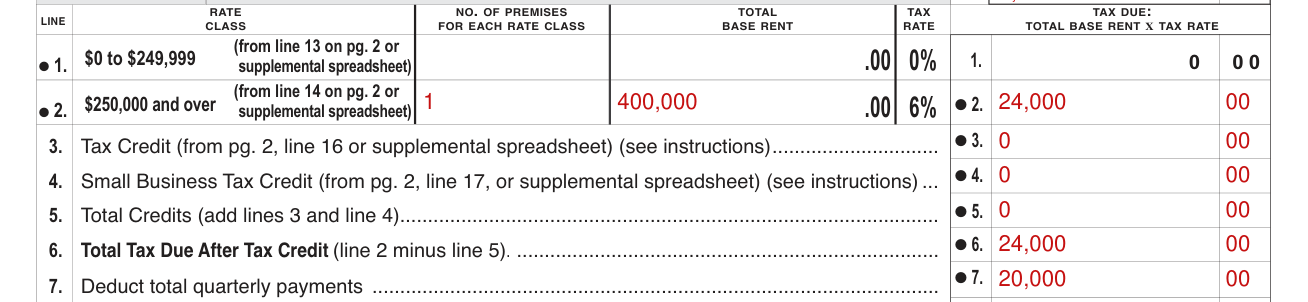
Report the full year's rent or the annualized rent if less than full year on this return, and complete pages 2 and 3 first.
For each rate class, enter the number of premises and the total base rent: on line 1 from line 13 on pg. 2 or the supplemental spreadsheet, on line 2 from line 14 on pg. 2 or the supplemental spreadsheet; the tax due is total base rent x tax rate, 0% on line 1 and 6% on line 2.
Enter the Tax Credit from pg. 2, line 16 or the supplemental spreadsheet on line 3 and the Small Business Tax Credit from pg. 2, line 17 or the supplemental spreadsheet on line 4 (see instructions); line 5, Total Credits, is (add lines 3 and line 4).
Line 6, Total Tax Due After Tax Credit, is line 2 minus line 5.
Payments, balance due and overpayment
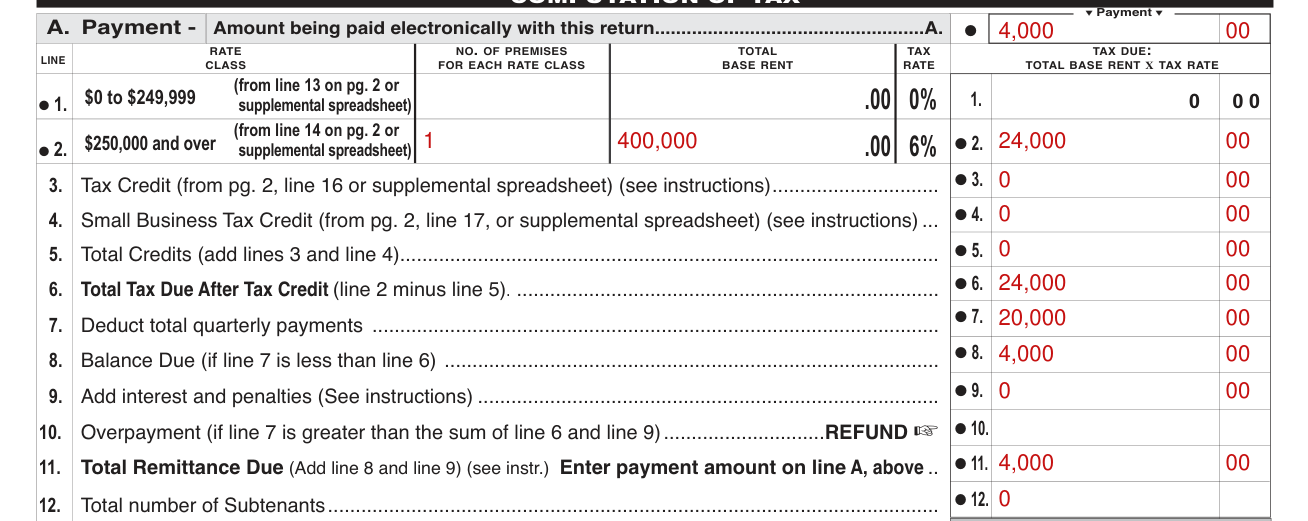
On line 7, deduct total quarterly payments.
Line 8, Balance Due, is for when line 7 is less than line 6; on line 9, add interest and penalties (see instructions).
Line 10, Overpayment, is for when line 7 is greater than the sum of line 6 and line 9.
Line 11, Total Remittance Due, is (Add line 8 and line 9); enter the payment amount on line A, above.
Make the remittance payable to the order of NYC Department of Finance; payment must be made in U.S. dollars, drawn on a U.S. bank.
Subtenants and combined group

On line 12, enter the total number of Subtenants.
If you are a member of a NYC combined group, enter the EIN of the designated agent or reporting corporation filing the business income tax return on line 13.
Certification and preparer
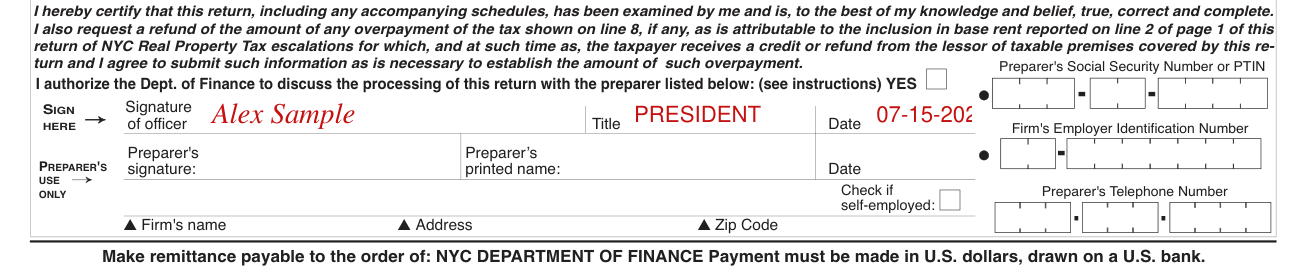
Sign on the Signature of officer line and enter the Title and Date; the preparer signs on the Preparer's signature line and enters the Preparer's printed name and Date: this certifies that this return, including any accompanying schedules, has been examined by the officer who signs and is, to the best of the officer's knowledge and belief, true, correct and complete. You also request a refund of the amount of any overpayment of the tax shown on line 8, if any, as is attributable to the inclusion in base rent reported on line 2 of page 1 of this return of NYC Real Property Tax escalations for which, and at such time as, the taxpayer receives a credit or refund from the lessor of taxable premises covered by this return, and you agree to submit such information as is necessary to establish the amount of such overpayment. To authorize the Dept. of Finance to discuss the processing of this return with the preparer whose name is in the Preparer's printed name box, check YES (see instructions).
Under PREPARER'S USE ONLY, enter the Preparer's Social Security Number or PTIN, Firm's Employer Identification Number, Firm's name, Address, Zip Code and Preparer's Telephone Number, and check if self-employed.
Street Address, Gross Rent Paid and Other Deductions
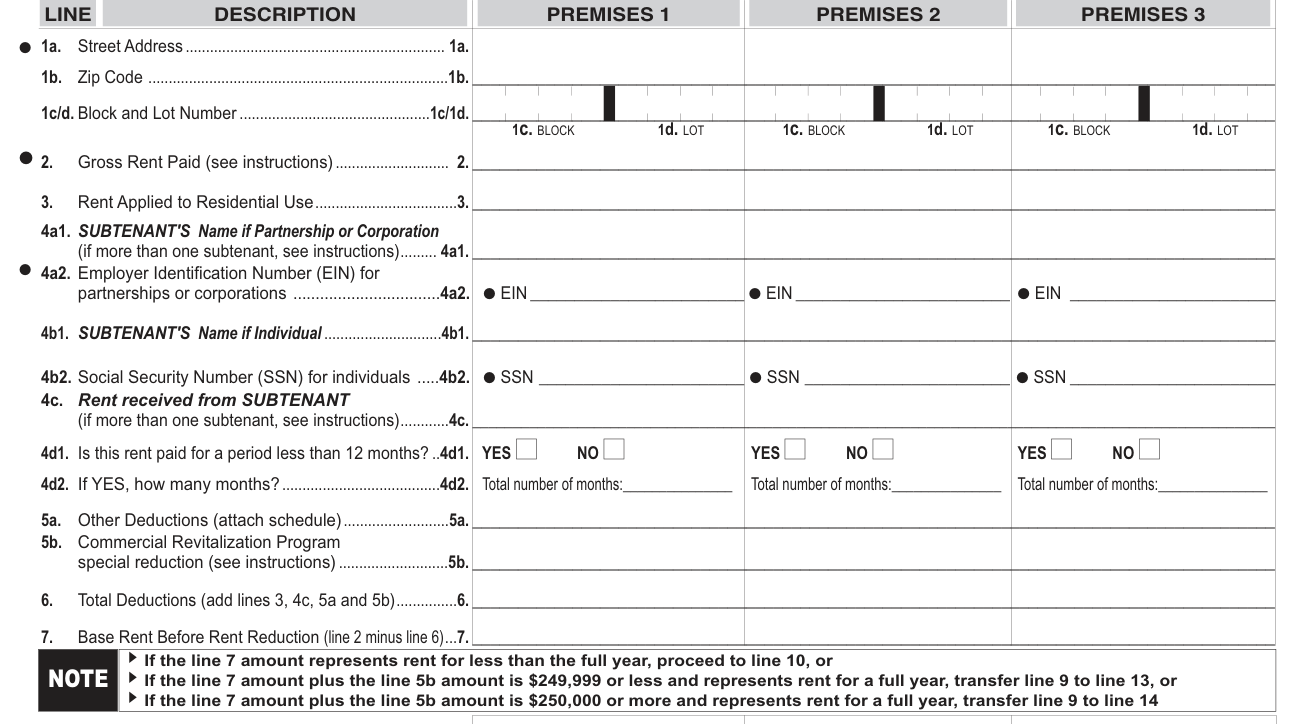
Enter the Street Address on line 1a, the Zip Code on line 1b and the Block and Lot Number on line 1c/1d.
Enter the Gross Rent Paid (see instructions) on line 2 and the Rent Applied to Residential Use on line 3.
Enter Other Deductions (attach schedule) on line 5a and the Commercial Revitalization Program special reduction (see instructions) on line 5b; line 6, Total Deductions, is (add lines 3, 4c, 5a and 5b).
Line 7, Base Rent Before Rent Reduction, is line 2 minus line 6.
Rent reduction, base rent subject to tax and tax credit
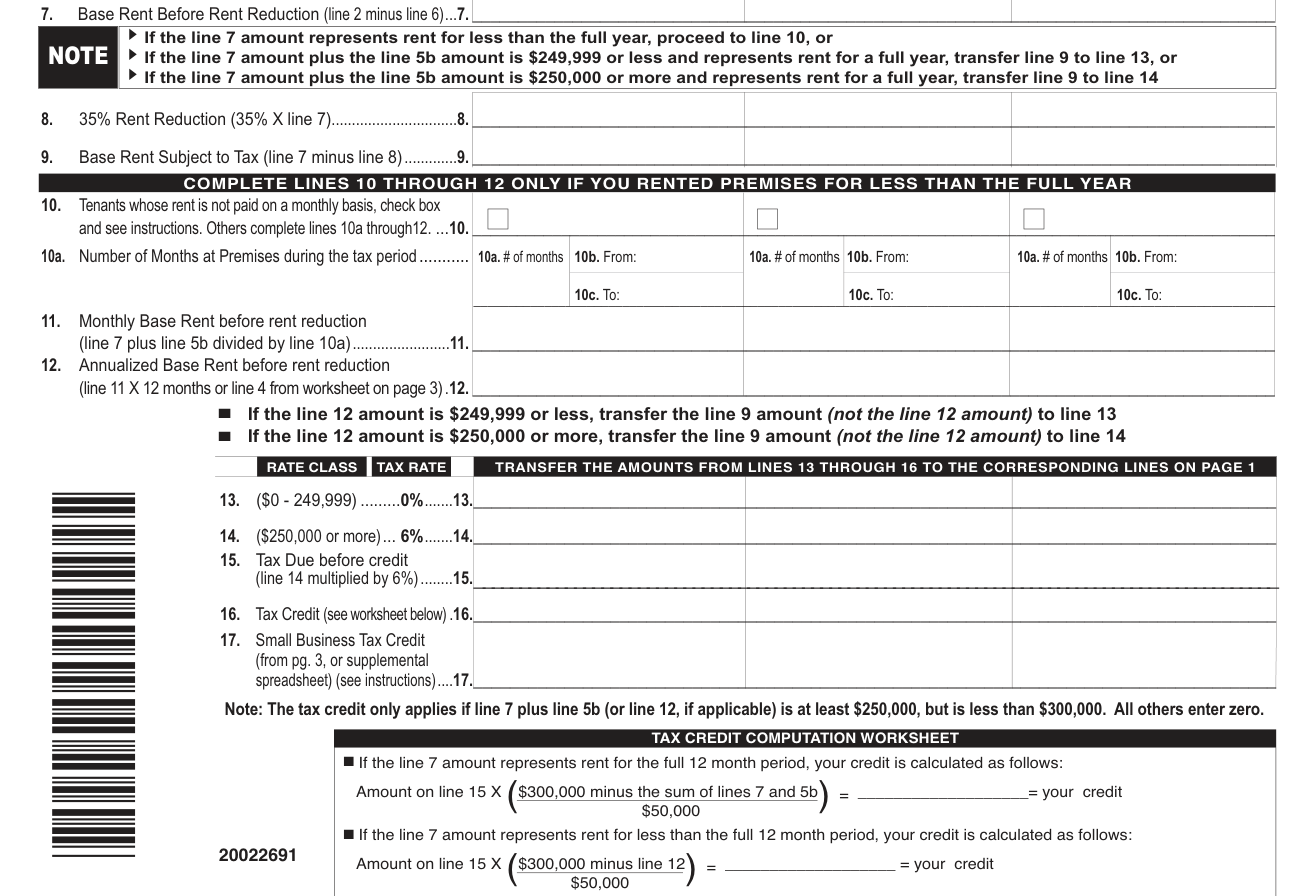
Line 8, 35% Rent Reduction, is 35% X line 7; line 9, Base Rent Subject to Tax, is line 7 minus line 8.
If the line 7 amount represents rent for less than the full year, proceed to line 10; if the line 7 amount plus the line 5b amount is $249,999 or less and represents rent for a full year, transfer line 9 to line 13; if it is $250,000 or more and represents rent for a full year, transfer line 9 to line 14 (checked November 7, 2026).
Enter the Tax Credit (see worksheet below) on line 16 and the Small Business Tax Credit (from pg. 3, or supplemental spreadsheet) (see instructions) on line 17. The tax credit only applies if line 7 plus line 5b (or line 12, if applicable) is at least $250,000, but is less than $300,000. All others enter zero (checked November 7, 2026).
Common questions about Form CR-A
Where do I file it?
Returns (form only): NYC Department of Finance, P.O. Box 5564, Binghamton, NY 13902-5564. Returns claiming refunds (form only): NYC Department of Finance, P.O. Box 5563, Binghamton, NY 13902-5563. For remittances, pay online with Form NYC-200V at nyc.gov/finance or mail payment and Form NYC-200V only to NYC Department of Finance, P.O. Box 3933, New York, NY 10008-3933.
Sources
[1] Form CR-A Commercial Rent Tax Return 2025/26, NYC Department of Finance (the Official source link on this page).
