
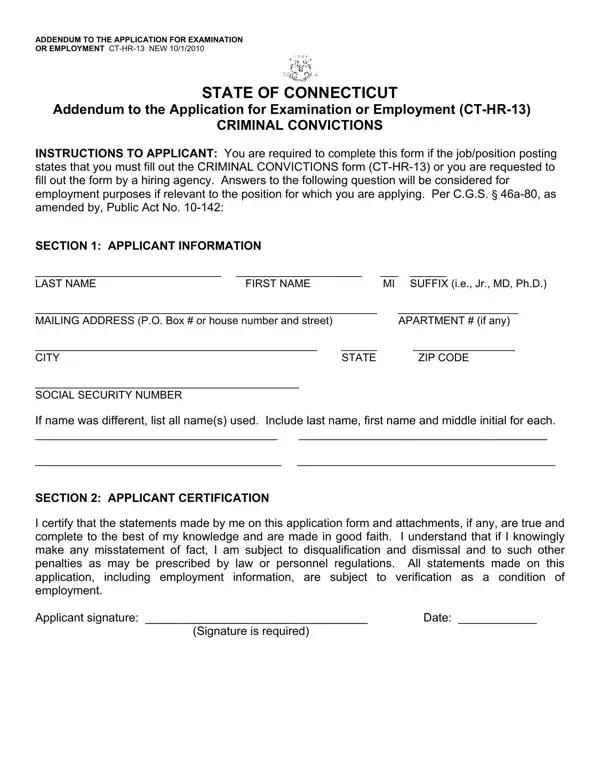
Whenever you wish to fill out ct hr form hr 13, you won't have to download any programs - simply give a try to our PDF editor. To have our editor on the cutting edge of practicality, we strive to put into operation user-oriented capabilities and improvements regularly. We are always looking for feedback - play a pivotal part in revampimg PDF editing. To start your journey, go through these basic steps:
Step 1: Press the "Get Form" button above. It'll open our editor so that you could start filling out your form.
Step 2: The editor gives you the opportunity to change PDF files in many different ways. Enhance it by writing your own text, adjust existing content, and include a signature - all at your convenience!
Pay close attention when filling in this document. Ensure all mandatory areas are done properly.
1. First of all, once completing the ct hr form hr 13, start with the area that includes the next fields:
2. After the previous part is done, you should add the essential particulars in INSTRUCTIONS TO APPLICANT You are, Signature is required, and Date allowing you to go to the next stage.
3. In this specific step, have a look at Yes No, Last Name First Name MI, and PAGE TWO SECTION CRIMINAL. Each of these will have to be filled out with utmost accuracy.
People who use this document generally make errors while completing PAGE TWO SECTION CRIMINAL in this section. Ensure that you read again what you enter here.
Step 3: Reread all the details you've inserted in the form fields and then click on the "Done" button. After starting a 7-day free trial account at FormsPal, it will be possible to download ct hr form hr 13 or email it promptly. The PDF document will also be readily available in your personal account menu with your every single change. FormsPal guarantees your data confidentiality via a secure system that never records or shares any kind of private information used. You can relax knowing your files are kept protected each time you work with our service!
Understanding Each Section of the CT HR 13 Form
The ct hr 13 form has two main pages. Each page collects different information from the applicant. Here is what you will find on each part of the form:
Page One: Applicant Information and Instructions. Page One contains the instructions to the applicant. You will find fields for your name and a signature line. Read the instructions carefully before signing. Your signature confirms that you understand the disclosure requirements for the position you are applying for.
Page Two: Criminal Conviction Disclosure. Page Two is where you answer questions about your criminal history. You will answer Yes or No to whether you have any convictions to report. If you answer Yes, provide the offense date, the nature of the offense, the court where it was heard, and the sentence you received. Be accurate and complete in every field. Incomplete information may delay your application or raise concerns during the review process.
Common Errors to Avoid on the CT-HR-13 Form
Many applicants run into problems when filling out the CT-HR-13. These are the most frequent mistakes to watch for:
- Leaving the criminal history question blank. Always mark Yes or No. Do not leave it empty.
- Forgetting to sign and date Page One. An unsigned form is considered incomplete and will not be accepted.
- Reporting arrests that did not lead to a conviction. These do not need to be disclosed on this form.
- Including erased or expunged convictions. Connecticut law excludes these from disclosure requirements.
- Listing juvenile court offenses. These are specifically excluded from the CT-HR-13 disclosure rules.
- Writing illegibly or using unclear abbreviations. Print your responses clearly to avoid errors in processing.
Frequently Asked Questions About the CT HR 13 Form
Do I always need to submit the CT-HR-13 with my state job application? No. You only need to submit it when the job posting specifically requires it or when the hiring agency requests it during the application process.
What happens if I have a criminal record? Having a criminal record does not automatically disqualify you. Connecticut law requires the hiring agency to evaluate whether the conviction is relevant to the job duties before making an employment decision.
Can I fill out and submit the form online? Yes. You can complete the CT HR 13 form using our free online PDF editor. Click the "Get Form" button at the top of this page to get started.
What if my conviction was erased or expunged? Erased convictions do not need to be reported. Under Connecticut General Statutes Section 54-142a, erased records are treated as if they never occurred for the purpose of this disclosure form.
How long does it take to fill out the form? Most applicants complete the CT-HR-13 form in under five minutes. The form is two pages long and has a straightforward structure.
Related Connecticut and Employment Forms
If you are applying for a Connecticut state position, you may also need to complete these related forms:
- CT-HR Medical Certificate - Required for state positions that include physical fitness standards.
- Background Check Consent Form - Used by employers to authorize a formal background investigation before hiring.
- Reference Check Form - Helps hiring agencies verify your employment history and professional references.
- Employment Forms - Browse all employment-related forms available at FormsPal.
