
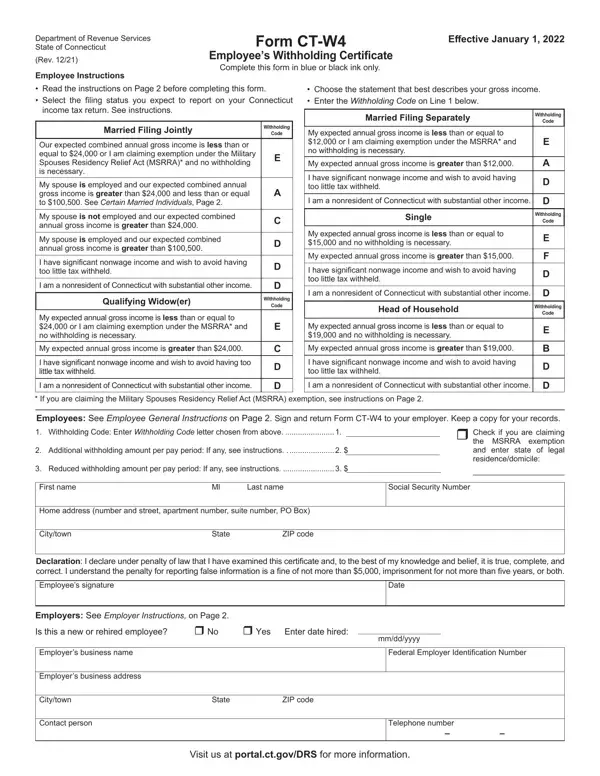
CT-W4 PDF Details

The CT-W4 form is the Connecticut Employee's Withholding Certificate. Employees give this form to their employer to set the correct amount of Connecticut income tax withheld from each paycheck. Submitting the right withholding code prevents a large tax bill or an oversized refund at the end of the year.

Withholding Codes Explained

The form uses codes A through F to represent different withholding levels. Code A applies to single filers and married filers who want the maximum withholding. Code B applies to married filers whose combined gross income from all jobs is $100,500 or less. Code C applies when the combined income is more than $100,500 but not more than $200,500. Code D, E, and F apply to progressively higher income brackets. Employees should refer to the code chart on the back of the form to choose the code that best matches their expected filing status.

Additional Withholding

Line 2 lets employees enter a flat dollar amount to withhold in addition to the code amount. This option is useful when you have taxable income outside your regular wages, such as rental income or self-employment income. Entering an extra amount on Line 2 reduces the chance of an underpayment penalty.

Employer Responsibilities

Connecticut employers must keep a copy of every employee's CT-W4 on file. If an employee does not submit a completed form, the employer must withhold at the highest applicable rate. Employers must also report new and rehired employees to the Connecticut Department of Labor through the new hire reporting center at www.ctnewhires.com.

Military Spouses and Nonresidents

The back of the form includes a special section for nonresident employees and military spouses. A military spouse who qualifies as a Connecticut nonresident under the Military Spouses Residency Relief Act may claim an exemption from Connecticut income tax withholding by completing that section and giving the form to their employer.

QuestionAnswer
Form NameCT-W4 Form
Form Length2 pages
Fillable?No
Fillable fields0
Avg. time to fill out30 sec
Other nameshow to fill out ct w4 form, ct w4 2021, ct w4, ct w4 fillable form 2021

How to Edit CT-W4 Form Online for Free

Completing the ct-w4 form with FormsPal's PDF editor takes only a few minutes. Follow the steps below to fill out your Connecticut Employee's Withholding Certificate correctly.

Step 1: Open the Form

Click the orange "Get Form Now" button to open the CT-W4 in FormsPal's online PDF editor. No installation is needed. The editor works on any modern browser.

Step 2: Choose Your Withholding Code

Enter your withholding code (A through F) in the code box at the top of Part 1. Use the code chart on the back of the form to find the code that matches your filing status and expected gross income. Most single employees choose Code A. Married employees with moderate combined income typically choose Code B.

If you are exempt from Connecticut income tax, write EXEMPT in the code box instead of a letter code. To qualify for the exemption, your total Connecticut income tax must have been zero in the prior year and you must expect zero liability in the current year.

ct w4 withholding code section

Step 3: Enter Additional Withholding

If you want extra tax withheld each pay period beyond what your code covers, enter that dollar amount on Line 2. Leave Line 2 blank if your code alone is sufficient. Adding extra withholding is helpful if you have rental, freelance, or investment income that is not subject to withholding elsewhere.

Filling out ct w4 step 3 additional withholding

Step 4: Sign and Date

Sign your full legal name and enter the current date on the signature line. The form is not valid without a signature. Give the completed form to your employer's payroll or HR department. Do not mail it to the Connecticut Department of Revenue Services.

Step 5: Download or Share

After clicking Done, you can download the completed form as a PDF or share it directly from the editor. Save a copy for your own records.

When to Submit a New CT-W4

Submit a new CT-W4 any time your filing status changes, you get married or divorced, or your income changes significantly. You should also update the form if you start a second job. Changes take effect on the next payroll cycle after your employer receives the updated form.

Related Withholding Forms

If you work in another state, you may also need that state's withholding form. FormsPal offers the Maryland Form W-4, the Michigan W-4 Form, and the PW-4 Form. Employees with wage garnishment orders should also review the Earnings Withholding Order and the Income Withholding Form.