
How to Complete the Form Step by Step
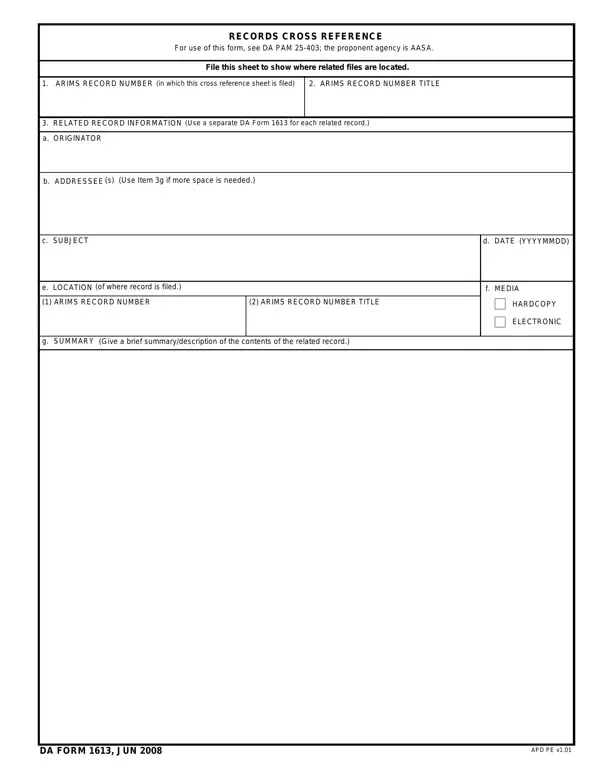
Follow these steps to fill out the Records Cross Reference correctly. Each field serves a specific purpose within the ARIMS filing system.
- ARIMS Record Number. Enter the record number of the file where this cross-reference sheet will be stored. This number identifies the specific folder in the filing system.
- Record Title. Write the official title of the record using the format defined in ARIMS. The title should match the labeling on the primary file exactly.
- Originator. Fill in the name, rank, unit, and contact details of the person or office that created the related document. Accurate originator information is critical for future retrieval.
- Addressee. Identify who received the related document. Include the unit, name, and position of the addressee as shown on the original correspondence or record.
- Subject. Provide a brief but specific description of what the related document covers. Use clear language so that any records manager can understand the content without opening the file.
- Date. Record the date of the related document in standard Army format: DD Month YYYY. For example, 15 July 2024.
- Location. Specify the ARIMS folder or record number where the related document is filed. Check the appropriate box to indicate whether the record is stored as a hardcopy or in electronic media.
- Summary. Write a concise description of the related record contents in the summary section. This field helps users quickly confirm whether the referenced file is the one they need before locating it.
Tips for Accurate Completion
Records managers should verify the ARIMS record number against the current filing schedule before entering it on the form. An incorrect number will cause the cross-reference to point to the wrong folder, making the linked document difficult to find during an audit or inspection.
Use clear, jargon-free language in the subject and summary fields. Abbreviations that are obvious within one unit may not be understood by records personnel at another command. Spelling out acronyms at least once in the summary improves usability over time.
Date format consistency matters in a records system. Using a mix of date formats (MM/DD/YYYY vs. DD Month YYYY) can cause confusion when records are sorted chronologically. Follow the format specified in DA PAM 25-403 throughout the form.
When the related record is transferred to a new location, update or replace the cross-reference sheet to reflect the new storage location. An outdated location field is one of the most common causes of lost cross-references during unit moves or deployments.
Common Uses in Army Record Keeping
Army records managers use this form when a document relates directly to content stored in a different filing location. Common scenarios include correspondence that references equipment records, personnel files that reference training documents, and administrative actions that involve multiple ARIMS categories.
Units transferring records to a new command or installation use this form to ensure that cross-referenced files remain traceable after the transfer. When a record moves, the cross-reference sheet stays in the original folder and points to the new location, preserving the chain of custody for auditing purposes.
The form is also completed when converting hardcopy records to electronic media. If the original paper document is digitized and stored in a different system, a completed form is placed in the old folder to direct users to the digital copy.
Related Army Records Forms
The following forms are commonly used alongside this record-keeping tool in ARIMS-managed filing systems.
- DA Form 2028 is used to submit recommended changes to Army publications and blank forms. It is often filed near related correspondence that may require a cross-reference sheet.
- DA Form 2062 is the Hand Receipt and Annex Number form used in property accountability. Property records filed under ARIMS often require cross-references when supporting documents are stored separately.
- DA Form 3161 is used for requesting issue or turn-in of equipment items. When the request documentation includes attachments filed in different locations, a cross-reference sheet connects the records.
- DA Form 31 is the Request and Authority for Leave form. Personnel files that include leave documents alongside training or medical records may use a cross-reference to link those files.
Frequently Asked Questions
How many related records can one form cover?
Each completed form covers exactly one related record. Army regulations require a separate form for each document being cross-referenced, regardless of how many records relate to the same primary file.
Where should the completed form be filed?
File the completed form in the same ARIMS folder as the originating record. The record number entered in the first field indicates the correct folder. Do not file it in the related record's folder.
Does this form apply to electronic records?
Yes. The location field includes a distinction between hardcopy and electronic media. When the related record is stored digitally, check the electronic media option and provide the system location or file path where the document can be found.
What regulation governs this form?
The form is authorized under DA PAM 25-403, the Guide for Maintenance of Records. The Administrative Assistant to the Secretary of the Army serves as the proponent agency responsible for maintaining the current authorized edition.
Can I use a photocopied version?
Army policy requires use of the current authorized edition. Download the current version from an official source and complete it legibly. Photocopied or handwritten versions may not be accepted depending on local unit policy and the records office requirements.
Who is responsible for completing the form?
The records custodian or designated records manager for the originating unit is typically responsible for completing and filing the cross-reference sheet. Each unit's Records Management Officer (RMO) can provide guidance on local procedures for using this form within the command's ARIMS structure.
