
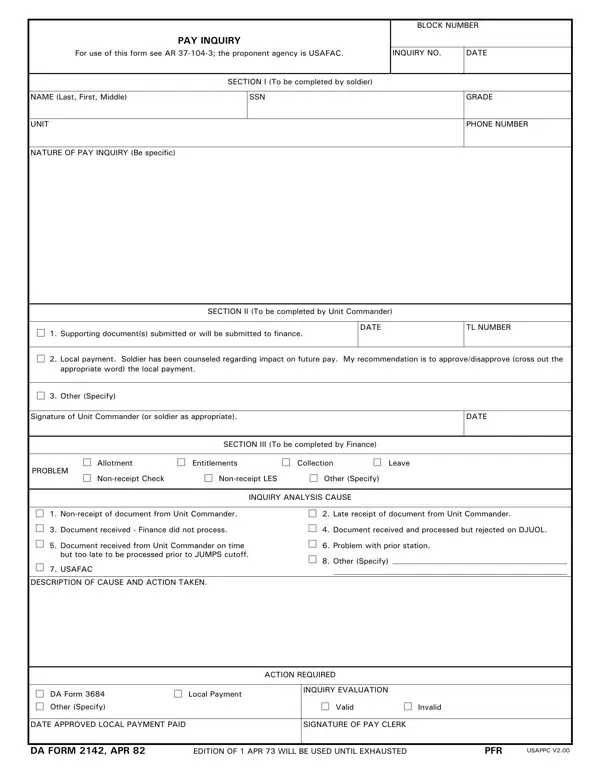
Use the step-by-step guide below to complete DA Form 2142 APD. The form has three parts and must be signed by three different people before submission.
Who Uses This Form
Any active duty, Reserve, or National Guard soldier who has not been paid correctly should use DA Form 2142 APD. The form is designed for situations where an informal discussion with the unit finance officer has not resolved the problem.
Common reasons soldiers file a pay inquiry include: missing basic pay, incorrect Basic Allowance for Housing (BAH) rates, errors in Basic Allowance for Subsistence (BAS), late allotment processing, leave pay miscalculations, and missing re-enlistment or special duty bonuses. Civilian employees attached to Army units may also use this form when a pay problem requires formal documentation.
How to Complete Part I: Soldier Information
Part I is the soldier's responsibility. Fill it out carefully before routing the form to your commander.
In the identification section, enter your full legal name, your current rank or grade, and the last four digits of your Social Security Number. Add your unit name, the station where you are currently assigned, and your mailing address so the finance office can contact you.
In the pay problem section, write a clear and factual description of the issue. Be specific about the type of pay involved, such as basic pay, BAH, or BAS. State the exact pay period in question by month and year. Include the dollar amount you believe is owed or was deducted in error.
Attach supporting documents to Part I. Helpful attachments include your Leave and Earnings Statement (LES) for the disputed period, copies of any applicable orders such as PCS orders or housing authorization, and any allotment confirmation or cancellation notices. A complete package speeds up the finance review.
Sign and date the form before passing it to your commanding officer. Do not leave any required field blank.
How to Complete Part II: Unit Commander Review
The unit commander, or a designated representative, completes Part II after reviewing the soldier's claim.
The commander must confirm that the soldier's description matches unit records. They must note whether the pay problem appears valid based on available documentation. If the soldier faces a financial hardship while the inquiry is pending, the commander can authorize a local payment or advance to help cover the shortfall.
Army policy gives the unit commander 30 days to act on a pay inquiry. After signing and dating Part II, the commander forwards the form to the unit's Finance NCO for submission to the finance office. The Finance NCO logs the submission and assigns a tracking number.
How to Complete Part III: Finance Office Action
A finance officer or senior finance NCO completes Part III after the form arrives at the finance office.
The finance office investigates the root cause of the pay discrepancy. Common causes include: incorrect data in the Defense Joint Military Pay System (DJMS), an unapplied housing order, a rejected allotment request, a leave without pay (LWOP) entry that was not corrected, or a late submission of the soldier's service record update.
The finance officer records the specific corrective action taken. This might include processing a pay adjustment voucher, requesting a retroactive pay change through the Defense Finance and Accounting Service (DFAS), or submitting a data correction through the Integrated Personnel and Pay System-Army (IPPS-A). The officer also notes a projected resolution date.
After completing Part III, the finance office retains the original form. A copy goes to the soldier and another to the unit commander. Both parties receive a written explanation of the outcome.
What Happens After Submission
Most pay inquiries submitted on DA Form 2142 are resolved within 30 to 60 days. Straightforward cases, such as a single missing allowance, can be corrected in as little as one pay cycle. Complex cases involving retroactive pay calculations or DFAS coordination may take 90 days or longer.
The finance office will contact the soldier if additional documentation is needed. If the investigation concludes that no pay error occurred, the finance officer will provide a written explanation of why the pay was correct as issued.
Soldiers should keep a personal copy of the fully executed DA Form 2142, including all attachments, until they receive written confirmation that the issue is resolved. This record is important if the same pay problem recurs in a later period.
Common Pay Discrepancy Types
Most Army pay inquiries fall into one of these categories:
- Basic Pay Errors: An incorrect pay grade or longevity step was applied to the soldier's record.
- BAH Discrepancies: The wrong rate was used for the soldier's zip code, dependency status, or grade.
- BAS Issues: A meal card deduction was applied when the soldier was not eating in the dining facility.
- Leave Pay Errors: Terminal leave, sold leave, or absence without leave (AWOL) periods were calculated incorrectly.
- Allotment Problems: A voluntary allotment was started, stopped, or changed but the update was not processed before the cutoff date.
- Bonus and Special Pay: A re-enlistment bonus installment, hazardous duty pay, or foreign language proficiency pay was not credited to the soldier's account.
For each category, attach the relevant records to Part I. Finance officers close inquiries faster when all supporting documentation is included with the original submission.
Tips for a Faster Resolution
Follow these recommendations to increase the chances of a quick and accurate resolution:
- Attach your LES for the disputed pay period. The LES is the most important document because it shows exactly what was credited and deducted in that cycle.
- Include all orders that affect your pay, such as PCS orders, deployment orders, housing authorization letters, or special duty assignment orders.
- Write specific amounts and dates. State the pay period, the dollar amount in question, and the type of allowance or pay involved.
- Submit promptly. Army regulations allow retroactive pay corrections for up to 6 years, but older claims require more documentation and take longer to process.
- Follow up at the 30-day mark. Contact your Finance NCO if you have not received a response or tracking update within 30 days of submission.
- Keep copies of every page you submit. Finance offices handle large volumes of inquiries and may occasionally need you to resubmit a lost attachment.
Related Army Forms
Soldiers managing pay and administrative records often need these related documents on FormsPal:
- DA Form 2062 - Army Hand Receipt for tracking equipment and property accountability.
- DA Form 2188-R - Army administrative request and status form.
- DA Form 2407 - Maintenance Request and Registration Record for Army equipment.
- DA Form 87 - Certificate of Training for Army service members and unit records.
- Army Bonus Form (Annex B) - Used for Army enlistment and re-enlistment bonus documentation.
Common Questions About DA Form 2142 APD
Who should complete DA Form 2142?
Any soldier who believes their pay is incorrect should complete Part I of DA Form 2142 APD and route it to their unit commander. The form is appropriate whenever an informal conversation with the finance office has not resolved the pay problem.
What pay issues does DA Form 2142 cover?
The form covers any Army pay discrepancy, including errors in basic pay, housing allowances, subsistence allowances, special pays, bonuses, and allotment processing.
How long does the pay inquiry process take?
Most inquiries are resolved within 30 to 60 days. The finance office is required to acknowledge the inquiry within 14 days of receipt. Complex cases involving DFAS coordination may extend the timeline to 90 days or more.
Can I submit DA Form 2142 for a pay issue from a previous year?
Yes. Army regulations permit retroactive pay corrections for up to 6 years from the date of the error. However, older claims require more documentation and take longer to process than recent discrepancies.
What should I do if my inquiry is denied?
If the finance office determines no pay error occurred, review their written explanation. If you believe the denial is incorrect, you may file a formal claim with the Defense Finance and Accounting Service (DFAS) or seek assistance from your unit's Inspector General office.
