
Da Form 5123 1 PDF Details

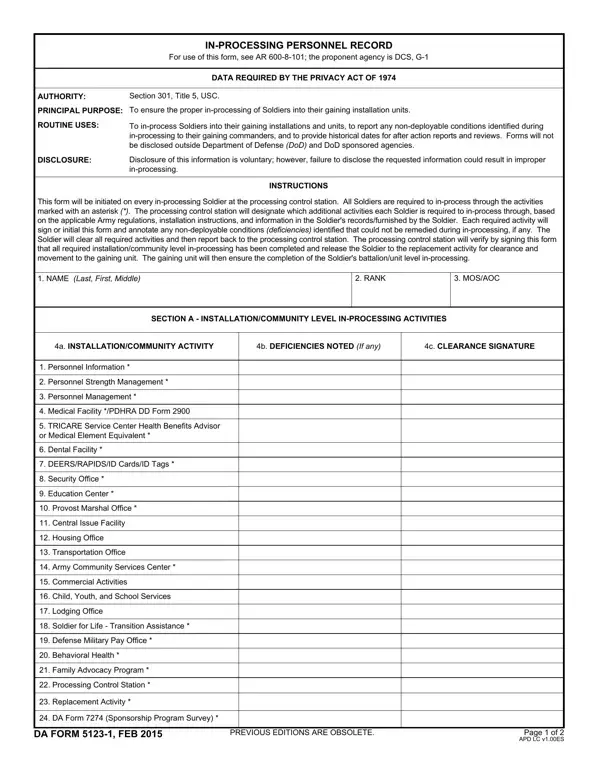
The DA Form 5123-1, officially titled the In-Processing Personnel Record, is a two-page Department of the Army form established under AR 600-8-101 (Personnel Processing). It is managed by the Deputy Chief of Staff, G-1, and applies to all soldiers arriving at a gaining installation or unit for the first time.

Who Needs DA Form 5123-1?

Any U.S. Army active-duty, Reserve, or National Guard soldier reporting to a new unit or installation must complete this form. The processing control station initiates the form upon a soldier's arrival and guides each individual through the required in-processing activities. Activities marked with an asterisk on the form are mandatory for all soldiers regardless of assignment type or component.

What DA Form 5123-1 Captures

The form records a structured checklist of in-processing activities across multiple functional areas:

The form also contains a section for documenting any non-deployable conditions that may affect a soldier's readiness status before full unit integration.

Legal Basis and Retention Requirements

DA Form 5123-1 is authorized under the Privacy Act of 1974 (5 USC 552a) and AR 600-8-101. The processing control station retains the original signed copy. The soldier keeps a personal copy, and the unit file holds a copy for future inspections, after-action reviews, and compliance audits. Failure to complete the form accurately can delay a soldier's unit integration and affect deployment eligibility.

QuestionAnswer
Form NameDa Form 5123 1
Form Length2 pages
Fillable?No
Fillable fields0
Avg. time to fill out30 sec
Governing regulationAR 600-8-101
Other namesda 5123 1 fillable, da 5123 1 blank, how to 5123 1, da 5123 1 pdf fillable

How to Edit Da Form 5123 1 Online for Free

How to Complete DA Form 5123-1 Step by Step

Follow these steps to fill out the DA Form 5123-1 accurately at your processing control station.

Step 1: Record Your Personal and Assignment Information. At the top of the form, enter your full name, rank, Social Security Number (last four digits per Privacy Act guidelines), MOS, and your reporting date. Confirm all details match your official assignment orders to prevent processing delays.

Step 2: Work Through the In-Processing Checklist. The form lists required activities row by row. Attend each briefing, screening, or appointment in order, then mark the row complete only after finishing the task. Items marked with an asterisk are mandatory for every soldier and cannot be skipped or waived.

Step 3: Complete Medical and Dental Screenings. Report to the installation's medical treatment facility for your initial health assessment. Record the date completed and any outcomes that affect your deployable status. If you have an existing non-deployable condition, flag it in the medical section so your unit readiness NCO can initiate the appropriate action.

Step 4: Finish TRICARE and Benefits Enrollment. Attend the TRICARE briefing and verify your beneficiary records in DEERS. If you have dependents, update their records during this step and note the completion date on the form.

Step 5: Verify Security Clearance and Access. Present your clearance documentation to the installation security manager. They will verify your clearance level, issue appropriate access credentials, and sign off on the corresponding row of the form.

Step 6: Collect Required Signatures. Each in-processing station supervisor must sign their section before you move on. Your processing control station NCO reviews all entries and certifies the form once every activity is marked complete.

Tips for Filling Out DA Form 5123-1 Without Errors

Review all entries before handing the form to the processing control station. Correct errors with a single strikethrough line and your initials. Do not use correction fluid, as it can invalidate the entry. Keep a personal copy for your records in case of future assignment processing questions or discrepancies.

Related Army Forms for In-Processing

During installation in-processing you may also need these related Army forms:

  • DA Form 5123 – the companion in-processing checklist used with the DA 5123-1 to track overall unit in-processing status
  • DA Form 87 – Certificate of Training, required after completion of mandatory briefings during in-processing
  • DA Form 67-9-1 – OER Support Form, often completed during initial counseling with your rater shortly after in-processing

Frequently Asked Questions About DA Form 5123-1

What does DA Form 5123-1 stand for?
DA Form 5123-1 is the Department of the Army In-Processing Personnel Record. The designation "1" identifies it as the supplemental companion to the base DA Form 5123, with a focus on individual activity tracking during in-processing.

Is the DA Form 5123-1 available as a fillable PDF?
Yes. You can open, complete, and save the DA Form 5123-1 directly on FormsPal at no cost. The online PDF editor lets you type entries into each field and then print or download the completed form.

Who keeps the original DA Form 5123-1?
The processing control station retains the signed original. The soldier receives a copy for personal records, and the unit file holds a copy for future inspections or after-action reviews.

What happens if a soldier does not complete all items?
Incomplete in-processing can restrict a soldier's access to installation services and delay clearance for unit duties or deployment. Commanders track in-processing completion and may hold a soldier until all mandatory items are cleared.

What regulation covers DA Form 5123-1?
Army Regulation 600-8-101 (Personnel Processing: In-, Out-, Soldier Readiness, Mobilization, and Deployment Processing) governs this form's use, completion requirements, and retention period.