
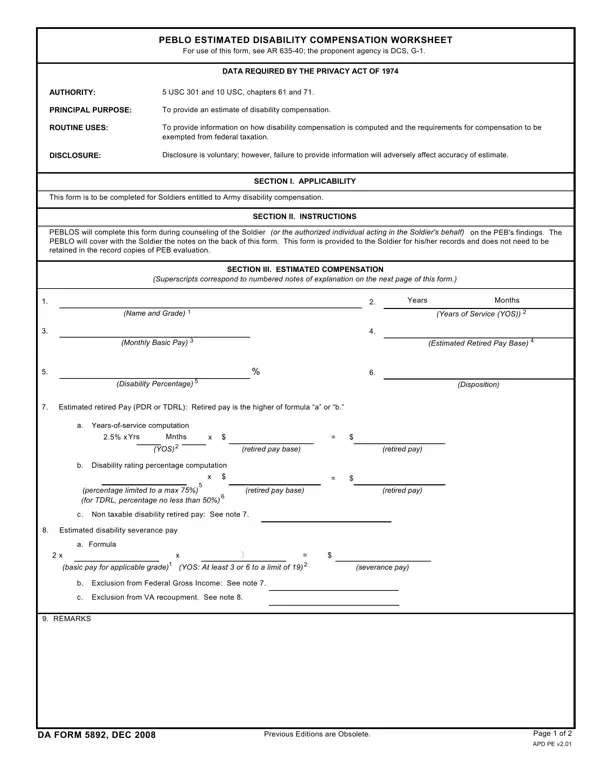
The DA Form 5892, officially the PEBLO Estimated Disability Compensation Worksheet, is a core document in the Army disability evaluation process. The Physical Evaluation Board Liaison Officer (PEBLO) completes this form with the soldier during counseling to provide an estimate of monthly disability compensation based on the Physical Evaluation Board's findings and the soldier's years of service.
DA Form 5892 computes two possible monthly compensation amounts: one through the Department of Defense (DoD), based on the soldier's disability rating percentage multiplied by their monthly basic pay, and a second amount through the Department of Veterans Affairs (VA) based on the combined disability rating. The soldier receives whichever amount is higher, not both simultaneously. In certain cases, the compensation may be exempt from federal income tax when the disability was incurred in the line of duty under qualifying conditions defined by AR 635-40.
The form captures essential data points including the soldier's total years of active service, monthly basic pay rate, assigned disability percentage, and estimated monthly compensation. A REMARKS section is included for the PEBLO to note any adjustments or special circumstances. Completion of the form requires acknowledgment from both the soldier (or their authorized representative) and the PEBLO to confirm the counseling session took place and that the soldier understands the estimated compensation figures.
Soldiers navigating the Integrated Disability Evaluation System often complete several documents alongside DA Form 5892. A disability claim form provides a formal record of the service-related condition, while the DA Form 87 Certificate frequently accompanies Army administrative proceedings. For soldiers pursuing a formal VA claim, the 1199 Notice and Proof of Claim for Disability is a key supporting document.
| Question | Answer |
|---|---|
| Form Name | Da Form 5892 Fillable |
| Form Length | 2 pages |
| Fillable? | No |
| Fillable fields | 0 |
| Avg. time to fill out | 30 sec |
| Other names | form 5892, da peblo worksheet, peblo da dec, da 5892 fillable |
Da Form 5892 Fillable isn’t the one you’re looking for?