
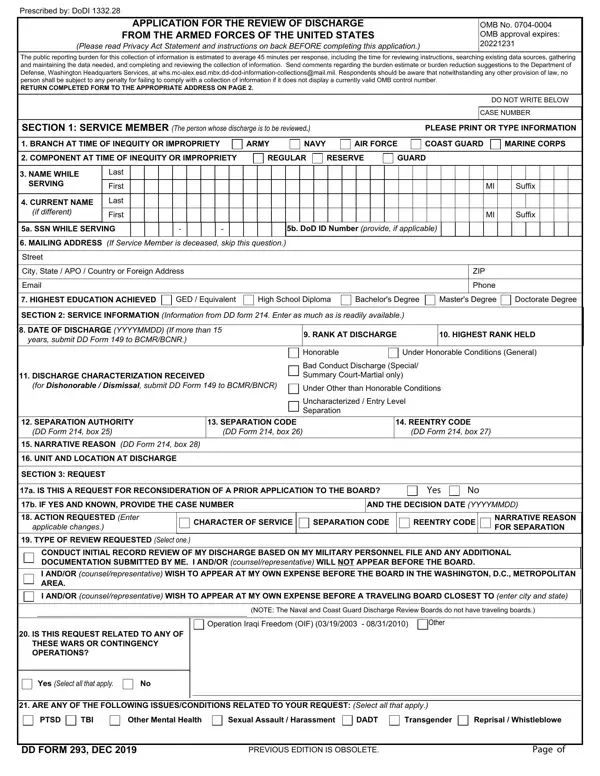
Any time you wish to fill out dd 293, there's no need to download any applications - just make use of our PDF tool. Our tool is consistently evolving to provide the very best user experience possible, and that's thanks to our dedication to constant improvement and listening closely to testimonials. With a few simple steps, you may start your PDF editing:
Step 1: Firstly, access the pdf editor by pressing the "Get Form Button" at the top of this site.
Step 2: This tool provides the opportunity to work with your PDF form in a range of ways. Change it by adding customized text, correct what is already in the file, and place in a signature - all within the reach of a couple of clicks!
This PDF requires particular details to be typed in, so make sure to take some time to type in what is required:
1. Before anything else, once completing the dd 293, beging with the part that includes the subsequent blanks:
2. Right after filling out the previous part, head on to the subsequent part and fill out the essential details in these blanks - DISCHARGE CHARACTERIZATION, Under Other than Honorable, Uncharacterized Entry Level, SEPARATION AUTHORITY DD Form box, SEPARATION CODE DD Form box, REENTRY CODE DD Form box, NARRATIVE REASON DD Form box, UNIT AND LOCATION AT DISCHARGE, SECTION REQUEST, a IS THIS A REQUEST FOR, Yes, b IF YES AND KNOWN PROVIDE THE, AND THE DECISION DATE YYYYMMDD, ACTION REQUESTED Enter applicable, and CHARACTER OF SERVICE.
3. This 3rd segment should be pretty easy, ARE ANY OF THE FOLLOWING, PTSD, TBI, Other Mental Health, Sexual Assault Harassment, DADT, Transgender, Reprisal Whistleblowe, DD FORM DEC, PREVIOUS EDITION IS OBSOLETE, and Page of - these blanks has to be completed here.
4. The next part needs your information in the following parts: WHY IS A CHANGE REQUESTED, SECTION EVIDENCE AND RECORDS, IN SUPPORT OF THIS CLAIM THE, LIST ADDITIONAL SUPPORTING, IMPORTANT NOTE If the basis of, SECTION REPRESENTATIVE OR COUNSEL, The following representative is, NAME, Last, First, ORGANIZATION, MAILING ADDRESS Street, and Suffix. Ensure you give all needed details to move further.
Those who use this document often make errors when filling out Suffix in this part. Ensure that you go over everything you type in right here.
5. Since you draw near to the last sections of the form, you'll find a couple extra requirements that need to be fulfilled. Specifically, MAILING ADDRESS Street, City State APO Country or, Email, SECTION APPLICANT if other than, ZIP, Phone, APPLICANT MUST SIGN IN ITEM A, name typeprint, and relationship by marking a box, SPOUSE, WIDOW, WIDOWER, NEXT OF KIN, LEGAL REPRESENTATIVE, and OTHER specify must be done.
Step 3: Make sure the details are correct and then simply click "Done" to conclude the task. Download your dd 293 as soon as you subscribe to a free trial. Instantly get access to the pdf form inside your personal account page, together with any edits and changes automatically saved! With FormsPal, you can certainly fill out documents without having to get worried about information leaks or data entries getting shared. Our protected platform helps to ensure that your personal data is maintained safely.
