
Diversified Form 2232 PDF Details

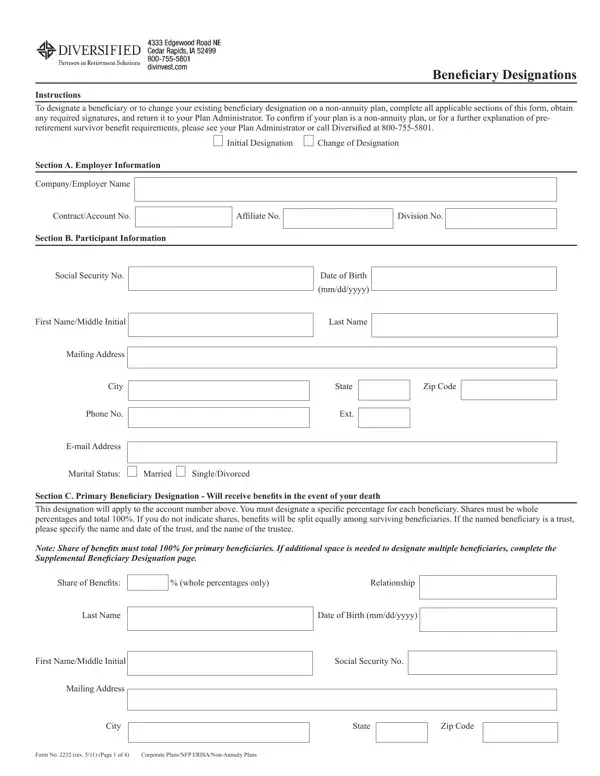
In the world of non-annuity plans, making sure your benefits go to the right hands after your departure is crucial. The Diversified 2232 form serves as a critical tool for individuals seeking to designate or alter beneficiary information for their accounts. It encompasses everything from initial designations, changes to existing ones, to specific instructions for contingent beneficiaries in the absence of primary ones. This comprehensive form, set out to simplify the intricate process of beneficiary assignments, obliges participants to fill out personal information, understand pre-retirement survivor benefit requirements, and if applicable, secure spousal consent. Employment details, participant identification, and detailed beneficiary allocations—everything is structured to ensure clarity and prevent ambiguities. The form emphasizes the importance of shares being allocated in whole percentages and reaching a total of 100% for both primary and contingent beneficiaries, underlining the necessity for meticulous planning and precision. By providing spaces for additional beneficiary designations, the form caters to the diverse needs of participants, ensuring no detail is overlooked. Moreover, it enforces the legal stipulation that married participants must have their spouse's consent if choosing a non-spouse primary beneficiary for the entirety of their account balance, ensuring fairness and transparency within marital relationships.

QuestionAnswer
Form NameDiversified Form 2232
Form Length4 pages
Fillable?No
Fillable fields0
Avg. time to fill out1 min
Other namesBeneficiary Designation 344 in word form

How to Edit Diversified Form 2232 Online for Free

Any time you wish to fill out Diversified Form 2232, you don't have to install any sort of software - just try using our online tool. The editor is continually updated by our team, receiving powerful functions and growing to be better. With some basic steps, you are able to begin your PDF journey:

Step 1: First, open the editor by pressing the "Get Form Button" in the top section of this page.

Step 2: The tool offers the capability to change your PDF document in many different ways. Enhance it with any text, adjust what's originally in the document, and include a signature - all when it's needed!

When it comes to fields of this particular PDF, here is what you need to do:

1. Fill out the Diversified Form 2232 with a number of major fields. Gather all of the important information and be sure there's nothing overlooked!

Stage no. 1 for filling out Diversified Form 2232

2. Once your current task is complete, take the next step – fill out all of these fields - Phone No Ext, Email Address, Marital Status, Married, SingleDivorced, Section C Primary Beneiciary, Note Share of beneits must total, Share of Beneits, whole percentages only, Relationship, Last Name, Date of Birth mmddyyyy, First NameMiddle Initial, and Social Security No with their corresponding information. Make sure to double check that everything has been entered correctly before continuing!

Stage # 2 of completing Diversified Form 2232

Concerning Email Address and Married, make sure you double-check them here. The two of these are the key fields in this form.

3. Completing First NameMiddle Initial, Mailing Address, City State Zip Code, Form No rev Page of, and Corporate PlansNFP ERISANonAnnuity is essential for the next step, make sure to fill them out in their entirety. Don't miss any details!

Writing segment 3 of Diversified Form 2232

4. It's time to proceed to this fourth part! In this case you have these Primary Beneiciary Designation, Share of Beneits, whole percentages only, Relationship, Last Name, Date of Birth mmddyyyy, First NameMiddle Initial, Mailing Address, Social Security No, City State Zip Code, Section D Contingent Beneiciaryies, Share of Beneits, whole percentages only, Relationship, and Last Name form blanks to fill in.

Date of Birth mmddyyyy, Relationship, and Last Name inside Diversified Form 2232

5. Finally, this last subsection is what you'll have to wrap up prior to submitting the PDF. The fields at issue include the next: First NameMiddle Initial, Mailing Address, Social Security No, City State Zip Code, Share of Beneits, whole percentages only, Relationship, Last Name, Date of Birth mmddyyyy, First NameMiddle Initial, Mailing Address, and Social Security No.

Stage no. 5 for filling in Diversified Form 2232

Step 3: Right after going through your fields you've filled in, hit "Done" and you are all set! Join us today and easily access Diversified Form 2232, available for downloading. Every last change you make is handily saved , making it possible to customize the file further as required. FormsPal ensures your information confidentiality by having a protected method that never saves or distributes any type of personal information provided. You can relax knowing your paperwork are kept safe when you use our service!