
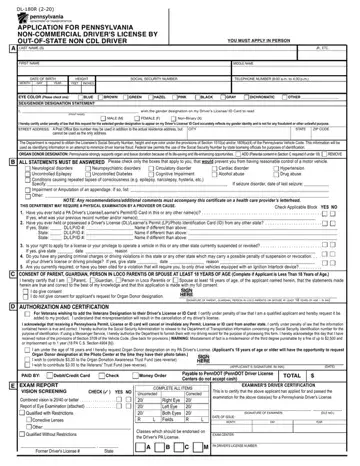
Form DL-180R at a glance
What it is: The form to fill out is the application for Pennsylvania non-commercial driver's license by out-of-state non CDL driver.
A filled-in Form DL-180R example: transferring a license from Ohio
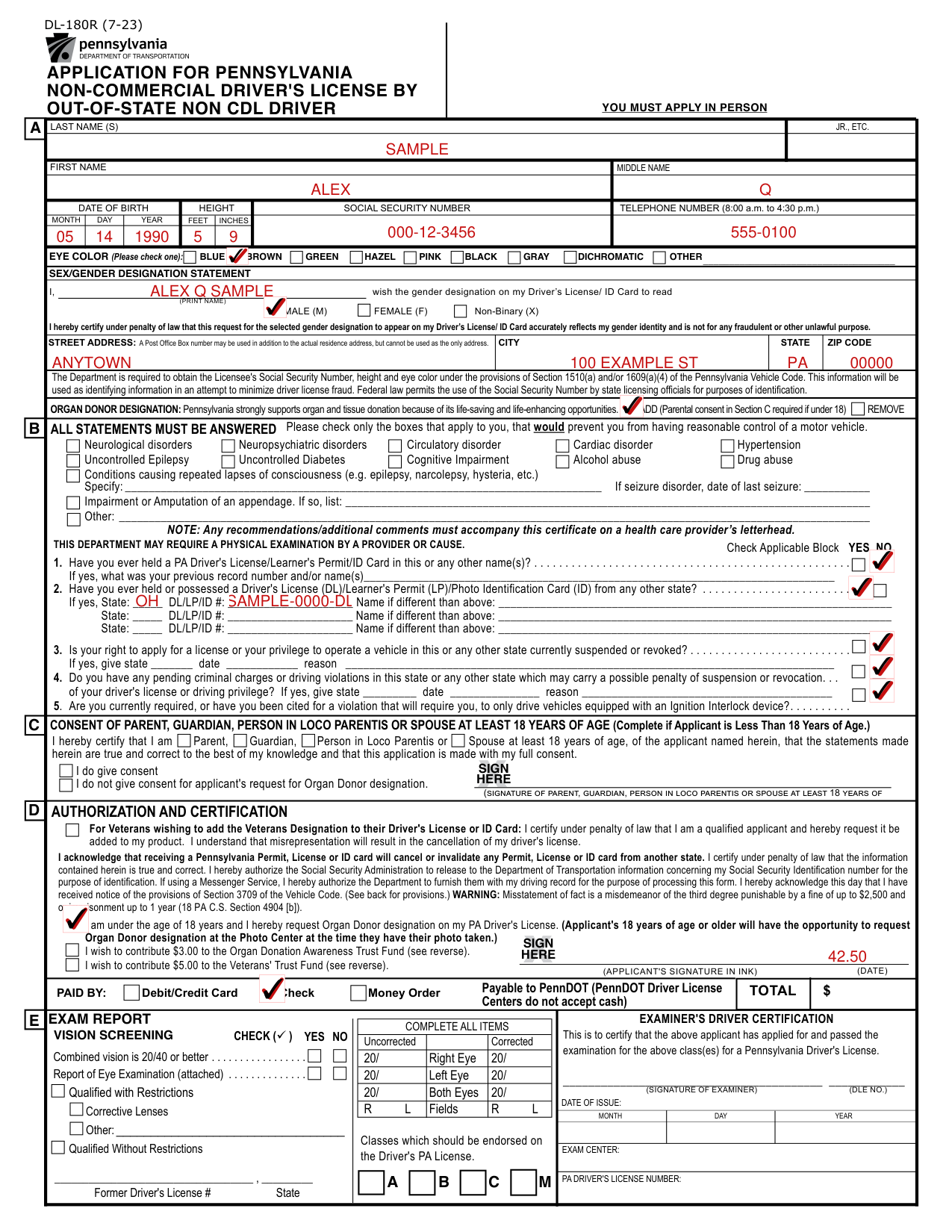
How to fill out Form DL-180R, box by box
Tap a group of boxes to open it, and a picture to see it full size.
Your name, social security number, telephone number, date of birth and height
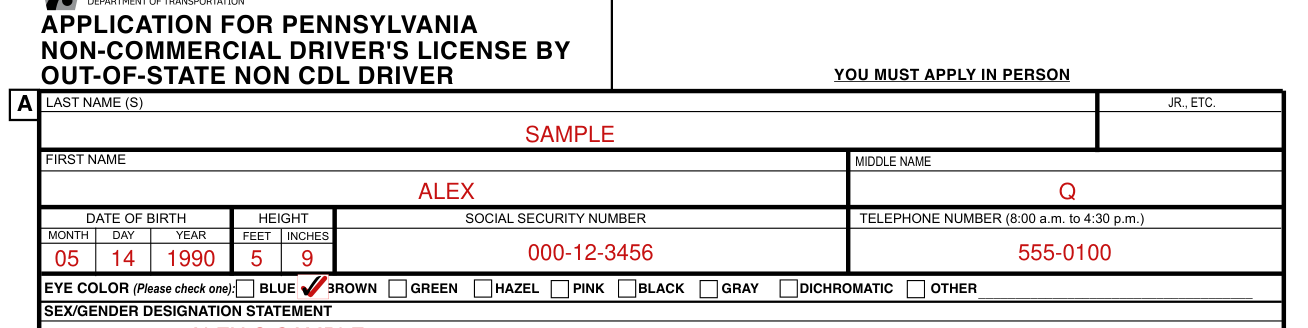
Write the last name (S) A JR., ETC., the first name, the middle name, the social security number, the telephone number (8:00 a.m. to 4:30 p.m.), the date of birth (month day year) and the height (feet inches).
Eye color

Check one eye color box: blue, brown, green, hazel, pink, black, gray, dichromatic or other.
Sex/Gender Designation Statement

Under the SEX/GENDER DESIGNATION STATEMENT, print the name and check male (M), female (F) or non-binary (X) for the gender designation to read on the Driver's License/ ID Card.
Certify under penalty of law that the request for the selected gender designation accurately reflects your gender identity and is not for any fraudulent or other unlawful purpose.
City street address

Write the city, street address, state and ZIP code; a Post Office Box number may be used in addition to the actual residence address, but cannot be used as the only address.
Organ Donor Designation

Check add or remove for the organ donor designation; parental consent in Section C is required if under 18.
Check Applicable Block YES NO

All statements must be answered: check only the boxes that apply to you, that would prevent you from having reasonable control of a motor vehicle, and check the applicable block yes or no.
If seizure disorder, write the date of last seizure; if impairment or amputation of an appendage, list it.
Have you ever held a PA Driver's License
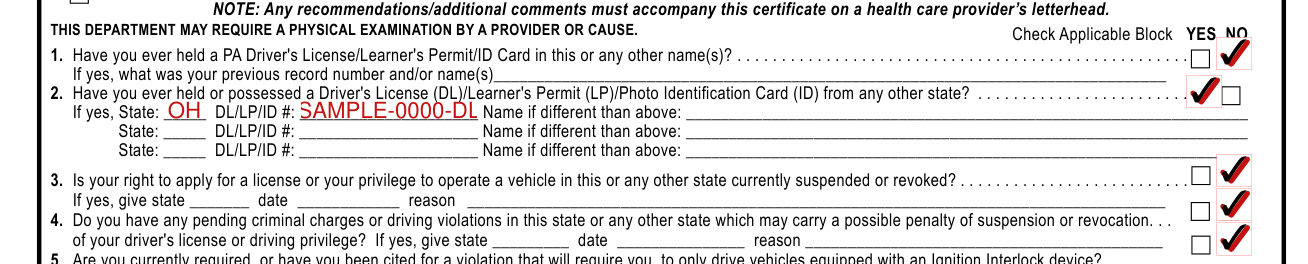
Check yes or no: 1. Have you ever held a PA Driver's License/Learner's Permit/ID Card in this or any other name(s)?
Check yes or no: 2. Have you ever held or possessed a Driver's License (DL)/Learner's Permit (LP)/Photo Identification Card (ID) from any other state?
Check yes or no: 3. Is your right to apply for a license or your privilege to operate a vehicle in this or any other state currently suspended or revoked?
Check yes or no: 4. Do you have any pending criminal charges or driving violations in this state or any other state which may carry a possible penalty of suspension or revocation of your driver's license or driving privilege?
Check yes or no: 5. Are you currently required, or have you been cited for a violation that will require you, to only drive vehicles equipped with an Ignition Interlock device?
If yes to 1, write your previous record number and/or name(s). If yes to 2, write the state, DL/LP/ID # and name if different than above. If yes to 3 or 4, give state, date and reason.
Consent of Parent, Guardian, Person in Loco Parentis or Spouse at Least 18 Years of Age

Complete if applicant is less than 18 years of age. The parent, guardian, person in loco parentis or spouse at least 18 years of age certifies that the statements made herein are true and correct to the best of my knowledge and that this application is made with my full consent. Check I do give consent or I do not give consent for applicant's request for Organ Donor designation. Sign on the SIGN HERE line, the signature of parent, guardian, person in loco parentis or spouse at least 18 years of age.
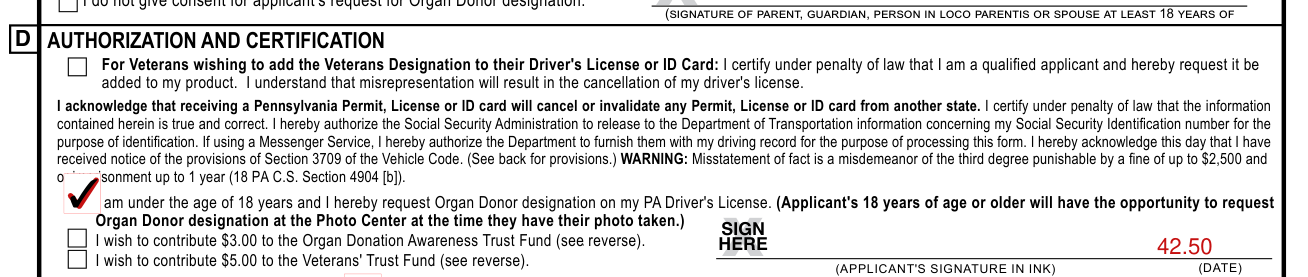
Authorization and Certification
Veterans designation: you have the opportunity to add the veterans designation to your driver's license, which clearly indicates you are a veteran of the United States Armed Forces. To qualify, you must have served in the United States Armed Forces, including a reserve component or the National Guard, and have been discharged or released from such service under conditions other than dishonorable. If you are requesting to add the veterans designation to your license, make sure you check the box at the top in Section D.
For veterans wishing to add the Veterans Designation to their Driver's License or ID Card, under Authorization and Certification certify under penalty of law that you are a qualified applicant and request it be added to your product. You understand that misrepresentation will result in the cancellation of your driver's license.
Acknowledge that receiving a Pennsylvania Permit, License or ID card will cancel or invalidate any Permit, License or ID card from another state, and certify under penalty of law that the information contained herein is true and correct.
Authorize the Social Security Administration to release to the Department of Transportation information concerning your Social Security Identification number for the purpose of identification. If using a Messenger Service, authorize the Department to furnish them with your driving record for the purpose of processing this form.
Acknowledge this day that you have received notice of the provisions of Section 3709 of the Vehicle Code.
The misstatement warning is under 18 PA C.S. Section 4904 [b].
Check that you wish to contribute $3.00 to the Organ Donation Awareness Trust Fund (see reverse) or $5.00 to the Veterans' Trust Fund (see reverse). If you are under the age of 18 years and hereby request Organ Donor designation on your PA Driver's License, check that request; applicants 18 years of age or older will have the opportunity to request Organ Donor designation at the Photo Center at the time they have their photo taken.
Total $ PAID BY and the fees

Enter the total $ and check paid by debit/credit card, check or money order, payable to PennDOT; the Driver License Centers do not accept cash.
To meet identification requirements you must present the following DL-180R (7-23): 4-Year Photo $39.50; 4-Year Photo with Class M $45.50. Drivers age 65 and over have the option of requesting a driver's license valid for two years instead of four.
Fees for this option are: 2-Year Photo $27.50; 2-Year Photo with Class M $33.50. This additional fee is required by Act 31, 1984 and will be used to support the Motorcycle Safety Educational Program in the Commonwealth of Pennsylvania.
More rules for Form DL-180R
Your out-of-state driver's license must be surrendered at the time you make application.
If you would like to contribute to the Organ Donation Awareness Trust Fund, add an additional $3.00. If you would like to make a tax deductible contribution to the Veterans' Trust Fund (VTF), add an additional $5.00.
No person shall receive a Pennsylvania Non-Commercial Driver's License unless and until the person surrenders to the Department all valid licenses in the person's possession issued by this or any other state. Final approval of this application is subject to verification of the applicant's past driver record history.
Should verification disclose outstanding violations in any state or jurisdiction, the application will be denied and all issued Pennsylvania Driver's Licenses are subject to cancellation and recall.
It is unlawful for any person to exhibit, cause a permit to be exhibited, or have in possession any recalled, cancelled, suspended, revoked, fictitious, or fraudulently altered driver's license.
It is unlawful to lend a driver's license to any other person or permit the use thereof by another, or to exhibit or represent as one's own any driver's license not issued to the person.
It is unlawful to fail or refuse to surrender to the Department upon lawful demand a recalled, cancelled, suspended, revoked, fictitious, or fraudulently altered driver's license.
The Department may cancel any driver's license upon determining that the licensee was not entitled to the issuance or that the person failed to give the required or correct information or committed fraud in making the application or in obtaining the license or the fee has not been paid. Any Pennsylvania driver who is convicted of any of the above offenses shall be assessed 3 points as of the date of violation.
The Department shall revoke the driver's license privilege of any driver for one year upon receiving a certified record of the driver's conviction of this offense.
Individuals transferring a non-commerical driver's license must be at least 16 1/2 years old. Out-of-state licenses expired for more than 6 months cannot be transferred.
All documents must show the same name and date of birth, or an association between the information on the documents. Additional documentation may be required, if a connection between documents cannot be established (e.g. Marriage Certificate, Court Order of name change, Divorce Decree, etc).
If you reside with someone, and have no bills in your name, you will still need to provide two proofs of residency. One proof is to bring the person with whom you reside along with their Driver's License or Photo ID to the Driver License Center. You will also need to provide a second proof of residency such as post-marked mail/package labels through USPS, UPS, FedEx etc., that has your name and physical address on it.
The address must match that of the person with whom you reside.
Common questions about Form DL-180R
What are the two proofs of residency in PA?
To meet residency requirements you must present two of the following (for customers 18 years of age or older): post-marked mail/package labels through USPS, UPS, FedEx etc.; a W-2 form/pay stub; lease agreements or mortgage documents; official tax records reflecting current name and address. You must present two of the following: a current, unexpired PA driver's license or photo ID card; a PA vehicle registration card; an auto insurance card; a computer-generated utility bill showing your name and address (cellphone, cable, electric, gas).
What do I need to transfer an out-of-state license to PA?
U.S. citizens: Social Security Card (must be original; card cannot be laminated) and one of the following. The one document is a birth certificate with raised seal (U.S. issued by an authorized government agency, including U.S. territories or Puerto Rico; no other birth documents will be accepted), a Certificate of U.S. Citizenship (BCIS/INS Form N-560), a Certificate of Naturalization (BCIS/INS Form N-550 or N-570), or a valid U.S. passport (only valid U.S. Passports and original documents will be accepted). Non-U.S. citizens must bring all of the following: original USCIS/immigration documents indicating current lawful immigration status; a valid passport, dependent on status; and a Social Security Card or SSA ineligibility letter (must be original; card cannot be laminated; documents must be original, photo copies will not be accepted).
Who signs it?
The applicant signs on the SIGN HERE line in ink and writes the date.
Where do I file it?
You must apply in person: you MUST appear in person at a Driver License Center and surrender your out-of-state license to apply.
Is there a penalty?
WARNING: Misstatement of fact is a misdemeanor of the third degree punishable by a fine of up to $2,500 and or imprisonment up to 1 year. Any persons violating any of the above is guilty of a summary offense and shall, upon conviction, be sentenced to pay a fine of $100. A person is guilty of a misdemeanor of the first degree if the person, with fraudulent intent, has possession of, sells or attempts to sell, uses or displays a driver's license, knowing it to have been altered, forged or counterfeited. Any person committing this offense is, upon conviction, subject to imprisonment for a term of up to 5 years.
Sources
[1] Form DL-180R (7-23), Application for Pennsylvania Non-commercial Driver's License by Out-of-state Non CDL Driver, PennDOT (the Official source link on this page).
