
Dmv Public Service License Form PDF Details

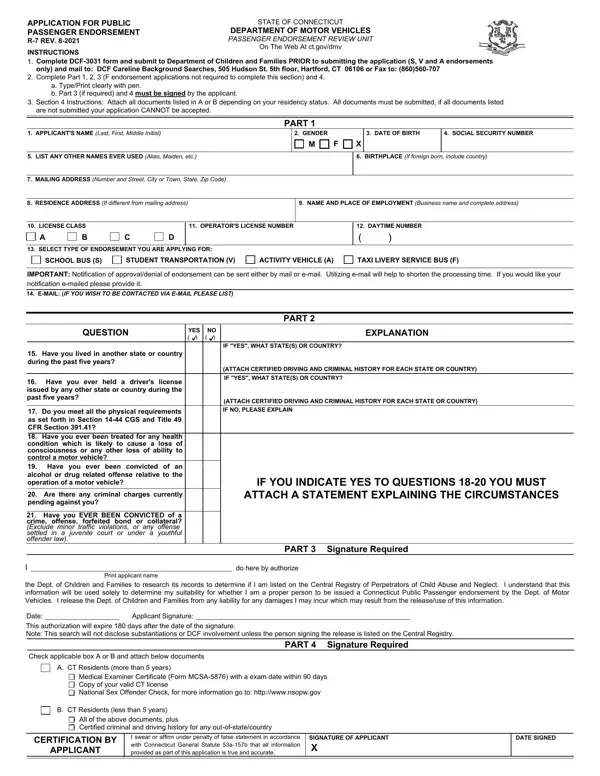
Navigating the requirements for obtaining a public passenger endorsement in Connecticut involves a detailed process, as laid out in the DMV Public Service License form. This form is part of the broader efforts by the state’s Department of Motor Vehicles to ensure that individuals operating vehicles in a commercial capacity meet specific criteria, aimed at safeguarding passenger safety. Applicants are required to undergo a comprehensive evaluation process, which includes submitting a DCF-3031 form to the Department of Children and Families for certain endorsements, ensuring their details are up-to-date and accurately reflected in parts 1 through 4 of the application, and attaching necessary documentation based on residency status for a thorough review. This process is meticulously designed to cover various checks, including medical examinations, criminal history reviews, and sex offender checks, underscoring the state's commitment to maintaining high safety standards. The form provides structured guidance on how to compile the application package correctly, highlighting the importance of attention to detail and the need for providing accurate information to avoid delays. Additionally, it details the prerequisites for different endorsements, covering school buses, student transportation, activity vehicles, taxi, livery services, and service buses, each with its unique set of requirements and implications for public safety and personal accountability.

QuestionAnswer
Form NameDmv Public Service License Form
Form Length5 pages
Fillable?No
Fillable fields0
Avg. time to fill out1 min 15 sec
Other namesct r, psl license ct, ct 7 motor vehicles, ct public service license

How to Edit Dmv Public Service License Form Online for Free

ct motor passenger form can be filled out with ease. Just use FormsPal PDF editing tool to accomplish the job quickly. FormsPal is aimed at giving you the best possible experience with our editor by consistently introducing new features and improvements. Our editor is now even more useful as the result of the most recent updates! So now, working with PDF files is a lot easier and faster than ever. This is what you will have to do to get going:

Step 1: First of all, open the editor by pressing the "Get Form Button" at the top of this page.

Step 2: As soon as you start the editor, you will get the form all set to be completed. Besides filling out different blank fields, you can also perform several other actions with the form, particularly adding your own textual content, changing the original text, adding graphics, putting your signature on the PDF, and more.

This form needs specific details; in order to ensure correctness, please bear in mind the guidelines hereunder:

1. When filling out the ct motor passenger form, make sure to complete all of the needed blank fields in its associated area. This will help to expedite the process, allowing for your information to be handled efficiently and accurately.

Filling in part 1 of ct r7

2. Once your current task is complete, take the next step – fill out all of these fields - Have you ever held a drivers, Do you meet all the physical, Are there any criminal charges, Have you EVER BEEN CONVICTED of a, ATTACH CERTIFIED DRIVING AND, IF YOU INDICATE YES TO QUESTIONS, ATTACH A STATEMENT EXPLAINING THE, Print applicant name, do here by authorize, the Dept of Children and Families, PART, Signature Required, Date This authorization will, Applicant Signature, and PART with their corresponding information. Make sure to double check that everything has been entered correctly before continuing!

Writing section 2 of ct r7

In terms of Do you meet all the physical and Signature Required, ensure that you get them right here. Both of these are surely the most significant ones in this file.

3. The following section is rather easy, Connecticut Department of Children, Page of, I Applicant Name do hereby, Employment, Day Care, Volunteer, Intern, Mentor, This area for DCF Use only, Date Processed, Central Registry, YES, Processors Initials, Other, and Name of Agency requesting - every one of these empty fields must be completed here.

Filling in section 3 of ct r7

4. To go ahead, the following form section requires filling out a handful of form blanks. Examples of these are Last Name, First Name, Middle, DOB, Name of SpousesOther Adults in the, Check if an additional sheet is, Middle, DOB, Names of ALL Children Biological, Check if an additional sheet is, Last Name, First Name, Middle, DOB, and Gender, which you'll find integral to continuing with this PDF.

ct r7 writing process outlined (part 4)

Step 3: Before finishing the file, it's a good idea to ensure that form fields were filled out the correct way. Once you verify that it's good, press “Done." Find your ct motor passenger form once you register here for a 7-day free trial. Immediately access the pdf form from your personal account, with any edits and adjustments being automatically saved! FormsPal provides protected document completion with no personal data record-keeping or distributing. Feel safe knowing that your details are in good hands here!