
Fema Form 90 123 PDF Details

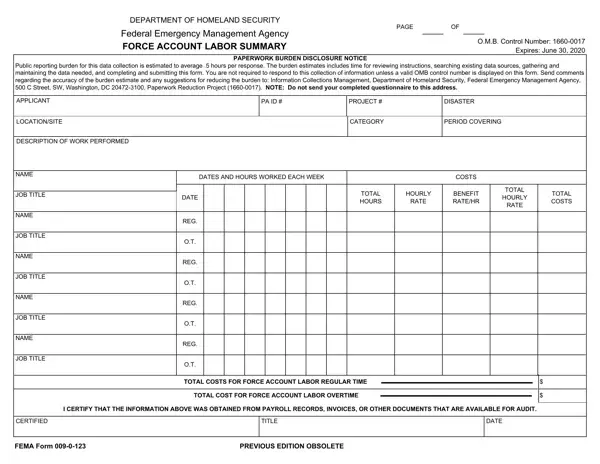
In the wake of a disaster, managing the associated costs and recovery efforts requires meticulous documentation and reporting. Among the essential documents for such processes is the FEMA 90-123 form, also known as the Force Account Labor Summary. Facilitated by the Department of Homeland Security's Federal Emergency Management Agency (FEMA), this form plays a pivotal role in accounting for labor resources utilized during disaster recovery operations. Entities engaged in recovery efforts must report the labor hours expended, distinguishing between regular and overtime work. The form requests detailed information including the applicant's name, project number, disaster category, and a precise description of the work performed, alongside corresponding dates and hours worked. It also captures the financial aspects, breaking down costs by hourly rate and total expenditure for both regular and overtime labor. The form's design is to ensure that recovery efforts are accurately documented and that entities are reimbursed appropriately. Submission of this form is contingent upon an active O.M.B. control number, emphasizing its legitimacy and necessity in the bureaucratic process of disaster recovery. Moreover, it embodies the government's effort to streamline and standardize the reporting procedure, thereby minimizing the administrative burden on those involved in the aftermath of a disaster.

QuestionAnswer
Form NameFema Form 90 123
Form Length1 pages
Fillable?No
Fillable fields0
Avg. time to fill out15 sec
Other namesfema form record, fema form force account, fema form 123, form 90 123

How to Edit Fema Form 90 123 Online for Free

When using the online tool for PDF editing by FormsPal, it is possible to fill out or modify 90 123 right here and now. Our professional team is relentlessly working to enhance the tool and help it become even faster for people with its many functions. Take your experience one stage further with constantly growing and unique options available today! Here is what you would have to do to get going:

Step 1: Firstly, access the tool by pressing the "Get Form Button" at the top of this site.

Step 2: When you open the PDF editor, you will find the form ready to be completed. Aside from filling in various blanks, it's also possible to perform several other actions with the form, including putting on custom text, modifying the initial textual content, adding graphics, affixing your signature to the form, and more.

For you to complete this PDF document, be sure to provide the information you need in each blank:

1. It is critical to fill out the 90 123 accurately, therefore pay close attention while filling in the sections that contain these blanks:

fema form account writing process described (step 1)

2. Immediately after this section is filled out, go to type in the relevant details in these: TOTAL HOURS, RATE, BENEFIT RATEHR, RATE, TOTAL COSTS, NAME, JOB TITLE, NAME, JOB TITLE, NAME, JOB TITLE, NAME, JOB TITLE, REG, and REG.

fema form account writing process shown (step 2)

In terms of JOB TITLE and BENEFIT RATEHR, be certain that you double-check them in this section. These two are the most significant fields in this PDF.

Step 3: Make sure your information is right and simply click "Done" to complete the process. After starting afree trial account with us, you'll be able to download 90 123 or email it without delay. The PDF will also be easily accessible through your personal account menu with all of your adjustments. At FormsPal, we aim to guarantee that all your information is maintained protected.