
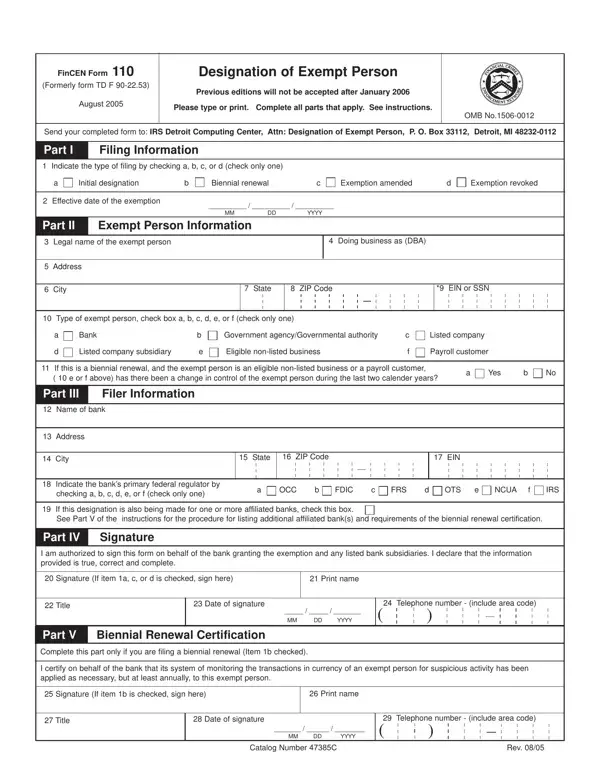
In the realm of financial regulation and compliance, the FinCEN Form 110 plays a pivotal role by allowing banks to designate certain customers as exempt from the Currency Transaction Reporting (CTR) requirements set forth under the Bank Secrecy Act. Initially known as the TD F 90-22.53, this form underwent revisions and was renamed FinCEN Form 110 in August 2005, with a stipulation that earlier editions of the form would not be accepted after January 2006. Designed to streamline the process and ensure efficient reporting, the FinCEN Form 110 must be completed with utmost precision, providing detailed information about the filing institution and the exempt entity, including the legal name, address, and type of exempt person. Upon completion, the form is sent to the IRS Detroit Computing Center, reflecting an intricate balance between regulatory compliance and operational efficiency. By facilitating the designation of exempt persons, it effectively reduces the burden on financial institutions in reporting transactions over $10,000, whilst still maintaining a robust framework to deter and detect financial crimes. The form further underscores the continuing obligation of banks to monitor transactions for any suspicious activities, even among exempt persons, thereby playing a crucial role in the broader objectives of the Financial Crimes Enforcement Network (FinCEN) to combat money laundering and finance-related crimes. Given its significance, the FinCEN Form 110 embodies a critical aspect of financial regulatory compliance, making its accurate and timely filing a key responsibility of eligible banking institutions.
| Question | Answer |
|---|---|
| Form Name | Fincen Form 110 |
| Form Length | 2 pages |
| Fillable? | No |
| Fillable fields | 0 |
| Avg. time to fill out | 30 sec |
| Other names | proprietorship, fincen 110 renewal, OTS, FinCEN |
Fincen Form 110 isn’t the one you’re looking for?