
Form 1041 Schedule D PDF Details

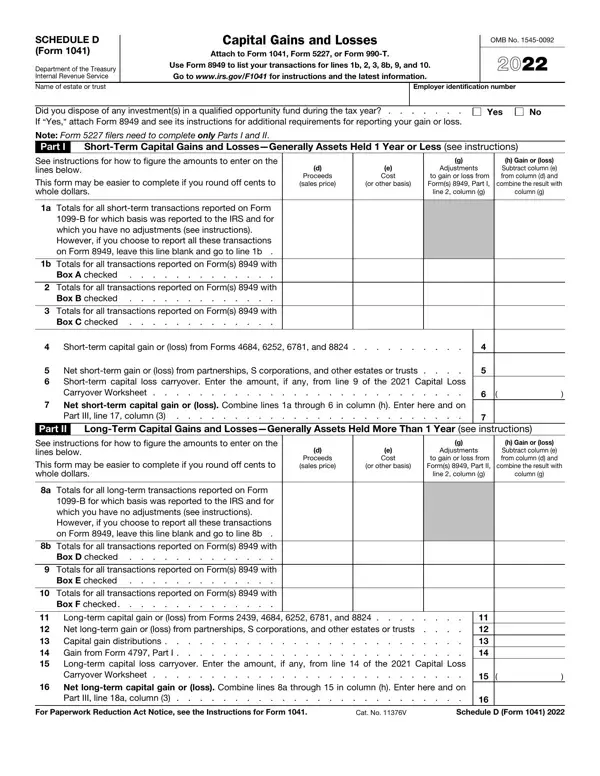
Understanding the nuances of tax forms is crucial for trustees and executors managing the financial affairs of estates and trusts. The Schedule D (Form 1041) serves as a key document in this process, guiding the reporting of capital gains and losses. This form, associated with the IRS and detailed for the 2021 tax year, demands careful attention to accurately document short-term and long-term transactions. It necessitates the attachment to Form 1041, Form 5227, or Form 990-T, depending on the nature of the entity reporting. Instructions laid out by the form emphasize the use of Form 8949 for listing specific transactions, indicating the IRS's effort to streamline the complex reporting process. The form is divided into parts that address short-term gains or losses for assets held for one year or less, and long-term gains or losses for assets held more than a year, incorporating data from various IRS forms and considering the impact of partnerships, S corporations, and capital loss carryovers. The summary of parts I and II elucidates the aggregate impact of these transactions on the estate or trust, guiding how to navigate tax implications. Moreover, the schedule delicately touches on the limitation of capital losses and the computation of taxes using maximum capital gains rates, showcasing the multifaceted nature of handling estate or trust finances. Reflecting on these elements provides a comprehensive overview of Schedule D (Form 1041) and its pivotal role in estate and trust tax preparation.

QuestionAnswer
Form NameForm 1041 Schedule D
Form Length2 pages
Fillable?No
Fillable fields0
Avg. time to fill out30 sec
Other names f1041sd.pdf - SCHEDULE D(Form 1041 Department of the ...

How to Edit Form 1041 Schedule D Online for Free

Using the online PDF tool by FormsPal, you'll be able to fill out or modify Form 1041 Schedule D right here and now. FormsPal professional team is relentlessly working to expand the editor and help it become much easier for clients with its many features. Enjoy an ever-improving experience now! With just a couple of easy steps, you are able to begin your PDF journey:

Step 1: Click on the "Get Form" button above. It's going to open our tool so that you could start completing your form.

Step 2: With the help of this state-of-the-art PDF editing tool, you can actually do more than simply fill out blanks. Try all of the functions and make your documents appear perfect with custom text incorporated, or adjust the file's original content to excellence - all that supported by the capability to incorporate any kind of pictures and sign the PDF off.

It will be easy to complete the form with this helpful guide! Here's what you want to do:

1. You'll want to complete the Form 1041 Schedule D correctly, thus take care when filling in the parts containing these particular blanks:

Filling out segment 1 of Form 1041 Schedule D

2. Right after finishing the previous section, go on to the next part and fill in the essential particulars in all these fields - Net shortterm gain or loss from, Part II, LongTerm Capital Gains and, See instructions for how to figure, Proceeds sales price, e Cost, or other basis, Adjustments, to gain or loss from Forms Part II, line column g, h Gain or loss Subtract column e, combine the result with, column g, a Totals for all longterm, and B for which basis was reported to.

Step no. 2 for completing Form 1041 Schedule D

3. Your next stage will be simple - fill in all the form fields in Part III, Summary of Parts I and II Caution, Beneficiaries, see instr, Estates or trusts, Total, Net shortterm gain or loss, Net longterm gain or loss, a Total for year b Unrecaptured, Total net gain or loss Combine, a b c, Note If line column is a net, Part IV Capital Loss Limitation, Enter here and enter as a loss on, and a The loss on line column or b to complete this process.

Form 1041 Schedule D conclusion process clarified (step 3)

4. To go ahead, this fourth form section involves filling in a few fields. Examples of these are Enter the estates or trusts, Add lines and If the estate or, Subtract line from line If zero, and Figure the tax on the amount on, which you'll find vital to moving forward with this form.

Writing part 4 of Form 1041 Schedule D

5. The very last section to finish this form is integral. Make sure to fill in the displayed blank fields, for instance Subtract line from line If zero, Figure the tax on the amount on, Add lines and Figure the tax, and Schedule D Form, before finalizing. Failing to accomplish that can end up in an unfinished and potentially incorrect paper!

Filling out segment 5 of Form 1041 Schedule D

It is possible to make errors while filling out your Figure the tax on the amount on, and so make sure that you look again prior to when you submit it.

Step 3: Immediately after looking through your entries, click "Done" and you're done and dusted! Join us right now and easily get access to Form 1041 Schedule D, ready for download. All changes you make are preserved , so that you can modify the file further if necessary. We do not share or sell the information that you enter when completing forms at our website.