
Form 941 Schedule D PDF Details

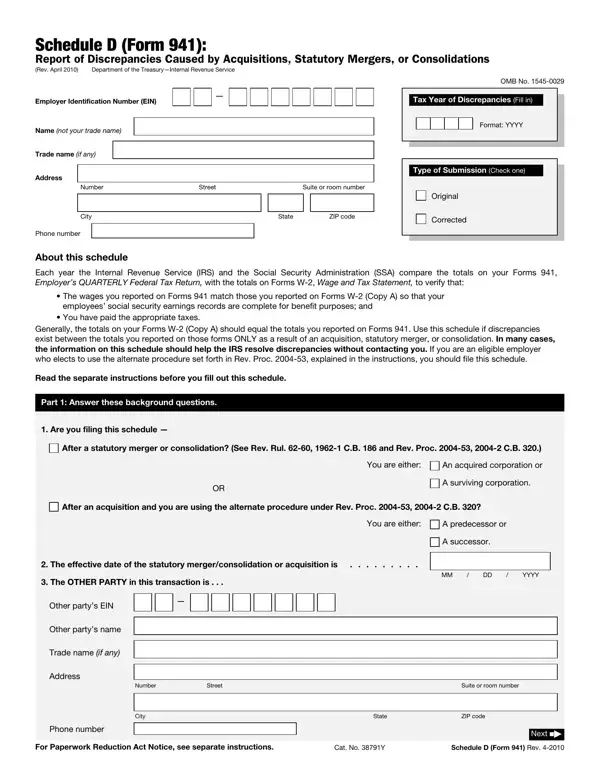
The Schedule D (Form 941), as a crucial component of payroll accounting and tax reporting, plays a foundational role in ensuring the accuracy of reported employee wages and the corresponding taxes paid by employers. Revised in April 2010 by the Department of the Treasury and administered by the Internal Revenue Service (IRS), this form addresses the specific scenarios in which discrepancies between the totals on Form 941, the Employer’s QUARTERLY Federal Tax Return, and Form W-2, the Wage and Tax Statement, arise as a direct result of acquisitions, statutory mergers, or consolidations. Scheduled for use when changes in corporate structure impact the reported figures, Schedule D offers a structured approach to rectify disparities ensuring that employees’ social security earnings records remain accurate for benefit purposes and verifying the appropriate payment of taxes. It stands out by simplifying the reconciliation process, potentially circumventing the need for direct IRS intervention by providing detailed breakdowns of social security wages, Medicare wages and tips, alongside other vital tax-related information through its segments. Employers find relief in the schedule’s clear delineation of processes for reporting amendments, which can be integral during times of significant organizational changes. Resorting to this schedule requires understanding its comprehensive instructions, eligibility criteria (as outlined in Rev. Proc. 2004-53), and the submission of requisite data to accurately reflect tax year discrepancies. Furthermore, those navigating the requirements after engaging in more than one relevant transaction within a calendar year must note the schedule’s provision for sequence reporting, further emphasizing its role in preserving the integrity of federal tax reporting.

QuestionAnswer
Form NameForm 941 Schedule D
Form Length2 pages
Fillable?No
Fillable fields0
Avg. time to fill out30 sec
Other namesf941sd schedule d form

How to Edit Form 941 Schedule D Online for Free

Form 941 Schedule D can be filled in without any problem. Just use FormsPal PDF editing tool to do the job in a timely fashion. The editor is continually maintained by us, acquiring additional functions and growing to be greater. To get the ball rolling, take these simple steps:

Step 1: Firstly, access the pdf editor by clicking the "Get Form Button" above on this page.

Step 2: This editor will give you the ability to modify most PDF files in various ways. Enhance it by writing customized text, correct what's already in the file, and put in a signature - all within the reach of a few mouse clicks!

It is easy to finish the form using this detailed tutorial! Here is what you have to do:

1. To begin with, once filling out the Form 941 Schedule D, start out with the part that contains the following blank fields:

Form 941 Schedule D conclusion process detailed (part 1)

2. Once your current task is complete, take the next step – fill out all of these fields - Are you filing this schedule, After a statutory merger or, You are either, An acquired corporation or, A surviving corporation, After an acquisition and you are, You are either, A predecessor or, A successor, The effective date of the, MM DD YYYY, The OTHER PARTY in this, Other partys EIN, Other partys name, and Trade name if any with their corresponding information. Make sure to double check that everything has been entered correctly before continuing!

Form 941 Schedule D completion process outlined (step 2)

3. In this step, examine Phone number, City, State, ZIP code, Next, For Paperwork Reduction Act Notice, Cat No Y, and Schedule D Form Rev. Every one of these must be filled in with greatest accuracy.

Form 941 Schedule D completion process clarified (portion 3)

4. To go onward, this stage involves completing a couple of blank fields. These include Your EIN, Name not your trade name, Other partys EIN, Part Tell us about the, Tax Year of Discrepancies Fill in, Format YYYY, Column A, Column B, Column C, Amount you reported to IRS for the, Amount you reported to SSA for the, The difference, Totals from Forms as corrected by, Totals from Forms W Copy A as, and Social security wages, which are integral to continuing with this process.

Form 941 Schedule D completion process outlined (part 4)

A lot of people frequently make mistakes while filling in Your EIN in this part. Make sure you review everything you enter right here.

5. Lastly, this final section is precisely what you should wrap up before closing the PDF. The blank fields under consideration are the next: Social security tips Federal, withheld, Advance earned, income credit EIC payments, If you are filing for one, Part Fill this part out ONLY if, File one Schedule D Form for, Example This is schedule of, Column A, Column B, Column C, Amount you reported to IRS for the, Amount you reported to SSA for the, The difference, and Totals from Forms as corrected by.

File one Schedule D Form  for, Column C, and If you are filing for one inside Form 941 Schedule D

Step 3: Ensure that your details are accurate and simply click "Done" to conclude the process. Go for a 7-day free trial account at FormsPal and obtain direct access to Form 941 Schedule D - with all adjustments saved and accessible from your personal cabinet. When using FormsPal, you're able to complete forms without being concerned about database breaches or data entries getting distributed. Our secure platform ensures that your personal data is stored safe.