

Form 10A100 at a glance
What it is: Form 10A100, the Kentucky Tax Registration Application, is used to apply for the Employer's Withholding Tax Account, the Sales and Use Tax Account/Permit, the Coal Seller/Purchaser Certificate ID Number and other Kentucky tax accounts.
Who signs: The application must be signed. The undersigned, who is duly authorized to sign this application, certifies the statements in it and any accompanying schedules to be correct to the best knowledge and belief.
What to bring and attach to Form 10A100
Your application will not be considered complete unless it includes all required information specified on the form, including a Federal Employer Identification Number and accurate Social Security Number(s), as appropriate.
A filled-in Form 10A100 example: a new bakery registers in Kentucky
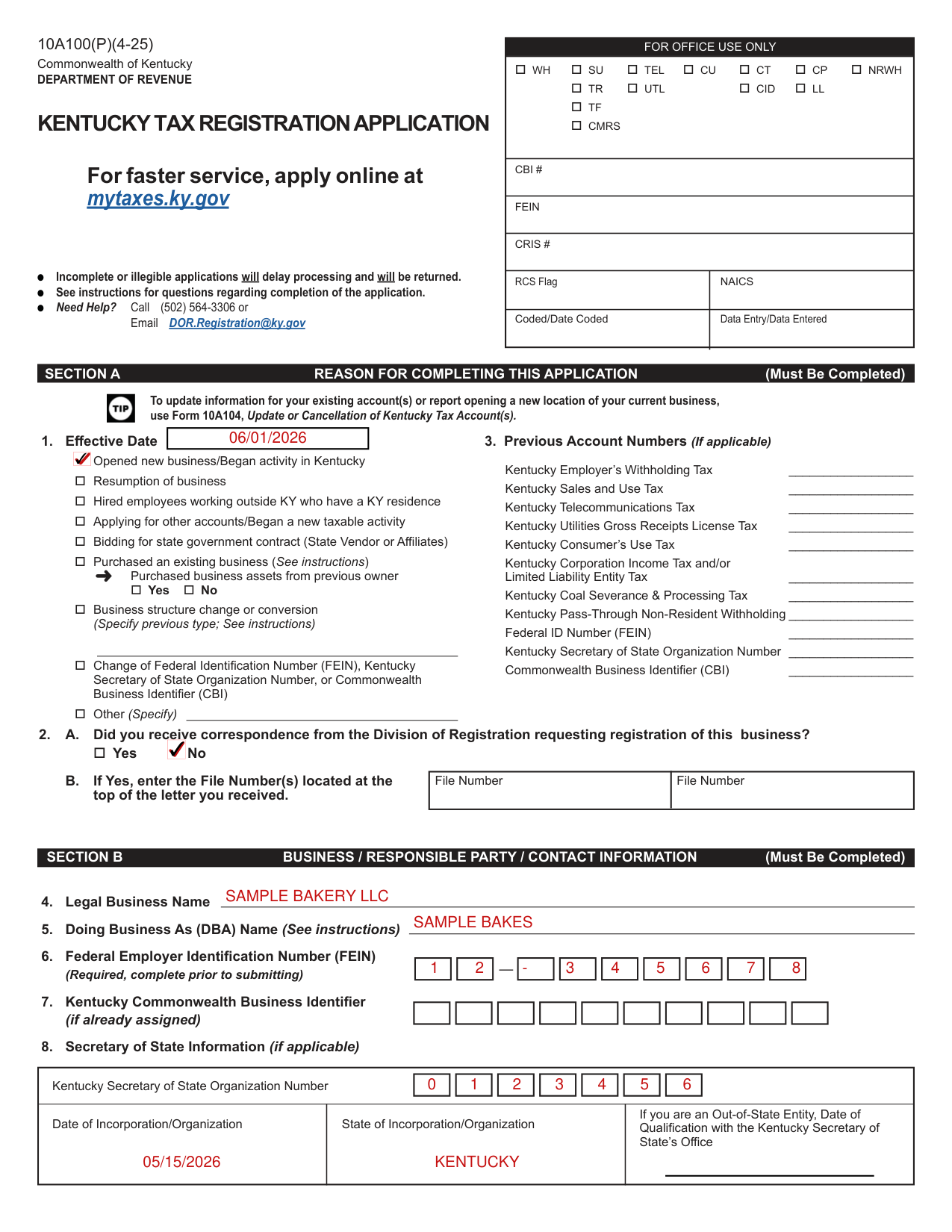
How to fill out Form 10A100, box by box
SECTION A: Reason for completing this application
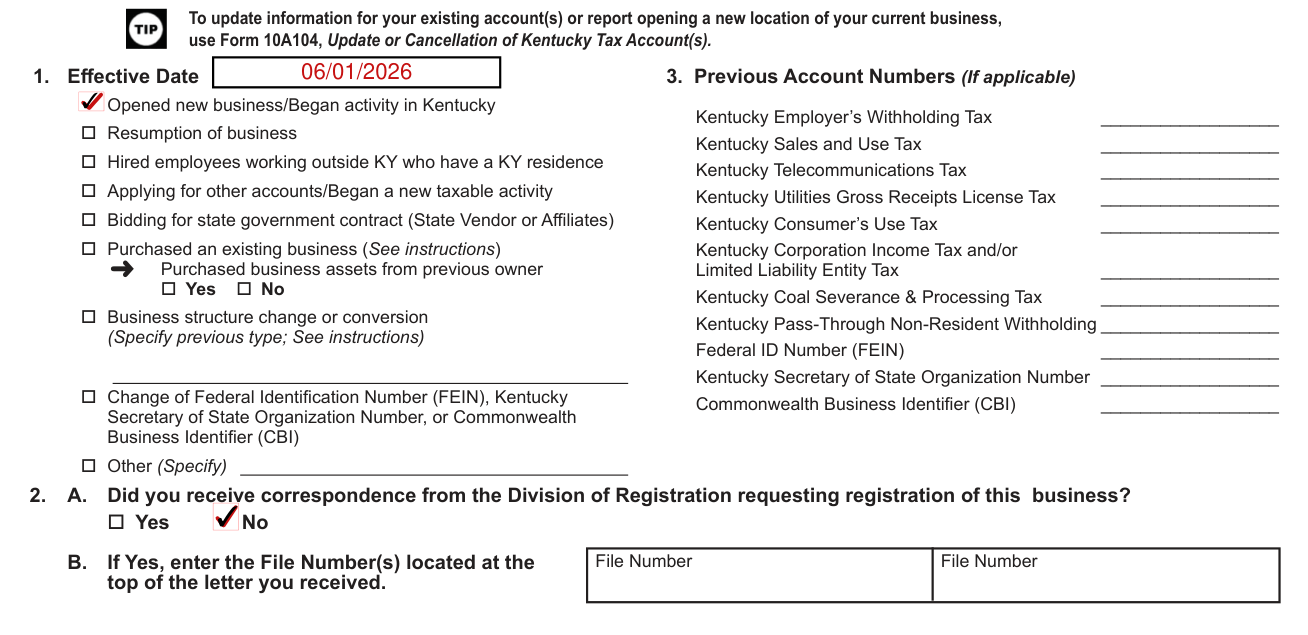
Section A, the reason for completing this application, must be completed.
Enter the effective date of the reason you are completing this application. Check the box which corresponds to why the application is being completed.
If you check Opened new business, Began Activity in Kentucky, Resumption of Business or Hired Employees Working Outside Kentucky Who Have a Kentucky Residence, complete Sections A, B, and C to determine the accounts for which you are required to apply.
If you check Resumption of Business, list your previous account numbers in Section A, question 3.
If you received a letter requesting registration from the Division of Registration, check Yes and list the File Number(s) from the letter in B. If No, leave B blank.
Legal business name, DBA, FEIN and Secretary of State information
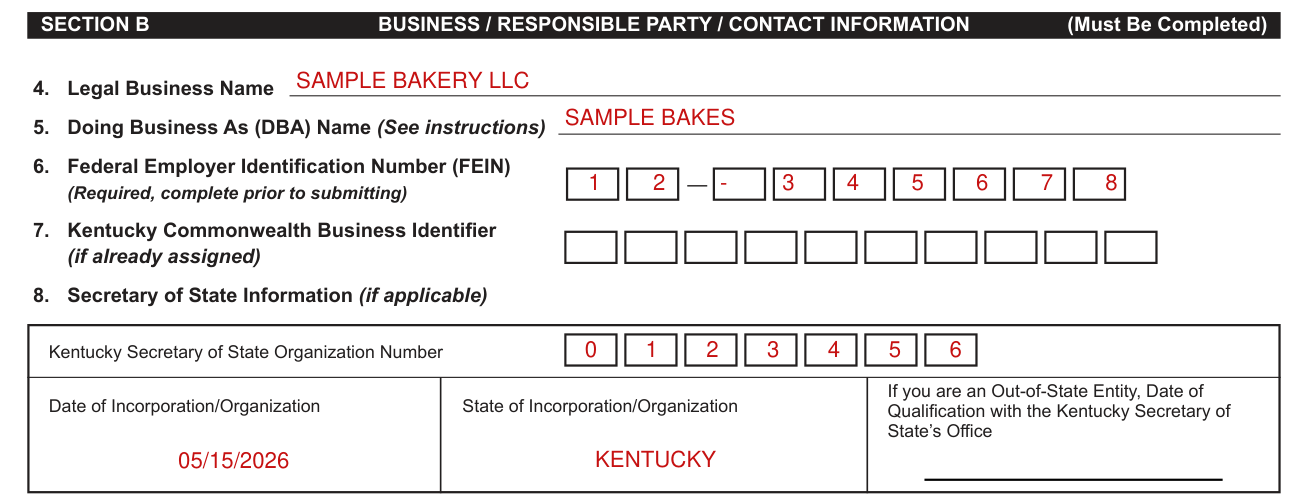
Enter the complete legal business name for your business or organization.
If your business or organization has a "doing business as" name, enter the name.
Enter the FEIN assigned to your business or organization by the Internal Revenue Service. If you are a disregarded entity that is operating under your parent's FEIN, DO NOT list your parent's/member's FEIN.
If your business has already been assigned a CBI, enter that 10-digit number.
Sole Proprietorships, Estates, HCSRs, Governments, Unincorporated Non-Profit Associations, Unincorporated Associations, Qualified Joint Ventures, and Non-statutory Trusts are not required to register with the Kentucky Secretary of State.
For all remaining entities, enter the Organization Number assigned to your entity by the Kentucky Secretary of State's Office, your date of incorporation/organization and the state in which you incorporated/organized.
Primary business location, accounting period and business structure
List the street address, city, state and ZIP Code for the location for which you are requesting registration. Do not list a P.O. Box for a business location address.
Check the box that corresponds to when your business or organization's accounting period ends. If you choose the fiscal year filing box, enter the month and day when your year ends.
Check the box for the organizational structure type you have selected for your business. If "Other" selected, enter the structure type on the blank provided.
Sole Proprietorships, HCSRs, Qualified Joint Ventures, Estates, Governments, and Unincorporated Non-Profits SKIP question 14.
Ownership disclosure and the person to contact
Social Security Numbers for responsible parties are required (KRS 131.180(3)).
For a Sole Proprietorship, enter owner's individual information, including Social Security Number, in question 15.
For a Profit Corporation, Professional Service Corporation (PSC), Public Benefit Corporation, Association, Cooperative Corporation, Limited Cooperative Association, Non-Profit Corporation or Government, enter the officers' information, including Social Security Numbers in questions 15 and 16. If more than two officers, attach a separate sheet.
Enter the name, title, daytime telephone number, extension, and e-mail address for the person to contact with questions about this application.
SECTION C: Tell us about your business or organization
Answer questions 18 through 58 to determine accounts for which your business or organization is required to apply.
You must complete SECTION D if you answered Yes to any of questions 19 through 22.
You must complete SECTION E if you answered Yes to any of questions 23 through 45 E.
SECTION F must be completed if you answered Yes to any of questions 44 or 45 B through 45 G.
SECTION G must be completed if you answered Yes to any of questions 45 E through 45 H.
If you answered Yes to question 47, you must complete SECTION H.
If you answered Yes to any of questions 48 through 54, you must complete SECTION I.
If you answered Yes to question 56, you must complete SECTION J.
If you answered Yes to any of questions 57 through 59, you must complete SECTION K and SECTION E.
Signature, printed name, phone number, title and date
Sign on the Signature line and enter the Printed Name, Phone Number, Title and Date (mm/dd/yyyy).
Send the completed application
Send the completed application to: Kentucky Department of Revenue, Division of Registration, 501 High Street, Station 20, Frankfort, Kentucky 40602-0299. FAX: 502-227-0772. E-MAIL: DOR.Registration@ky.gov.
Complete the application and file it with the Kentucky Department of Revenue at least 30 days before engaging in an activity that requires the establishment of: Employer's Withholding Tax Account (KRS 141.310), Consumer's Use Tax Account (KRS 139.310), Sales and Use Tax Account (KRS 139.200, 139.240), Utility Gross Receipts License Tax Account (KRS 160.613), Transient Room Tax Account (KRS 142.400), Telecommunications Tax Account (KRS 136.614 and 136.616), Motor Vehicle Tire Fee Account (KRS 224.50-868), Coal Seller/Purchaser Certificate ID Number (KRS 143.037), Commercial Mobile Radio Service Prepaid Service Charge Account (KRS 65.7634).
More rules for Form 10A100
Fully completed paper applications will be processed, barring seasonal workload increases, within 5 to 10 business days. Applications with missing or unclear information requiring additional research may take longer.
Incomplete or illegible applications will delay processing and will be returned.
For faster service, apply online at mytaxes.ky.gov. If your business structure is not available as a selection online, you must submit a completed Kentucky Tax Registration Application by mail, fax, or e-mail.
Other situations
You changed your business structure or one of its identification numbers
Any change to an entity's business structure, Federal Identification Number (FEIN), Kentucky Secretary of State Organization Number, or Commonwealth Business Identifier (CBI) requires that new accounts be applied for with the Department of Revenue.
List your old account numbers in Section A, question 3, and complete Sections A, B and C to determine the account(s) for which you are required to re-apply.
You purchased an existing business
If you have purchased an existing business, list the previous owner's accounts, if available.
A request in writing from the previous owner is required to cancel previous accounts.
If the business structure, Federal Identification Number (FEIN), Secretary of State Organization Number, and Commonwealth Business Identifier (CBI) will all stay the same, DO NOT use the Kentucky Tax Registration Application. Use Form 10A104, Update or Cancellation of Kentucky Tax Account(s), to provide the updated business and responsible party information or update your information online.
Common questions about Form 10A100
Is there a penalty?
Failure to complete and file the required application in the specified time frames shall subject you to applicable penalties as provided in KRS 131.180.
Where to get help with Form 10A100
For assistance in completing the application, please call the Division of Registration at (502) 564-3306, Monday through Friday between the hours of 8:00 a.m. and 5:00 p.m., Eastern Time.
Sources
[1] Form 10A100 (4-25), Kentucky Tax Registration Application and Instructions, Kentucky Department of Revenue (the Official source link on this page).