
Form 22 15 PDF Details

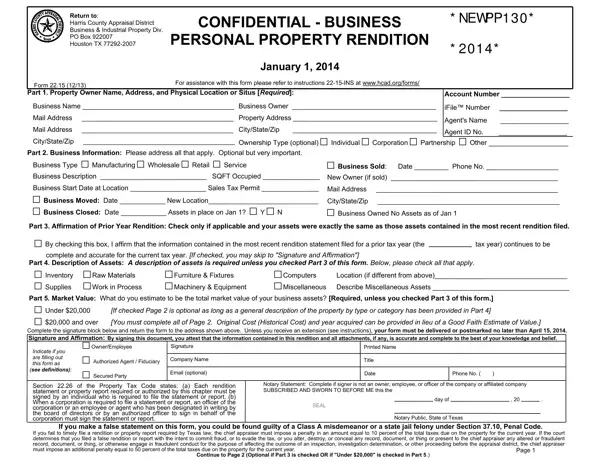
Understanding the intricate details and requirements of tax documents can be overwhelming for many business owners, and the Form 22.15 is no exception. This form is crucial for businesses located in Harris County, Texas, as it pertains to the personal property rendition which must be filed with the Harris County Appraisal District by a specified deadline. Essentially, it aims to capture valuable information regarding the business and industrial property held, helping to assess tax obligations accurately. The form requires business owners to provide detailed information about their business, including the owner's name, business name, location, and description of assets. It also seeks updates on any significant changes such as business relocations, closures, or sales. Moreover, businesses must affirm the accuracy of their previous year's rendition and estimate the market value of their assets, which directly impacts their tax responsibilities. Understanding and completing this form accurately is not only a matter of compliance but also a way to ensure that businesses are fairly assessed and taxed accordingly. An inaccurate or late submission could lead to penalties, underscoring the importance of giving this document the attention it deserves.

QuestionAnswer
Form NameForm 22 15
Form Length2 pages
Fillable?No
Fillable fields0
Avg. time to fill out30 sec
Other namestx 22 15, texas form 22 15, how to form rendition, tx business property rendition

How to Edit Form 22 15 Online for Free

Dealing with PDF files online is simple with this PDF editor. You can fill out tx form business rendition here within minutes. To keep our tool on the cutting edge of practicality, we work to adopt user-oriented features and enhancements regularly. We're at all times looking for suggestions - play a vital role in revampimg PDF editing. All it takes is just a few easy steps:

Step 1: Access the PDF in our tool by hitting the "Get Form Button" above on this page.

Step 2: With our online PDF editing tool, you can do more than simply fill in blanks. Edit away and make your forms look faultless with customized textual content incorporated, or adjust the file's original input to perfection - all comes along with an ability to insert almost any pictures and sign it off.

With regards to the blank fields of this particular form, this is what you need to know:

1. Complete your tx form business rendition with a number of essential blank fields. Collect all the required information and make certain not a single thing neglected!

The best way to prepare form rendition part 1

2. Once your current task is complete, take the next step – fill out all of these fields - Part Market Value What do you, Under, If checked Page is optional as, and over, You must complete all of Page, Complete the signature block below, Authorized Agent Fiduciary, Company Name, OwnerEmployee, Signature, Printed Name, Title, Date, Secured Party, and Email optional with their corresponding information. Make sure to double check that everything has been entered correctly before continuing!

Tips on how to fill out form rendition stage 2

Lots of people frequently make mistakes while filling out Date in this area. Make sure you go over everything you type in here.

3. This subsequent segment is relatively uncomplicated, Page is Optional if Part is, Owner Name, Account Number, September Inventory Appraisal, faith opinion of market value for, Part Inventory ASupplies B Raw, Description, A Inventory, B Supplies, C Raw Materials D Work in Process, E Assets You Own Leased Loaned, Value, Description, Location, and Good Faith Estimate of - every one of these blanks must be completed here.

E Assets You Own Leased Loaned, Location, and B Supplies of form rendition

4. You're ready to proceed to the next portion! Here you've got all of these p o t s o C, a n g i r, Cost Totals, Part Personal Property Leased, Property Owners Name Address and, Description, Selling Price in Lease, Optional, Annual Rent, Optional, Part Personal Property You Manage, Property Owners Name Address and, Description, Quantity Units, and Optional fields to complete.

Optional, Cost Totals, and Quantity  Units in form rendition

Step 3: Ensure that your details are right and click "Done" to complete the project. Make a 7-day free trial plan at FormsPal and acquire immediate access to tx form business rendition - downloadable, emailable, and editable from your personal cabinet. FormsPal is dedicated to the privacy of all our users; we always make sure that all information put into our editor remains confidential.