Form 296 PDF Details

In the realm of vehicle and heavy equipment safety, the adherence to comprehensive inspection protocols stands as a fundamental necessity, where the Form 296 Vehicle/Heavy Equipment Pre-Use Inspection Checklist emerges as a critical tool for ensuring operational integrity, safety, and compliance. Catering to various sections including general equipment information, heavy equipment standards, liability acknowledgements, and transport or support vehicles, this form meticulously encompasses an array of inspection criteria. From the roll-over protection system (ROPS) compliance and the functionality of gauges and lights to the integrity of structural components and the absence of engine leaks, each checklist item is designed to affirm the equipment’s readiness and safety before deployment. Notably, it extends beyond basic mechanical evaluations to include checks for environmental safeguards against flammable materials and invasive species, thereby underscoring a broader commitment to safety and environmental stewardship. Accompanied by liability sections that assign responsibility for the equipment's condition and an inspection section that concludes with either acceptance or rejection, Form 296 is comprehensive in scope. It also addresses additional transportation vehicles, aligning with regulations set forth by the Federal Motor Carrier Safety Administration (FMCSA) and the Commercial Vehicle Safety Alliance (CVSA), ensuring every inspected vehicle or piece of equipment meets stringent safety and operation standards.

QuestionAnswer
Form NameForm 296
Form Length6 pages
Fillable?No
Fillable fields0
Avg. time to fill out1 min 30 sec
Other namesequipment checklist template, equipment inspection log, equipment inspection checklist pdf, daily equipment inspection checklist

How to Fill Out Form 296

Form 296 at a glance

What it is: Optional Form 296 is the Vehicle/Heavy Equipment Pre-Use Inspection Checklist, and its purpose is to document pre-existing vehicle/equipment condition and to determine suitability for incident use.

Who signs: The operator's signature acknowledges full responsibility and liability for the operation and mechanical condition of the vehicle/ equipment described herein.

A filled-in Form 296 example: an inspector accepts a pickup truck
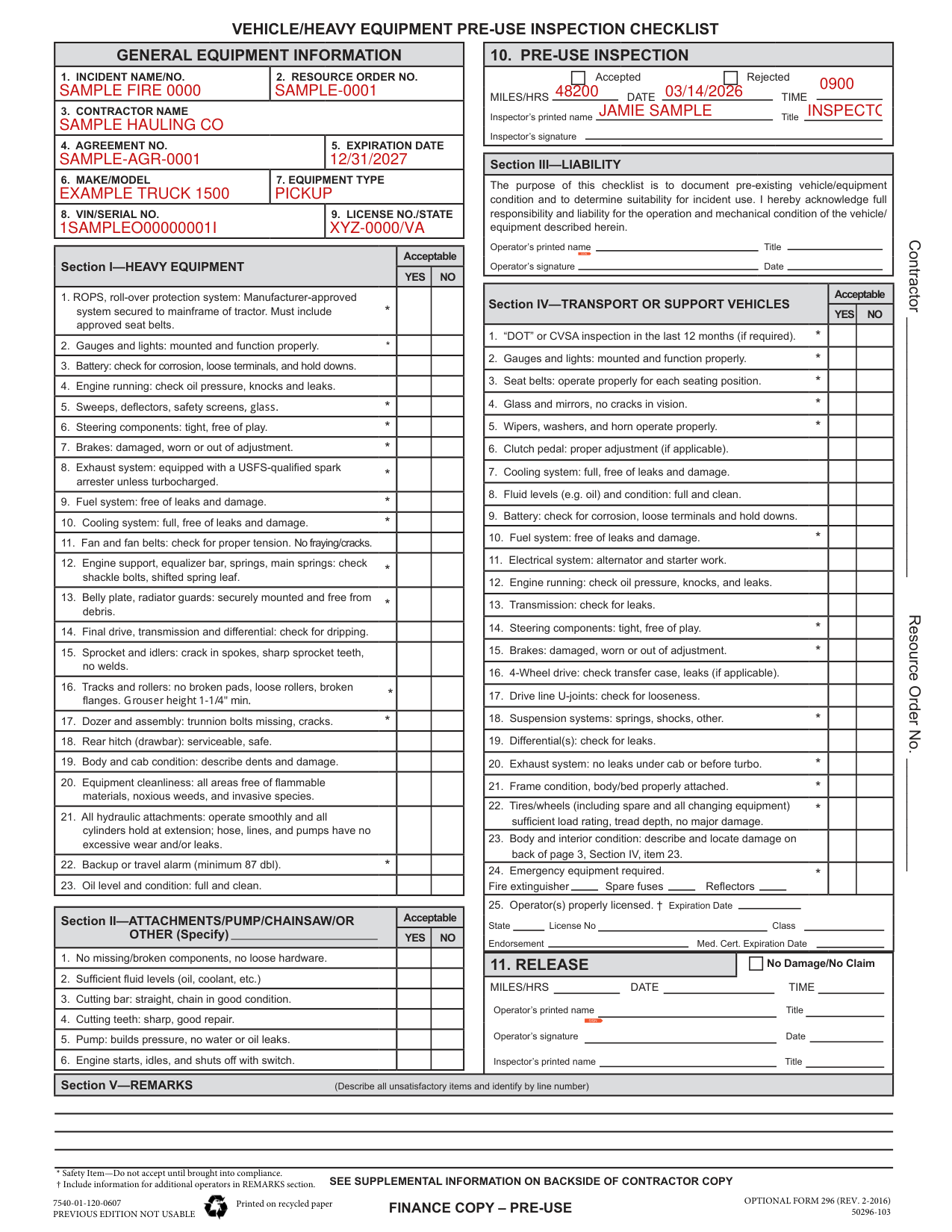
Form 296 example filled out, example: an inspector accepts a pickup truck
An inspector fills in Optional Form 296 for a contractor's pickup truck. The inspector accepts the truck at 48,200 miles, so Rejected stays empty. The picture shows boxes 1 to 10, and every value in it is made up. The fillable form has no field for the Inspector's signature, so the example leaves it for you to sign on the printed form. Section III-LIABILITY is left blank because the operator signs it later. Operator(s) properly licensed stays empty because no operator is named yet. Release stays empty because the truck is not yet released. Section V-REMARKS is left blank because the inspector found nothing unsatisfactory.

How to fill out Form 296, box by box

General equipment information

Form 296 example filled out, general equipment information

Enter the Incident Name/No. in box 1, the Resource Order No. in box 2 and the Contractor Name in box 3.

Enter the Agreement No. in box 4, the Expiration Date in box 5, the Make/Model in box 6, the Equipment Type in box 7, the VIN/Serial No. in box 8 and the License No./State in box 9.

Pre-use inspection

Form 296 example filled out, pre-use inspection

In box 10, Pre-Use Inspection, mark Accepted or Rejected, then enter the Miles/Hrs, Date and Time and the Inspector's printed name and Title, and sign the Inspector's signature.

The Inspector must ACCEPT or REJECT all equipment he/she inspects.

Section III-LIABILITY

Form 296 example filled out, section III-LIABILITY

In Section III-LIABILITY, enter the Operator's printed name and Title, then sign the Operator's signature and enter the Date.

Operator(s) properly licensed

Form 296 example filled out, operator(s) properly licensed

Next to Operator(s) properly licensed, enter the State, License No, Class, Endorsement and Med. Cert. Expiration Date.

Release

Form 296 example filled out, release

In box 11, RELEASE, mark No Damage/No Claim, then enter the Miles/Hrs, Date and Time, the Operator's printed name and Title, sign the Operator's signature and enter the Date, and enter the Inspector's printed name and Title.

Section V-REMARKS

Form 296 example filled out, section V-REMARKS

In Section V-REMARKS, describe all unsatisfactory items and identify by line number.

More rules for Form 296

In Section I-HEAVY EQUIPMENT, mark YES or NO under Acceptable.

In Section II-ATTACHMENTS/PUMP/CHAINSAW/OR OTHER (Specify), mark YES or NO under Acceptable.

In Section IV-TRANSPORT OR SUPPORT VEHICLES, mark YES or NO under Acceptable.

If an item such as Gauges and lights is marked *, it is a Safety Item: do not accept until brought into compliance. For an item marked †, include information for additional operators in REMARKS section.

In Section IV, Transport and Support Vehicles, REJECT IF parts and accessories covered in FMCSR part 393, 396 and/or CVSA North American Uniform Out-of-service Criteria are not in safe and proper operating conditions at all times.

The inspector shall inspect for compliance with the FMCSA, State and Local laws and regulations.

See supplemental information on backside of contractor copy.

Sources

[1] Optional Form 296 (REV. 2-2016), Vehicle/Heavy Equipment Pre-Use Inspection Checklist (the Official source link on this page).

Please rate Form 296

1 Votes
If you believe this page is infringing on your copyright, please familiarize yourself with and follow our DMCA notice and takedown process - click here to proceed .