
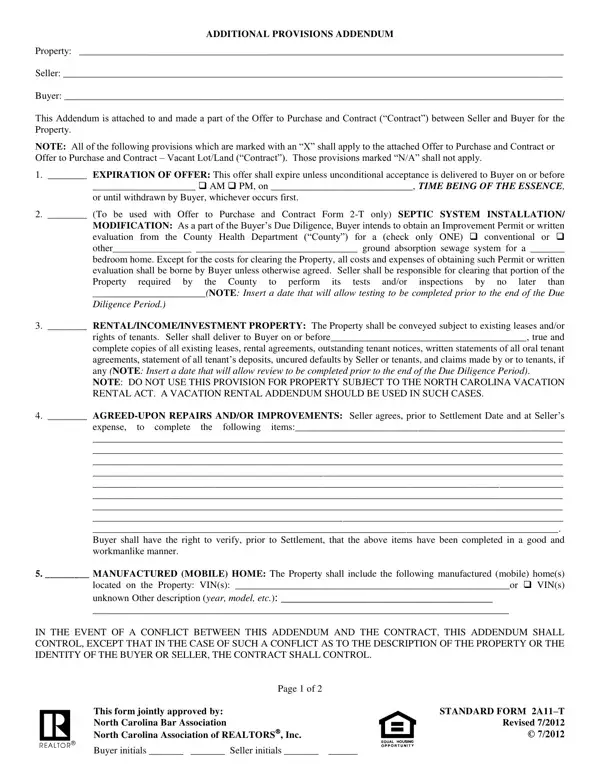
In the intricate landscape of real estate transactions, the 2A11 T form serves as a critical instrument, especially within the context of North Carolina's market. This form, known as the Additional Provisions Addendum, is a companion document to the primary Offer to Purchase and Contract, playing a pivotal role in customizing the agreement to the specific needs and agreements between the seller and buyer regarding the property in question. Among its key features, the form addresses the expiration of the offer, setting a clear deadline for acceptance to ensure the timely progression of the transaction. It also covers the essential aspect of septic system installation or modification, delineating responsibilities for obtaining necessary permits and evaluations, thereby emphasizing the due diligence required from the buyer. The inclusion of clauses regarding rental/income/investment properties ensures that transaction details surrounding tenancies are transparent and agreed upon, safeguarding both parties' interests. Furthermore, it facilitates negotiations around agreed-upon repairs and improvements, definitively stating the seller's obligations before the settlement date. Notably, for transactions involving manufactured (mobile) homes, the form specifies identification details, ensuring clarity about the physical assets included in the property deal. This document, jointly approved by the North Carolina Bar Association and the North Carolina Association of REALTORS®, underscores the complexity and tailored nature of real estate transactions, highlighting the necessity for both parties to thoroughly understand and agree upon each provision laid out in the addendum. It also carries a cautionary note about its legal validity and the imperative need for consultation with a real estate attorney if there are any ambiguities or concerns, illustrating an approach grounded in cautious legal prudence.
| Question | Answer |
|---|---|
| Form Name | Form 2A11 T |
| Form Length | 2 pages |
| Fillable? | No |
| Fillable fields | 0 |
| Avg. time to fill out | 30 sec |
| Other names | nc additional provisions addendum form 2a11 t, additional provisions addendum 2a11 t, north carolina additional provisions addendum, 2a11 t |
Form 2A11 T isn’t the one you’re looking for?