
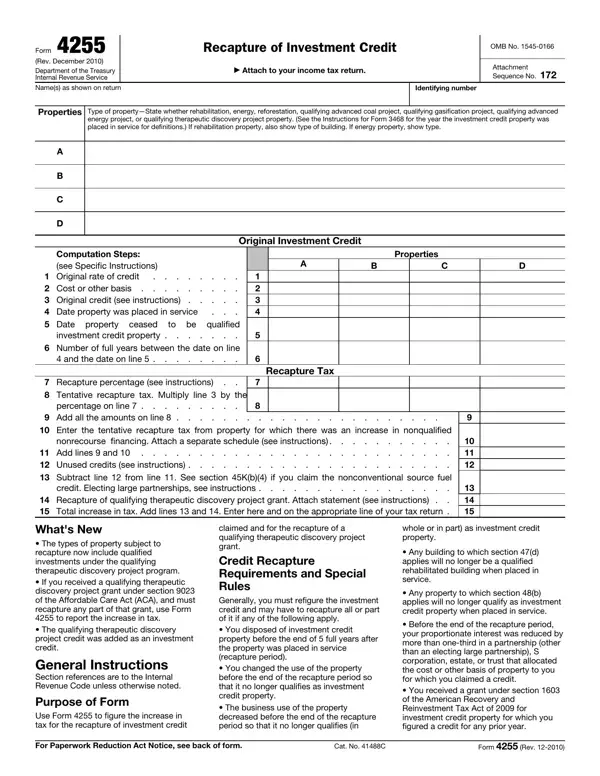
Working with PDF forms online is very simple with our PDF editor. You can fill out Form 4255 here with no trouble. Our editor is constantly evolving to give the very best user experience attainable, and that is because of our resolve for constant improvement and listening closely to feedback from customers. It merely requires a couple of basic steps:
Step 1: Access the PDF form in our editor by clicking the "Get Form Button" above on this page.
Step 2: With the help of this handy PDF editor, it is easy to accomplish more than merely complete blank form fields. Try each of the functions and make your documents seem sublime with custom textual content added in, or modify the file's original content to excellence - all comes along with an ability to incorporate any type of photos and sign the PDF off.
Filling out this form needs attention to detail. Make sure every blank is filled in accurately.
1. You will want to complete the Form 4255 correctly, so be mindful when filling out the segments that contain these fields:
2. Once your current task is complete, take the next step – fill out all of these fields - Date property ceased investment, Recapture percentage see, Tentative recapture tax Multiply, Add all the amounts on line, Recapture Tax, Enter the tentative recapture tax, nonrecourse financing Attach a, Add lines and Unused credits, credit Electing large partnerships, Recapture of qualifying, Whats New The types of property, claimed and for the recapture of a, whole or in part as investment, Any building to which section d, and Any property to which section b with their corresponding information. Make sure to double check that everything has been entered correctly before continuing!
People generally make some errors when filling out Date property ceased investment in this section. Remember to re-examine what you enter here.
Step 3: Right after you have looked over the information you given, press "Done" to finalize your form at FormsPal. Acquire your Form 4255 after you sign up for a 7-day free trial. Readily access the pdf from your personal account, together with any modifications and changes being all saved! FormsPal ensures your data confidentiality via a protected system that in no way saves or distributes any type of private information typed in. Feel safe knowing your docs are kept protected any time you work with our services!
