
Form 5305 Simple PDF Details

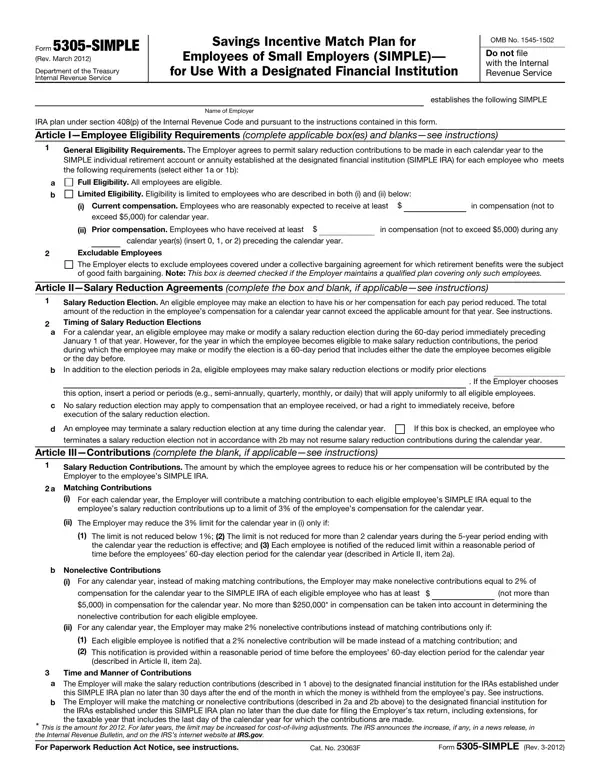
The Form 5305-SIMPLE, revised in March 2012 by the Department of the Treasury Internal Revenue Service, plays a crucial role for small employers aiming to establish a Savings Incentive Match Plan for Employees (SIMPLE) tied to a designated financial institution. This document, crucial but not filed with the Internal Revenue Service (IRS), outlines the structure and operational guidelines of a SIMPLE individual retirement account (IRA) plan, adhering to section 408(p) of the Internal Revenue Code. It details eligibility requirements ensuring employees understand when they can participate based on their compensation and prior year earnings. Employers are guided on making and managing contributions, offering flexibility between matching or nonelective contributions, while emphasizing the importance of timely contributions to employee accounts. Additionally, the form addresses administrative aspects like election modifications, cessation of contributions, and the implications of withdrawals or rollovers on tax implications. Specifically, the form rigorously delineates the parameters for contributions, both from employees through salary reductions and employers via matching or nonelective contributions, highlighting the limitations and conditions under which these contributions operate. Furthermore, through various articles, it underscores the eligibility criteria for employees, guiding employers on who can participate, based on prior earnings and setting forth terms for inclusion or exclusion within the plan. The comprehensive structure of the form serves not only as a plan document but also as a guide for both employers and employees navigating the complexities of retirement savings within the context of small business operations.

QuestionAnswer
Form NameForm 5305 Simple
Form Length6 pages
Fillable?No
Fillable fields0
Avg. time to fill out1 min 30 sec
Other namesform 5305 simple 2021, form 5305 simple, 5305, irs form 5305 simple

How to Edit Form 5305 Simple Online for Free

irs form 5305 can be filled in online in no time. Simply open FormsPal PDF editing tool to perform the job right away. We are committed to making sure you have the perfect experience with our tool by regularly releasing new features and upgrades. Our editor is now much more helpful with the newest updates! At this point, editing PDF documents is a lot easier and faster than ever. To get the process started, consider these simple steps:

Step 1: Access the PDF form inside our editor by pressing the "Get Form Button" at the top of this page.

Step 2: The tool helps you modify your PDF form in a range of ways. Transform it by writing any text, adjust what is already in the PDF, and put in a signature - all at your convenience!

When it comes to fields of this specific document, here's what you need to do:

1. Fill out your irs form 5305 with a number of necessary blank fields. Get all of the necessary information and be sure there's nothing forgotten!

The way to fill out 5305 step 1

2. The third step is usually to submit the next few blank fields: execution of the salary reduction, d An employee may terminate a, terminates a salary reduction, Article IIIContributions complete, Salary Reduction Contributions The, a Matching Contributions, i For each calendar year the, employees salary reduction, ii The Employer may reduce the, The limit is not reduced below, the calendar year the reduction is, b Nonelective Contributions, i For any calendar year instead of, compensation for the calendar year, and ii For any calendar year the.

a Matching Contributions, b Nonelective Contributions, and ii For any calendar year the in 5305

3. This 3rd part is rather uncomplicated, Article VIIEffective Date, This SIMPLE IRA plan is effective, See instructions, Name of Employer, Address of Employer, By Signature Date, Name and title, The undersigned agrees to serve as, Name of designated financial, By Signature Date, Address, Name and title, and Form SIMPLE Rev - all these form fields will have to be filled in here.

Completing segment 3 in 5305

As to Address of Employer and Name and title, be certain you take another look here. The two of these could be the most significant fields in this page.

4. This subsection comes with all of the following empty form fields to fill out: I Opportunity to Participate in, You are eligible to make salary, SIMPLE, II Employer Contribution Election, For the calendar year the Employer, A matching contribution equal to, year, A matching contribution equal to, number from to and is subject, A nonelective contribution equal, are an employee who makes at least, III Administrative Procedures, To start or change your salary, I Salary Reduction Election, and Model Salary Reduction Agreement.

are an employee who makes at least, I Salary Reduction Election, and II Employer Contribution Election in 5305

5. The form has to be concluded by filling out this area. Below you can find an extensive list of blank fields that need to be completed with specific information for your document submission to be accomplished: Subject to the requirements of the, II Maximum Salary Reduction, I understand that the total amount, III Date Salary Reduction Begins, I understand that my salary, IV Duration of Election, This salary reduction agreement, Signature of employee, and Date.

5305 conclusion process detailed (part 5)

Step 3: Once you have reread the information in the document, click on "Done" to finalize your FormsPal process. Sign up with us right now and easily get irs form 5305, prepared for downloading. All changes made by you are preserved , meaning you can customize the form at a later time as needed. When using FormsPal, you'll be able to fill out forms without worrying about data incidents or records getting shared. Our protected system ensures that your personal data is maintained safely.