
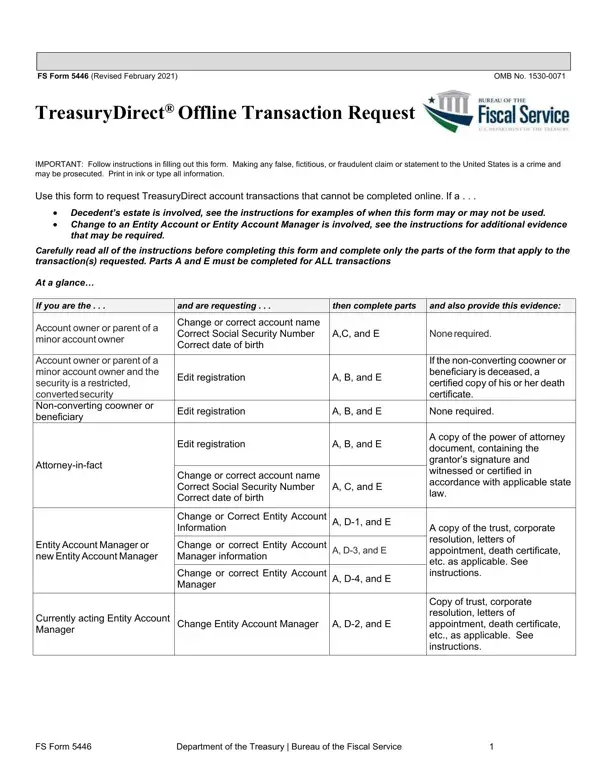
FS Form 5446 at a glance
What it is: FS Form 5446, the Offline Transaction Request for TreasuryDirect accounts, requests account maintenance transactions that cannot be completed online.
Notary: Notary certification is not acceptable.
Complete a separate FS Form 5446 for each TreasuryDirect account number.
What to bring and attach to FS Form 5446
For an Individual Account Owner or parent of a minor account owner, and the security is a restricted, converted security: if the non-converting coowner or beneficiary is deceased, a certified copy of his or her death certificate.
For an Entity Account Manager: a copy of the evidence that establishes your authority to request the transaction. If filed with a court, the evidence must be under court seal. For example: copy of trust, corporate resolution, letters of appointment, (dated within one year of submission), death certificate, etc., as applicable.
For an Attorney-in-fact: a copy of the power of attorney document, containing the grantor's signature and witnessed or certified in accordance with applicable State law.
For Other: a copy of the evidence that establishes your authority to request the transaction.
A filled-in FS Form 5446 example: an account owner corrects a date of birth
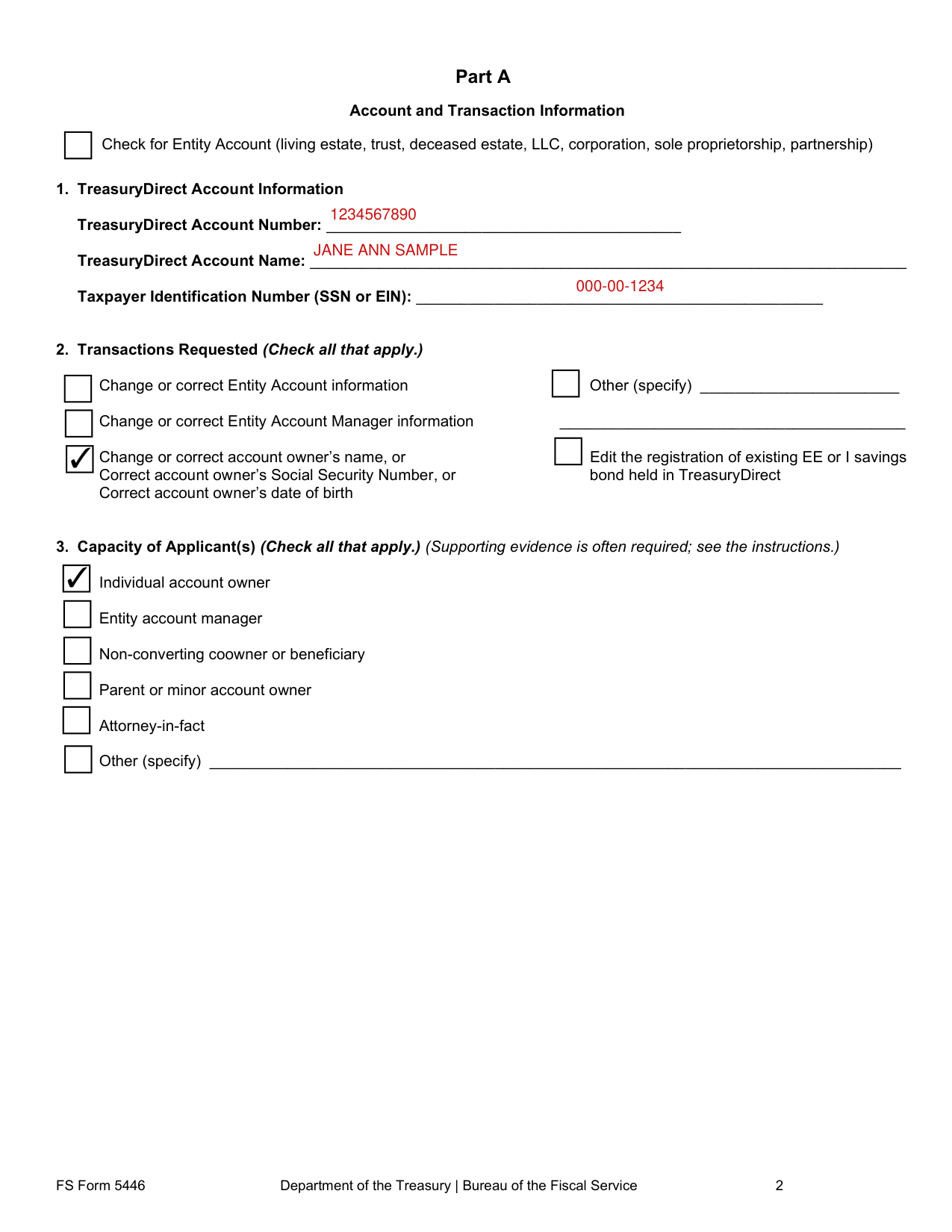
How to fill out FS Form 5446, box by box
TreasuryDirect Account Information
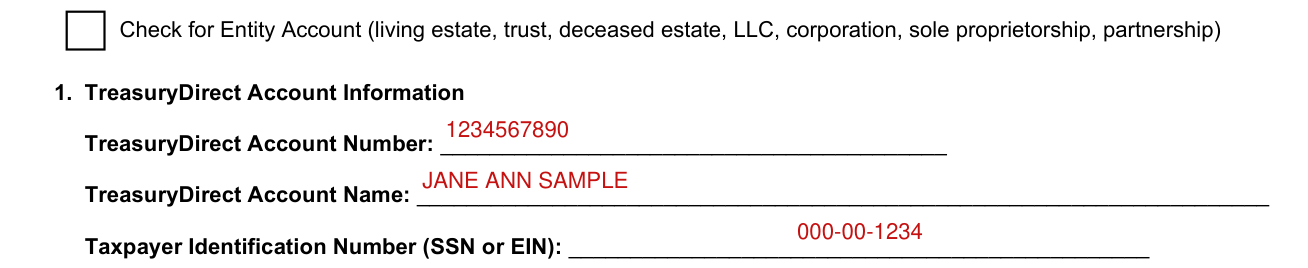
Provide the TreasuryDirect account number, account name, and Taxpayer Identification Number (Social Security Number or Employer Identification Number).
If the account is an Entity Account (living estate, trust, deceased estate, LLC, corporation, sole proprietorship, partnership), check for Entity Account.
Transactions Requested

Mark the appropriate box to show the type of transaction requested. You can mark more than one box, if multiple transactions are requested.
Capacity of Applicant(s)
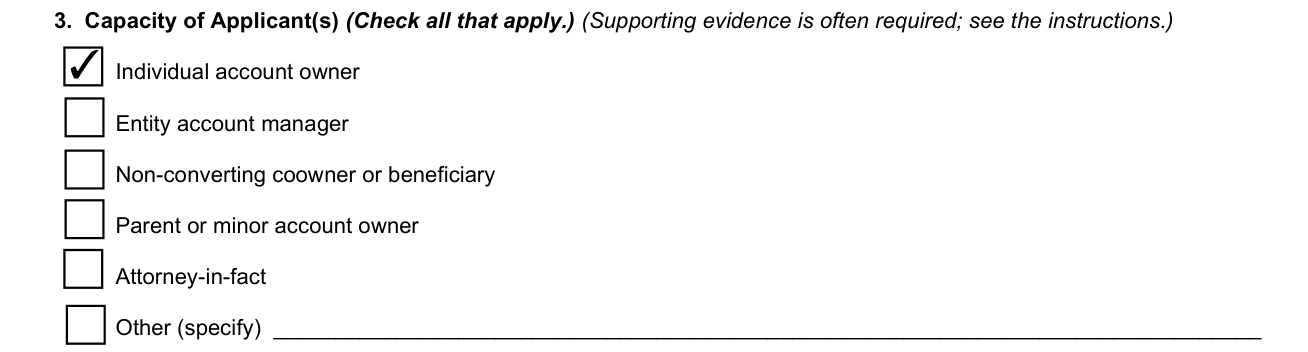
Mark the box that best describes the capacity in which you are acting. You can check more than one box, if applicable.
Edit the Registration of Securities
To edit only the securities described, write in each row the CUSIP Number of Treasury Bills, Notes, Bonds, FRNs, and TIPS, the Issue Date of EE and I, the Confirmation Number and the Registration.
The following person is to be named as Secondary owner or Beneficiary, so mark one.
Change or Correct Account Information
By signing you certify that the account owner's name has been legally changed by Marriage, Divorce, Adoption, Naturalization or Court order, so mark the one that applies.
Write the account owner's correct legal name.
Write the account owner's correct Social Security Number.
Write the account owner's correct date of birth as Month/Day/Year.
Entity Account Manager Consent and Changes
Write the Name of Entity Account Manager consenting to the change and the TreasuryDirect Entity Account Name.
By signing you certify that the Entity Account Manager's name has been legally changed by Marriage, Divorce, Adoption, Naturalization or Court order, so mark the one that applies.
For the new Entity Account Manager, write the Account Manager Name, Taxpayer Identification Number, Date of Birth, Street Address, City, State, ZIP Code, Home Phone, Work Phone, Cell Phone, Driver's License/State ID number with its Issuing State and Expiration Date, and the E-mail Address, and check one Mailing Address.
Signatures and Certifications
Sign in ink in the presence of a certifying officer and provide the requested information.
Each applicant must appear before and establish identification to the satisfaction of an authorized certifying officer and sign the application in the officer's presence.
If you are a parent of a minor account owner, your signature certifies that you are requesting the transaction on the minor's behalf, for the minor's benefit.
Write a City, State, ZIP Code and E-mail Address for each Signature.
The certifying officer must complete the Name of Person Who Appeared and the date of appearance, the City, State, the Name of Financial Institution, and its City, State, ZIP code.
More rules for FS Form 5446
Multiple copies of any part may be completed and submitted together, if necessary. Attach all completed parts together, in alphabetical order.
If your situation is different
You are editing the registration of securities
Complete a separate Part B for each new registration requested and/or if the total number of securities being edited is more than can be described in the space provided.
Check the box to edit the registration of all securities or describe the securities on which you want to edit the registration, as indicated in Item 2.
Provide the complete name and Social Security Number of the owner/primary owner. The account owner must be named as the owner/primary owner in the registration of the securities held in his or her TreasuryDirect account.
If a secondary owner or beneficiary is to be shown in the registration, check the appropriate box and provide the name and Social Security Number of the person to be shown as the secondary owner or beneficiary.
You are changing an individual account owner's name
Complete this item if the account owner's name has changed by marriage, divorce, adoption, naturalization, court order, or some other valid reason. Indicate the manner by which the name changed and furnish the account owner's new legal name. Evidence may be required.
You are changing or correcting Entity Account information
The Entity Account Manager must provide the information for D-1, Change or Correct Entity Account Information. Change Entity Account Name: complete this item if the name of the Entity has changed.
Provide an explanation for the name change. Correct Entity Account Name: complete this item if the Entity Account name has been entered incorrectly. Correct Taxpayer Identification Number: complete this item if the Taxpayer Identification Number for the Entity was entered incorrectly.
To change the Taxpayer Identification Number on your TreasuryDirect account from a Social Security Number (123-45- 6789) to an Employer Identification Number (12-3456789), or vice versa, you must establish a new account.
You are consenting to a change of Entity Account Manager
Complete Part D-2 to consent to a change of Entity Account Manager for a TreasuryDirect account. The new Entity Account Manager will need to complete section D-4, and sign in section E in the presence of a certifying officer.
You are changing an Entity Account Manager's name
The Entity Account Manager must provide the information for D-3, Change or Correct Current Entity Account Manager Information. Change Entity Account Manager's Name: complete this item if the Entity Account Manager's name has changed by marriage, divorce, adoption, naturalization, court order, or some other valid reason. Indicate the manner by which the name changed and furnish the Entity Account Manager's new legal name.
You are changing to a new Entity Account Manager
Evidentiary documentation must also be provided to explain why the Entity Account Manager change is being requested.
Before you go
Carefully read all of the instructions before completing this form and complete only the parts of the form that apply to the transaction(s) requested. Parts A and E must be completed for ALL transactions.
Common questions about FS Form 5446
Where do I file it?
FS Form 5446 page 12, Where To Send: send all completed parts of the form, as well as any other forms and evidence, to Treasury Retail Securities Services PO Box 9150 Minneapolis, MN 55480-9150. Legal evidence or documentation you submit cannot be returned.
Is there a penalty?
Making any false, fictitious, or fraudulent claim or statement to the United States is a crime and may be prosecuted.
Sources
[1] FS Form 5446 (Revised April 2026), TreasuryDirect Offline Transaction Request, Bureau of the Fiscal Service.