
Form 769 Oklahoma PDF Details

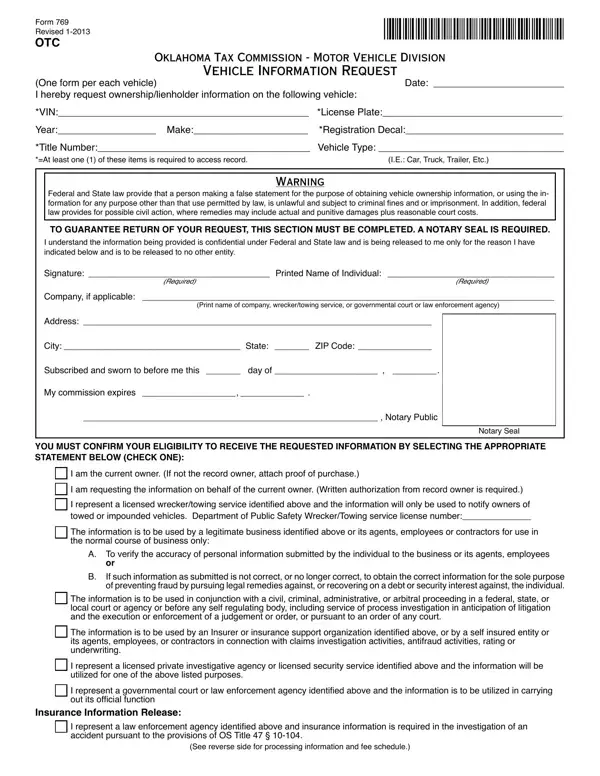
The process of obtaining vehicle-related information in Oklahoma is systematically outlined in the comprehensive Form 769, a document meticulously revised in January 2013 by the Oklahoma Tax Commission - Motor Vehicle Division. Designed for individuals or entities in need of obtaining detailed records on vehicle ownership or lienholder information, Form 769 serves as a critical resource. Applicants are required to provide specific vehicle identifiers such as the Vehicle Identification Number (VIN), license plate, registration decal, or title number to access the desired records. This form underscores the importance of utilizing the retrieved data in accordance with Federal and State laws, highlighting the legal ramifications for misuse, ranging from criminal penalties to potential civil actions. In ensuring a secure and trustworthy process, the form mandates a notary seal alongside the applicant's signature and specifies various legitimate grounds under which the information may be requested, including verification purposes by owners or entities like towing services, insurers, and legal or law enforcement agencies. The form elaborates on the procedural aspects of submission, the associated fees for different information requests, and emphasizes the significance of specifying the scope of historical data required to expedite the process efficiently. Through its structured format and detailed instructions, Form 769 is a vital tool for facilitating access to vehicle information within the stipulated legal framework, ensuring that the process remains transparent, secure, and aligned with privacy protection standards.

QuestionAnswer
Form NameForm 769 Oklahoma
Form Length2 pages
Fillable?Yes
Fillable fields41
Avg. time to fill out8 min 46 sec
Other namesOklahoma, requestor, Thissearchisavailableonlytoqua, lienholder

How to Edit Form 769 Oklahoma Online for Free

Handling PDF documents online is always a breeze with this PDF tool. You can fill in oklamhoma form 769 here effortlessly. We are aimed at providing you the best possible experience with our editor by constantly introducing new capabilities and enhancements. With these improvements, using our editor gets easier than ever before! To get started on your journey, take these basic steps:

Step 1: Firstly, open the pdf editor by pressing the "Get Form Button" above on this site.

Step 2: With the help of our state-of-the-art PDF editing tool, you can accomplish more than simply fill out blanks. Express yourself and make your docs appear perfect with custom text put in, or optimize the original input to perfection - all that comes along with an ability to insert stunning photos and sign it off.

It is an easy task to complete the document with our helpful tutorial! Here's what you must do:

1. For starters, once filling out the oklamhoma form 769, beging with the form section that has the subsequent fields:

Stage # 1 of completing requestor

2. Just after filling in the last section, head on to the next stage and fill in the essential particulars in these blank fields - City State ZIP Code, Subscribed and sworn to before me, My commission expires, Notary Public, YOU MUST CONFIRM YOUR ELIGIBILITY, Notary Seal, I am the current owner If not the, I am requesting the information on, A To verify the accuracy of, If such information as submitted, and The information is to be used in.

I am requesting the information on, Notary Seal, and If such information as submitted in requestor

3. This part is normally straightforward - fill in all of the blanks in Insurance Information Release, I represent a law enforcement, and See reverse side for processing to complete this segment.

Insurance Information Release, See reverse side for processing, and I represent a law enforcement of requestor

4. The form's fourth paragraph comes with the following blanks to complete: Please designate one of the, I wish to receive all title, I wish to receive all title, List name of individual or company, I wish to receive all available, Available Documentation and Fee, Check the box next to the, Fee, Type Description, Current Ownership Lienholder, Current ownership lienholder, Computer Generated Title History, A summary of title transactions, Microfilm Title History, and Records search for all applicable.

Available Documentation and Fee, Microfilm Title History, and Records search for all applicable inside requestor

5. Finally, the following last section is what you should complete before submitting the document. The fields here include the next: Name of Lienholder, Certified, Title History, Certiied copies of all applicable, Please review the Important Notice, Qualifying requestors only This, Teletype survey of other states to, No Charge Jurisdictional Records, Oklahoma Tax Commission Motor, Telephone procedural inquiries, and Instate toll free option ext.

Filling out part 5 in requestor

People who work with this PDF frequently make mistakes when filling out Title History in this part. Remember to double-check what you enter here.

Step 3: Immediately after rereading the fields, click "Done" and you are good to go! Sign up with us today and instantly get access to oklamhoma form 769, available for downloading. Each modification made is handily kept , making it possible to edit the pdf further when necessary. FormsPal provides protected document completion without personal data recording or sharing. Rest assured that your data is in good hands with us!