
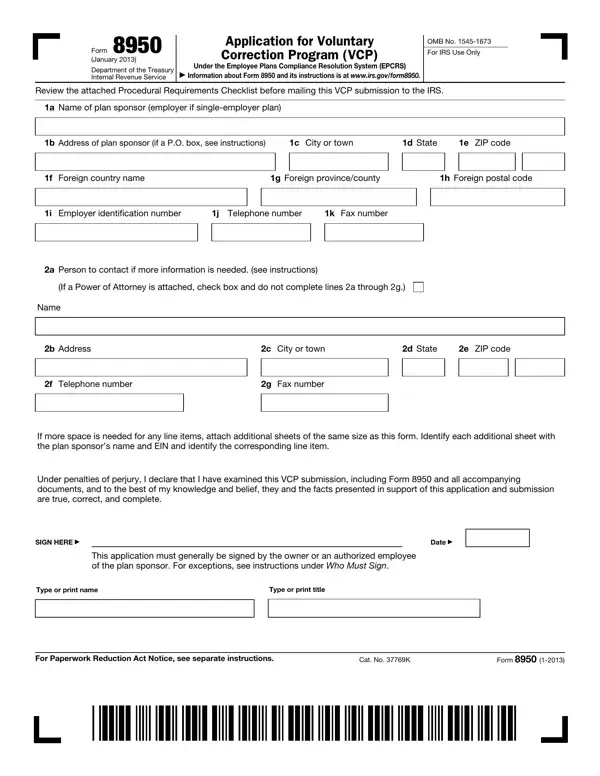
Form 8950 PDF Details

Navigating the complexities of retirement plan compliance can be a daunting task for employers, but the Internal Revenue Service (IRS) offers a lifeline through Form 8950, Application for Voluntary Correction Program (VCP) under the Employee Plans Compliance Resolution System (EPCRS). Introduced in January 2013, this form serves as a critical tool for plan sponsors looking to correct mistakes in their retirement plans proactively, thereby ensuring these plans meet the IRS's qualifications for tax-favored status. The VCP permits plan sponsors to correct a wide range of errors, spanning from plan document failures to operational mishaps, before they come to the attention of the IRS on audit. With detailed sections soliciting information about the plan, its sponsor, and specifics of the failures to be corrected, along with proposed correction methods, Form 8950 requires meticulous completion and submission alongside a procedural requirements checklist. This checklist, integral to the submission process, helps prevent delayed processing by ensuring all necessary documentation, including the compliance fee and corrective action plans, is in order. Additionally, Form 8950 addresses various submission types, including regular, anonymous, and group submissions, catering to different sponsor needs and situations. Importantly, the form underscores the necessity of truthful and complete disclosure under penalties of perjury, ensuring the integrity of the correction process. As a gateway to rectifying plan errors and maintaining their preferential tax treatment, understanding and accurately completing Form 8950 stands as an essential step for plan sponsors committed to the welfare of their retirement plans and their participants.

QuestionAnswer
Form NameForm 8950
Form Length6 pages
Fillable?No
Fillable fields0
Avg. time to fill out1 min 30 sec
Other namesProc, form 8950, distributions, VCP

How to Edit Form 8950 Online for Free

2013 can be completed very easily. Just make use of FormsPal PDF editor to get it done promptly. FormsPal professional team is always endeavoring to enhance the tool and ensure it is even faster for clients with its handy features. Enjoy an ever-evolving experience now! Starting is easy! Everything you need to do is take the following basic steps down below:

Step 1: Press the "Get Form" button at the top of this webpage to get into our PDF editor.

Step 2: The editor grants the capability to change PDF documents in various ways. Transform it by writing customized text, correct what is already in the document, and put in a signature - all within the reach of a couple of mouse clicks!

If you want to fill out this PDF form, ensure that you enter the necessary details in each area:

1. To start with, when filling out the 2013, begin with the area that features the next blank fields:

Find out how to prepare SSN stage 1

2. Now that the last section is done, you'll want to insert the necessary details in f Telephone number, g Fax number, If more space is needed for any, Under penalties of perjury I, SIGN HERE, Date, This application must generally be, Type or print name, and Type or print title so that you can progress to the third stage.

Tips on how to complete SSN step 2

Concerning Type or print name and Type or print title, be sure you take another look here. The two of these are the key ones in this form.

3. The following section focuses on Check one, VCP regular submission, VCP anonymous submission, VCP group submission, NonVCP b submission as permitted, a Name of plan plan name may not, b Enter digit plan number, see instructions, d Enter the dollar value of the, plans assets see instructions, c Enter month plan year ends, MM see instructions, e Enter number of participants, see instructions, and Indicate type of plan by entering - fill out these blank fields.

The right way to complete SSN step 3

4. Filling in Yes, Are all qualification failures and, If Yes please indicate the, Schedule, Schedule, Schedule, Schedule, Schedule, Schedule, Schedule, Schedule, Schedule, Schedule, Schedule, and Schedule is essential in this next part - you'll want to don't hurry and be mindful with every single empty field!

How to fill in SSN portion 4

5. To conclude your document, the particular subsection involves a couple of extra blank fields. Entering If Yes attach an explanation that, Does the VCP submission relate to, As of the date this VCP submission, As of the date this VCP submission, If Yes include an attachment, Have you previously filed a Form, If Yes attach an explanation see, and Form should wrap up everything and you're going to be done in a blink!

SSN conclusion process shown (stage 5)

Step 3: After proofreading your form fields you've filled in, press "Done" and you are done and dusted! Download the 2013 as soon as you join for a free trial. Quickly use the pdf form in your personal cabinet, together with any modifications and adjustments being automatically kept! We do not sell or share the details that you enter while filling out forms at our site.