
Form 921 A PDF Details

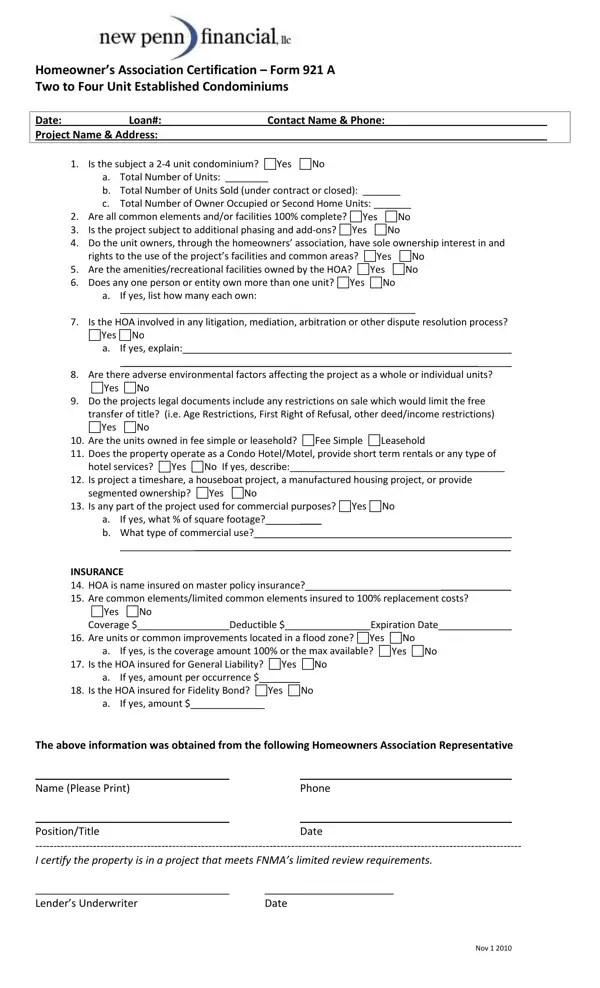
The Homeowner’s Association Certification, commonly referred to as Form 921 A, serves as a comprehensive tool for evaluating the standards and specifics of a condominium project ranging from two to four units. This form delves into various critical areas, such as the total number of units and their occupancy status, the completion of common elements, and whether the project is expected to undergo further phasing. It also assesses the ownership and rights regarding the project's facilities and common areas, alongside the ownership spread among individuals or entities. Furthermore, it addresses potential red flags such as litigation involving the homeowners’ association, environmental factors that could impact the property, restrictions on sale that might affect the free transfer of title, and the nature of ownership - whether fee simple or leasehold. Additionally, the form inquires about the unique operations of the property, including whether it functions as a condo hotel/motel or engages in short-term rentals, and scrutinizes the usage for commercial purposes. Insurance-related queries probe into the coverage extents for the common elements and whether the units lie within a flood zone, encapsulating an all-around view on the standing and integrity of the condominium project. This documentation is essential for lenders and parties interested in ensuring the condominium meets the limited review requirements set by regulatory entities such as FNMA, facilitating informed decision-making in the real estate and lending spheres.

QuestionAnswer
Form NameForm 921 A
Form Length1 pages
Fillable?No
Fillable fields0
Avg. time to fill out15 sec
Other nameshomeowners' association certification form 921, condo certification form, condo cert, what is condo form 921

How to Edit Form 921 A Online for Free

By using the online PDF tool by FormsPal, it is easy to complete or edit condo cert here. The editor is consistently upgraded by our team, getting new functions and becoming a lot more convenient. If you are looking to get started, this is what you will need to do:

Step 1: Click on the "Get Form" button above. It is going to open our pdf editor so that you can start filling out your form.

Step 2: When you launch the editor, you will get the document prepared to be completed. Apart from filling in different blanks, you may as well perform other things with the file, specifically writing your own textual content, editing the original text, adding graphics, affixing your signature to the form, and more.

Pay close attention while filling in this form. Make sure that all required blanks are done correctly.

1. To start off, when filling in the condo cert, start with the area containing next blank fields:

Completing segment 1 of condo certification

2. Just after performing the last part, go to the next part and fill in all required particulars in all these fields - Yes No, Are the units owned in fee simple, Fee Simple, Leasehold, hotel services, Yes No If yes describe, Is project a timeshare a, segmented ownership, Yes No, Is any part of the project used, Yes No, a b What type of commercial use, If yes what of square footage, INSURANCE HOA is name insured on, and Yes No.

Filling out part 2 in condo certification

3. In this particular step, check out Is the HOA insured for Fidelity, Yes No, If yes amount, The above information was obtained, Date, Phone, Date, and Nov. Each one of these should be filled in with utmost accuracy.

Part number 3 in submitting condo certification

Be extremely careful when filling out Phone and The above information was obtained, because this is where most users make a few mistakes.

Step 3: Prior to finalizing the file, it's a good idea to ensure that all blanks have been filled out right. As soon as you’re satisfied with it, click “Done." After starting a7-day free trial account here, you will be able to download condo cert or send it through email promptly. The file will also be at your disposal from your personal cabinet with all your modifications. FormsPal offers risk-free form editing with no personal data recording or sharing. Feel at ease knowing that your data is secure here!