
Form 921 I PDF Details

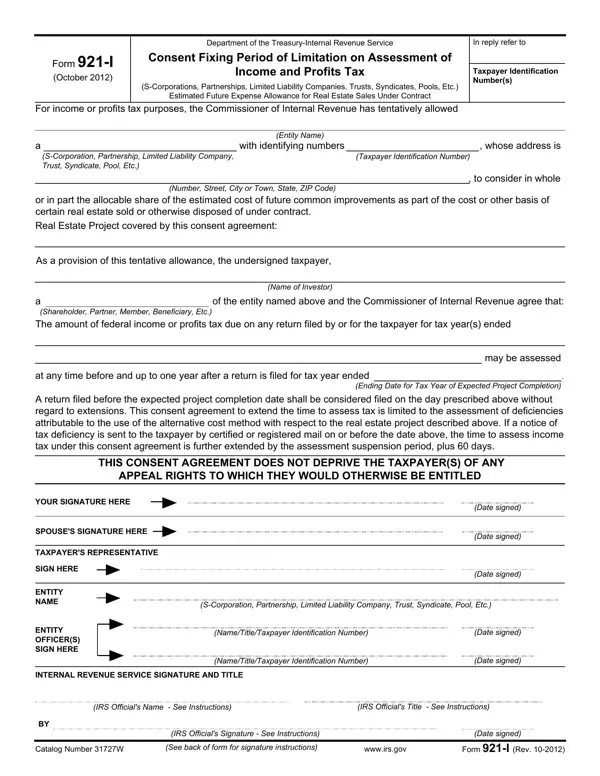
In the labyrinth of tax regulations and forms, Form 921-I emerges as a specific tool for entities such as S-Corporations, Partnerships, Limited Liability Companies, Trusts, Syndicates, and Pools, defining an agreement between these entities and the Internal Revenue Service (IRS) regarding the period of limitation on the assessment of income and profits tax. This form, a product of intricate tax legislation, acts as a consent agreement, allowing for the use of an alternative cost method in accounting for certain real estate transactions under contract. The essence of Form 921-I lies in its ability to extend the timeframe within which the IRS can assess taxes on the realized income or profits from sold or disposed of real estate, intricately tied to future common improvements estimated costs. By stipulating conditions such as the extension of the assessment period to one year after a return is filed post-project completion and the preservation of appeal rights for taxpayers, the form underscores a mutual agreement framework. It meticulously outlines the signatures required from various stakeholders—ranging from individual investors and IRS officials to entity officers—thereby binding all parties under the agreed terms. Furthermore, instructions for both taxpayers and IRS employees embedded within the document ensure clarity and compliance, illustrating the form’s role not just as a financial instrument but also as a guideline navigating through the procedural aspects of tax assessment agreements.

QuestionAnswer
Form NameForm 921 I
Form Length2 pages
Fillable?No
Fillable fields0
Avg. time to fill out30 sec
Other namesS-Corporation, 921-P, 921 form, irs form 921

How to Edit Form 921 I Online for Free

S-Corporation can be completed without any problem. Simply use FormsPal PDF editing tool to do the job in a timely fashion. FormsPal is dedicated to making sure you have the absolute best experience with our tool by constantly introducing new capabilities and upgrades. Our tool is now a lot more intuitive with the newest updates! Currently, working with PDF forms is simpler and faster than ever. In case you are looking to get going, this is what you will need to do:

Step 1: Simply click the "Get Form Button" in the top section of this webpage to get into our form editing tool. There you will find all that is required to fill out your document.

Step 2: As soon as you access the tool, you'll see the form ready to be filled out. Aside from filling out various blanks, it's also possible to perform other actions with the form, specifically adding custom textual content, changing the initial textual content, adding graphics, placing your signature to the form, and much more.

To be able to finalize this form, ensure you enter the right information in every single field:

1. Begin completing the S-Corporation with a group of necessary blank fields. Collect all of the necessary information and be sure not a single thing missed!

Step # 1 for filling in Sept

2. After this selection of blank fields is filled out, proceed to type in the applicable information in all these - at any time before and up to one, may be assessed, A return filed before the expected, Ending Date for Tax Year of, THIS CONSENT AGREEMENT DOES NOT, APPEAL RIGHTS TO WHICH THEY WOULD, YOUR SIGNATURE HERE, SPOUSES SIGNATURE HERE, TAXPAYERS REPRESENTATIVE, SIGN HERE, ENTITY NAME, ENTITY OFFICERS SIGN HERE, Date signed, Date signed, and Date signed.

Stage no. 2 in filling out Sept

3. This next step is normally hassle-free - fill in all the fields in INTERNAL REVENUE SERVICE SIGNATURE, IRS Officials Name See, IRS Officials Title See, IRS Officials Signature See, Catalog Number W, See back of form for signature, wwwirsgov, Date signed, and Form I Rev in order to finish this process.

Part no. 3 in submitting Sept

Be very careful when filling in Form I Rev and IRS Officials Signature See, as this is the part where many people make some mistakes.

Step 3: Before finalizing this document, ensure that blanks are filled in the proper way. The moment you believe it's all good, click “Done." Sign up with FormsPal now and immediately use S-Corporation, available for downloading. All adjustments you make are preserved , so that you can modify the file further if necessary. At FormsPal, we do our utmost to be certain that all your information is kept protected.