
Form A 5052 Tc PDF Details

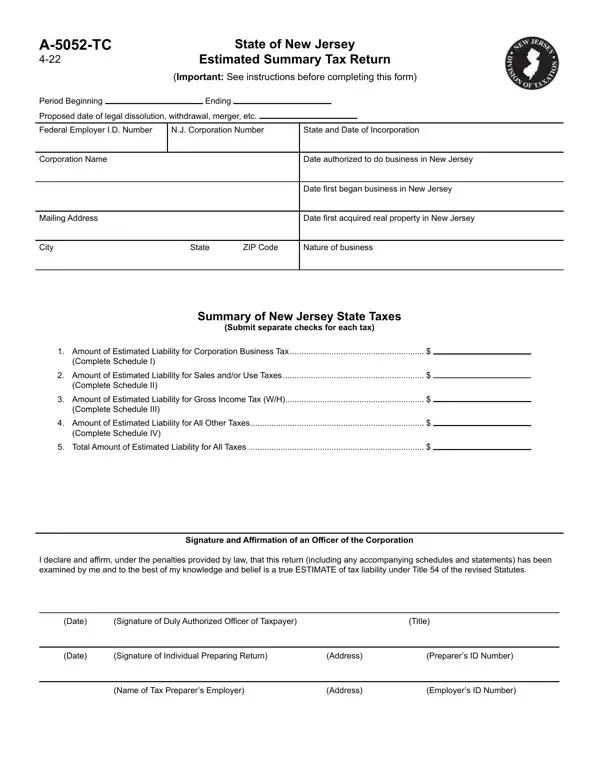
Understanding the intricacies of tax forms is essential for corporations aiming to maintain compliance with the State of New Jersey's taxation regulations. The A-5052-TC form, specifically revised in November 2013 (revision 16), plays a critical role for entities undergoing significant changes such as dissolution, merger, withdrawal, etc., by providing an estimated summary of their tax liabilities. This form requests detailed information about the corporation, including the Corporation Name, Federal Employer I.D. Number, N.J. Corporation Number, and the nature of business, along with specific periods relevant to the entity's operations in New Jersey. It covers the estimated liabilities across various tax categories, including Corporation Business Tax, Sales and/or Use Taxes, Gross Income Tax, and other applicable taxes, ensuring a comprehensive summary is provided to the State. Additionally, it mandates the affirmation from a duly authorized officer of the corporation, underlining the seriousness and legal implications of the information provided. Completing the form accurately requires a thorough understanding of the business's financial affairs and often necessitates the involvement of a professional tax preparer, especially to navigate the nuanced instructions and schedules included with the form. With instructions spanning the computation of estimated taxes, minimum tax requirements, and special considerations for New Jersey S Corporations and Alternative Minimum Assessments, the A-5052-TC form embodies the complexity and necessity of accurate tax planning and reporting for corporations in transition.

QuestionAnswer
Form NameForm A 5052 Tc
Form Length4 pages
Fillable?No
Fillable fields0
Avg. time to fill out1 min
Other namesnew jersey estimated form, nj tc estimated, a 5052, estimated jersey taxpayer

How to Edit Form A 5052 Tc Online for Free

When working in the online tool for PDF editing by FormsPal, you can easily fill out or modify form 5052 right here. FormsPal expert team is ceaselessly working to expand the tool and insure that it is even faster for clients with its extensive features. Bring your experience to a higher level with continuously developing and fantastic opportunities we offer! With some easy steps, you may begin your PDF journey:

Step 1: Just press the "Get Form Button" in the top section of this webpage to start up our pdf file editing tool. This way, you will find all that is required to work with your document.

Step 2: Using this handy PDF file editor, you could do more than just fill out blank form fields. Express yourself and make your documents look professional with customized textual content incorporated, or adjust the original input to excellence - all that backed up by the capability to add almost any images and sign the file off.

This PDF will need specific information to be filled in, thus you must take the time to type in precisely what is required:

1. When completing the form 5052, be sure to complete all of the needed blank fields within its relevant section. It will help to expedite the work, enabling your information to be processed swiftly and accurately.

Part # 1 for filling in how to nj a 5052 tc

2. Once your current task is complete, take the next step – fill out all of these fields - Summary of New Jersey State Taxes, Submit separate checks for each tax, Amount of Estimated Liability for, Complete Schedule I, Amount of Estimated Liability for, Complete Schedule II, Amount of Estimated Liability for, Complete Schedule III, Amount of Estimated Liability for, Complete Schedule IV, Total Amount of Estimated, Signature and Affirmation of an, and I declare and affirm under the with their corresponding information. Make sure to double check that everything has been entered correctly before continuing!

How you can fill in how to nj a 5052 tc step 2

3. The next step should be quite uncomplicated, Date, Signature of Duly Authorized, Title, Date, Signature of Individual Preparing, Address, Preparers ID Number, Name of Tax Preparers Employer, Address, and Employers ID Number - every one of these form fields will need to be filled out here.

Address, Date, and Name of Tax Preparers Employer in how to nj a 5052 tc

It is easy to get it wrong when filling in your Address, therefore make sure to reread it before you send it in.

4. Filling in Computation of Estimated, Schedule I, a Adjusted Entire Net Income, b Business Allocation Factor if, c Tax Base Nonallocating, multiply line a by line b and, d Estimated Corporation Business, See instruction a See instruction, d Alternative Minimum Assessment, CBT instructions, Check here and enter zero if AMA, e Total Estimated Corporation, Also enter on page line, Computation of Estimated New, and Schedule II is crucial in the next form section - don't forget to don't rush and take a close look at each and every field!

The right way to prepare how to nj a 5052 tc stage 4

5. The final section to conclude this form is critical. Make certain to fill out the mandatory form fields, including Enter Estimated Tax for current or, Computation of Estimated New, Schedule III, Enter tax paid over the last, Period Ending, Amount Paid, and Enter Estimated Tax for current or, prior to using the file. Failing to do so might result in a flawed and probably incorrect form!

how to nj a 5052 tc writing process clarified (part 5)

Step 3: Prior to finalizing your document, make certain that form fields are filled in correctly. Once you’re satisfied with it, press “Done." Right after registering a7-day free trial account here, you will be able to download form 5052 or email it without delay. The file will also be at your disposal in your personal cabinet with your each modification. FormsPal is devoted to the privacy of all our users; we make sure that all personal information entered into our editor stays confidential.