
Form Accident Report PDF Details

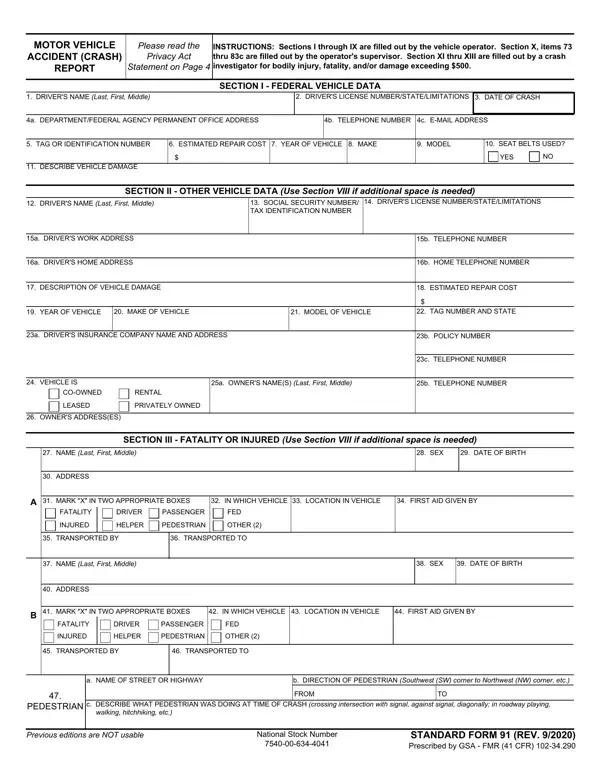
At the heart of managing and investigating automotive incidents within federal agency operations lies the comprehensive Accident Report Form, specifically the STANDARD FORM 91 (REV. 9/2020). This document serves as a critical tool in compiling detailed information regarding motor vehicle crashes involving federal vehicles. Carefully structured into thirteen sections, this form embarks on capturing a broad spectrum of data ranging from basic federal vehicle data, details pertaining to other vehicles involved, to the nuances of any fatalities or injuries sustained. Operators of the vehicles find themselves responsible for the initial nine sections, detailing everything from the crash's date and specifics about the vehicle damaged to personal driver data and the precise circumstances of the accident. The supervisor's input becomes relevant in Section X, focusing on the trip details and verification if the crash occurred within the employee's scope of duties, adding an extra layer of accountability and detail. Beyond the immediate factual recounting and administrative certification lies the investigative part, Sections XI through XIII, delving into crash investigation data, additional comments, and attachment listings, culminating in a formal review and approval process by the reviewing official and crash investigator. This meticulously outlined document not only complies with the Privacy Act of 1974 but also underscores the mandatory nature of this reporting, driven by a twofold purpose: ensuring accurate record-keeping and facilitating efficient claims processing, thus encapsulating both the immediate and procedural aftermath of federal vehicle incidents.

QuestionAnswer
Form NameForm Accident Report
Form Length5 pages
Fillable?No
Fillable fields0
Avg. time to fill out1 min 15 sec
Other namesform accident, massachusetts crash, sf 91 2020, sf 91

How to Edit Form Accident Report Online for Free

Working with PDF files online is certainly a breeze with our PDF tool. Anyone can fill out accident and incident reporting here effortlessly. FormsPal is devoted to providing you the ideal experience with our tool by regularly introducing new capabilities and enhancements. Our tool is now much more helpful with the most recent updates! At this point, working with PDF documents is simpler and faster than before. Starting is easy! All you have to do is take these simple steps directly below:

Step 1: Press the "Get Form" button at the top of this page to get into our PDF tool.

Step 2: As you launch the tool, you'll notice the document all set to be filled in. Besides filling out various blanks, it's also possible to do many other actions with the PDF, such as putting on custom textual content, editing the original textual content, adding illustrations or photos, putting your signature on the PDF, and a lot more.

This form requires particular information to be typed in, hence be sure you take some time to enter exactly what is asked:

1. It's essential to complete the accident and incident reporting properly, so be attentive when filling out the sections comprising these blanks:

word document accident report form writing process shown (portion 1)

2. Just after filling in this step, go to the subsequent part and fill in all required details in all these blanks - COOWNED, RENTAL, LEASED, PRIVATELY OWNED, OWNERS ADDRESSES, SECTION III FATALITY OR INJURED, NAME Last First Middle, ADDRESS, SEX, DATE OF BIRTH, MARK X IN TWO APPROPRIATE BOXES, IN WHICH VEHICLE LOCATION IN, FIRST AID GIVEN BY, FATALITY, and DRIVER.

DRIVER, LEASED, and IN WHICH VEHICLE  LOCATION IN of word document accident report form

It's easy to make a mistake while completing the DRIVER, hence you'll want to reread it before you decide to finalize the form.

3. This next section should also be pretty uncomplicated, c DESCRIBE WHAT PEDESTRIAN WAS, Previous editions are NOT usable, National Stock Number, and STANDARD FORM REV Prescribed by - all these blanks must be filled out here.

word document accident report form completion process shown (stage 3)

4. The next paragraph needs your involvement in the following places: SECTION IV CRASH TIME AND, DATE OF CRASH, TIME OF CRASH, and INDICATE ON THE DIAGRAMS BELOW. Remember to type in all required information to move forward.

Filling out part 4 of word document accident report form

5. To conclude your document, this particular area incorporates a number of extra blank fields. Typing in FED, AREA, FED, AREA, FED, AREA, FED AREA FED, AREA, FED, AREA, a Front, g Right Side, b Right Front, h Left Side, and c Left Front is going to finalize everything and you're going to be done in no time at all!

Part no. 5 in filling out word document accident report form

Step 3: As soon as you've looked over the details provided, just click "Done" to complete your document generation. Try a 7-day free trial subscription with us and obtain direct access to accident and incident reporting - download, email, or change inside your FormsPal account page. At FormsPal, we strive to ensure that all of your details are stored private.