Please rate Form C4 2

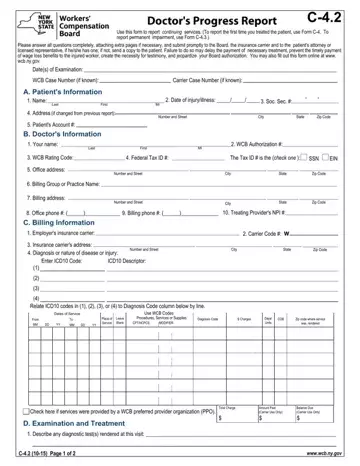
The Doctor's Progress Report C-4.2 serves a crucial function in the workers' compensation process, enabling healthcare providers to document and report on the ongoing treatment of injured workers. Unlike the initial report captured by Form C-4 or the documentation of permanent impairment required by Form C-4.3, the C-4.2 form focuses on the continuation of medical services provided to the patient. Healthcare providers are tasked with thoroughly answering all questions and, if necessary, attaching additional pages to ensure comprehensive documentation. Timely submission of this form to the Board, insurance carrier, and, if applicable, the patient's attorney or licensed representative is emphasized as critical. Delays in submission can inadvertently hinder the payment for necessary treatments, delay wage loss benefits, necessitate further testimony, and potentially risk the provider's authorization by the Board. The form also highlights the importance of including detailed billing information, diagnostic tests conducted, changes in treatment plans, and assessments of the patient's work capabilities. Significantly, the form includes provisions for providers to indicate whether the patient's condition and treatment align with their medical opinions regarding the injury's causation and the patient's capacity to resume work, underscoring the integral role of medical assessment in the trajectory of workers' compensation claims. Compliance with these reporting requirements is not just a matter of administrative procedure; it is integral to the fair and efficient functioning of the workers' compensation system, ensuring that injured workers receive the timely and appropriate medical care and benefits they are entitled to.
| Question | Answer |
|---|---|
| Form Name | Form C4 2 |
| Form Length | 3 pages |
| Fillable? | No |
| Fillable fields | 0 |
| Avg. time to fill out | 45 sec |
| Other names | c 4 2, c42 form, workers comp c 4, wc c4 2 |
Form C4 2 isn’t the one you’re looking for?
Please rate Form C4 2
